
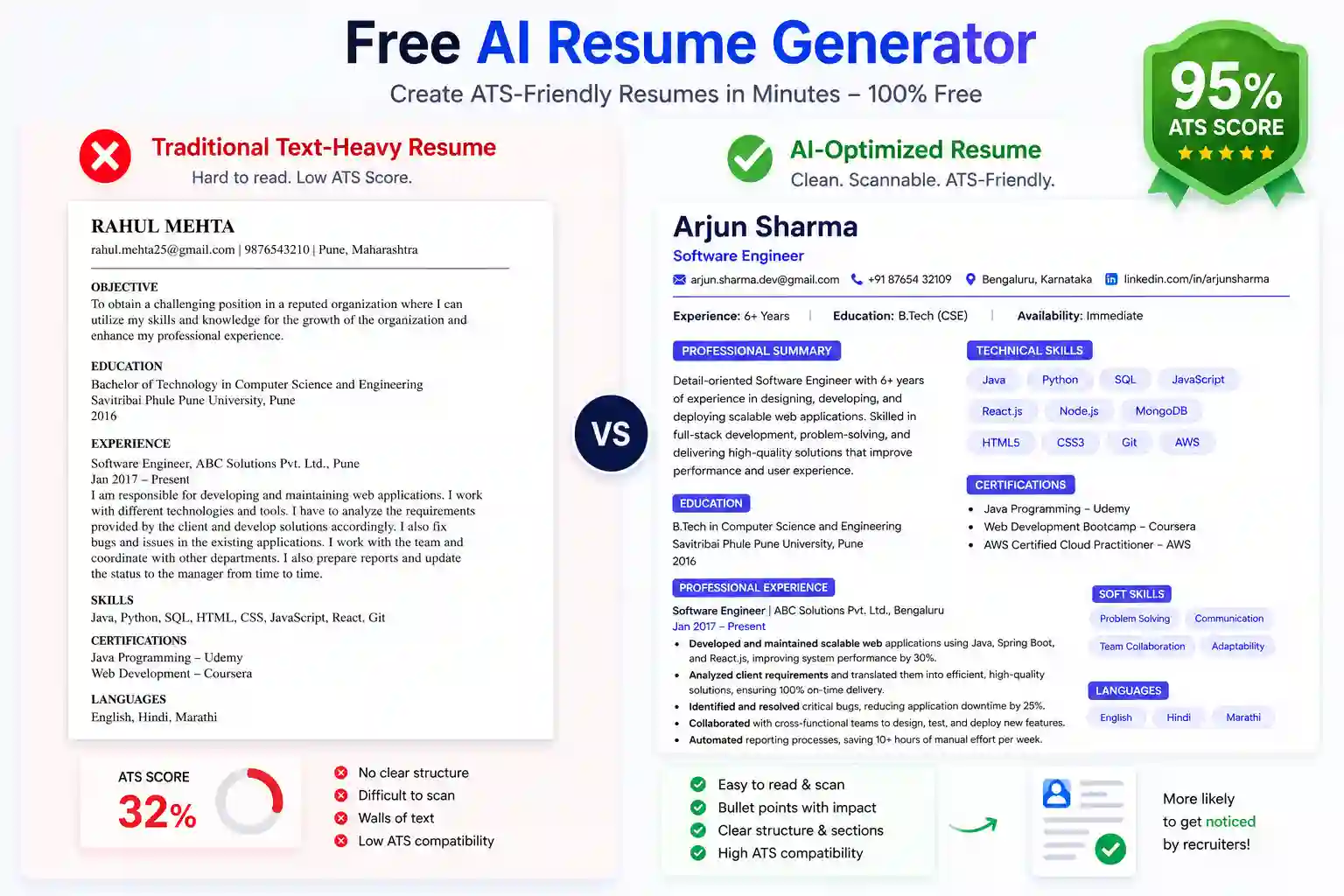
Last Updated on April 26, 2026 by RADHIKA VATLAM
Build an ATS-Friendly Resume With Our Free AI Resume Generator
Are you tired of spending 30 minutes filling out an online resume builder, only to be hit with a paywall or forced to create an account at the very end? We were too. That is why we built this free AI resume generator that is 100% ATS-friendly with absolutely no sign-up required.
Whether you are a fresher applying for your first campus placement or an experienced professional targeting top companies, the way you present your experience matters. Simply enter your details below, and our built-in AI will automatically rewrite your job descriptions into powerful, action-driven bullet points. It even calculates a live ATS (Applicant Tracking System) score out of 100 before you download your file.
How to Use This Resume Generator (Step-by-Step Guide)
Follow these simple steps to create your professional resume using our free AI resume generator:
Step 1: Fill Basic Information
Start by entering your personal details:
- Full Name: Exactly as shown in your official documents.
- Professional Email Address: Avoid nicknames like “john123xyz@gmail.com”.
- Phone Number: Include your country code (+91) for applications.
- Professional Title: Be specific (e.g., “Senior Software Engineer” instead of just “Engineer”).
- Location/City: Helps with location-based job filtering.
- LinkedIn Profile URL: Optional but highly recommended.
Step 2: Add Education Details
List your educational qualifications in reverse chronological order (most recent first):
- Degree Name: e.g., Bachelor of Technology, Master of Business Administration, B.Com.
- Institution Name: Full official name of the college or university.
- Year of Graduation: The year you completed the degree.
- Certifications: Include any relevant online courses or professional certifications.
Step 3: Detail Your Work Experience
This is the most important section. Instead of just listing duties, focus on achievements and impact:
- Job Title: Exact designation from your offer letter.
- Company Name: Full company name as it appears officially.
- Duration: From month/year to month/year (or check “Till Date” if current).
- Job Description: Provide raw details, and let the AI format them (see examples below).
Step 4: List Your Skills
Separate skills into categories for clarity:
- Technical Skills: Programming languages, tools, software, frameworks.
- Soft Skills: Leadership, communication, problem-solving, teamwork.
- Languages: List languages you speak (e.g., English, Hindi, Telugu).
The Secret to Better Resume Output: How to Provide Better Input
Important: The quality of your resume output depends entirely on the quality of information you provide. A vague, single-word input produces a generic resume. Detailed, specific input produces an impressive resume that catches recruiters’ attention.
Example 1: Job Description (Software Engineer)
❌ Weak Input: “Worked as a developer on various projects. Did coding and testing. Helped with bug fixes.”
✅ Strong Input: “Led development of 3 microservices handling 50K+ daily transactions, reducing system latency by 40% through database optimization. Implemented automated testing suite covering 85% of codebase, reducing production bugs by 60%. Mentored 2 junior developers on best practices, improving code review quality by 35%. Collaborated with product and design teams to deliver features 2 weeks ahead of schedule.”
Example 2: Job Description (Finance/Accounts)
❌ Weak Input: “Handled accounts, maintained records, processed invoices.”
✅ Strong Input: “Managed accounts payable and receivable for 500+ vendor relationships, maintaining 99.5% accuracy in transaction processing. Reconciled monthly financial statements of Rs. 50+ crore, identifying and resolving discrepancies worth Rs. 2+ lakh. Implemented GST compliance procedures reducing audit findings by 70%. Automated invoice processing using Excel macros, reducing manual work by 25 hours per month. Trained team of 3 on new accounting procedures, achieving 100% compliance.”
Example 3: Skills Section
❌ Weak Input: “Java, Python, SQL, Excel, Communication”
✅ Strong Input:
Technical Skills: Java (Spring Boot, Microservices), Python (Django, Data Analysis), SQL (PostgreSQL, MySQL), Excel (Pivot Tables, VLOOKUP, Macros), AWS (EC2, S3, Lambda), Docker, Kubernetes, Git
Soft Skills: Team Leadership, Problem-Solving, Stakeholder Management, Agile Methodology, Technical Documentation
Languages: English (Fluent), Hindi (Native), Telugu (Conversational)
Example 4: Certifications
❌ Weak Input: “Excel, SAP, GST”
✅ Strong Input: “Microsoft Excel Advanced Certification (Issued: April 2023), SAP Financial Accounting Module Training – JNTU (Issued: March 2022), GST Compliance and Implementation Workshop – ICAI (Issued: June 2023)”
How to Write Better Achievement Statements
Use this simple formula to write powerful achievement statements before feeding them into our free AI resume generator:
[Action Verb] + [What You Did] + [Impact/Result with Numbers] = Strong Achievement
- Action Verbs: Led, Implemented, Achieved, Improved, Optimized, Developed, Designed, Managed, Coordinated, Increased, Reduced, Established, Streamlined.
- Quantify Results: Always add numbers — percentage improvement, amount saved, time reduced, users served, revenue generated, team size managed.
- Show Impact: Connect your actions to business outcomes like cost savings, efficiency gains, revenue increase, and customer satisfaction.
Real-World Input Examples by Role
- Software Developer (8+ years): “Architected and deployed cloud-based platform serving 2M+ users, generating $5M annual revenue. Reduced system downtime by 85% through implementation of auto-scaling and load balancing. Led technical interviews and onboarded 15+ engineers. Mentored 5 junior developers on system design, with 4 promoted within 18 months.”
- Marketing Manager (5+ years): “Led integrated digital marketing campaign reaching 3M+ users, resulting in 45% increase in brand awareness and 28% improvement in conversion rate. Managed marketing budget of $250K and team of 4. Increased social media followers from 50K to 500K in 2 years through strategic content initiatives.”
- HR Specialist (6+ years): “Reduced employee attrition by 35% through implementation of employee engagement program. Managed recruitment for 200+ positions, reducing time-to-hire from 45 days to 28 days. Implemented HRIS system benefiting 1000+ employees, improving data accuracy by 95%.”
Need Another Office Tool?
Getting the job is only the first step. Once you are hired, managing your office communication is essential. If you ever need to request time off quickly and professionally, try our Free AI Leave Letter Generator to create instant formal emails for your manager or HR department without any sign-up required.
Frequently Asked Questions (FAQs)
Is this free AI resume generator really free with no sign-up?
Yes, it is 100% free. There are no hidden paywalls, no watermarks on your document, and you do not need to register an email account or password to download your files.
What is a good ATS Score?
An ATS score above 80% is considered excellent. If your generated score is lower, try adding more specific technical keywords to your Skills section, or add more measurable metrics (like percentages and numbers) to your job descriptions before clicking Generate again.
Does this tool work for freshers with no work experience?
Yes! If you are a fresher, simply focus heavily on Step 2 (Education & Certifications) and Step 4 (Skills). In the work experience section, you can list major college projects, internships, or volunteer work instead of formal employment.
Is my personal data safe when using this builder?
Absolutely. Your resume data is processed temporarily to generate the document and communicate with the AI. We do not save or store your personal contact information or resume data in any database after you leave or refresh the page.
Why does the AI format my experience into bullet points?
HR managers and Applicant Tracking Systems scan resumes in about 6 seconds. Dense paragraphs are hard to read and often get rejected. Bullet points starting with action verbs are the industry standard for modern, professional resumes.