

Last Updated on December 30, 2025 by RADHIKA VATLAM
Are you tired of hosting providers offering cheap introductory prices and then shocking you with high renewal fees? If so, you’re not alone—and you’re exactly who InterServer was built for.
In this InterServer hosting review, I examine whether the company truly delivers on its much-promoted price lock promise—and, more importantly, how it performs under real-world conditions rather than controlled demos.
I spent 27 days testing InterServer hosting on a live subdomain, stress-testing the server with heavy WordPress plugins, and documenting every aspect of the experience. This is not a review based on marketing claims; instead, this InterServer hosting review is grounded in hands-on testing and verifiable performance data
🚨 Full Testing Transparency & Affiliate Disclosure
My Testing Setup:
I purchased InterServer’s Standard Shared Hosting plan specifically to test it for this review. Here’s complete transparency about my testing and relationship:
What I Tested:
- Plan: Standard Shared Hosting
- Cost: $0.01 first month (using my own TECHFIN affiliate coupon)
- Test Site: testinter.foenix.techfin2k.com
- Duration: 27 days of continuous testing
Affiliate Relationship: I am an InterServer affiliate. When you purchase through my links using the TECHFIN coupon code, I earn a commission. I paid for this hosting myself (using my own coupon) to conduct genuine testing.
Pricing Truth Upfront:
- **First month:** $0.01 (with TECHFIN coupon)
- **Months 2-12 (or 2-24):** $2.50/month (locked for your chosen term)
- **After term ends:** $7/month ongoing
- **Billing:** Monthly available (no forced annual contracts)
**Important:** The “$2.50 price lock” only applies for 1-2 years (your chosen term), then increases to $7/month. This is still more transparent and cheaper than most competitors , but it’s NOT “$2.50 forever.” See the Pricing section below for billing screenshots and my actual invoice.
Want to see how it compares to other budgets hosts? Check out my Acuweb vs InterServer comparison
All test results, screenshots, and performance data in this review are from my actual 27-day testing period. My opinions remain honest regardless of the affiliate relationship.
📹 Watch My Complete 27-Day Testing Journey
Before diving into the detailed analysis, watch my complete hands-on testing experience—from purchasing the plan to performance testing to final verdict:

What’s Covered in This Video:
- ✅ Purchasing process using TECHFIN coupon ($0.01)
- ✅ WordPress installation complete walkthrough
- ✅ Domain naming restriction I discovered
- ✅ Performance testing methodology (blank site + content-heavy)
- ✅ PHP limit customization demonstration
- ✅ Heavy plugin stress testing
- ✅ 27-day uptime monitoring results
- ✅ Final honest verdict
Spoiler Alert: 100% uptime for 27 days straight—not a single minute of downtime! ✅
⭐ What is InterServer?
InterServer is a U.S.-based web hosting company founded in 1999. With over 25 years in the industry, they’ve built a reputation for providing transparent pricing, reliable performance, and flexible hosting solutions.
What Sets InterServer Apart:
- Transparent pricing (though with clarifications needed—see pricing section)
- Monthly billing options (no forced long-term contracts)
- High-performance SSD infrastructure
- 24/7 in-house support
- Own datacenter in Secaucus, New Jersey.
To overcome this and cater to the needs of global readers, you can use a CDN—see my guide on How to Setup Cloudflare Free CDN: Complete Tutorial (2025)
InterServer appeals to developers and advanced users due to flexibility and control, but also offers beginner-friendly tools through cPanel and Softaculous one-click installers.
💰 InterServer Pricing Reality: The Complete Truth (Based on My Real Purchase)
This section explains InterServer’s real pricing behavior, based entirely on my actual purchase, invoices, and dashboard pricing—not marketing claims.
InterServer promotes a strong “Price Lock Guarantee”, but during real-world testing, I found that the pricing structure is term-based, not an unconditional lifetime rate. Below is the full breakdown with proof.
What InterServer Advertises
InterServer’s official messaging highlights:
- ✅ “Price Lock Guarantee”
- ✅ $2.50/month Standard cPanel Hosting
- ✅ No aggressive renewal shocks
- ✅ Unlimited websites, storage, and inodes
These claims are largely accurate, but they require context to avoid misunderstandings.
What I Actually Observed During Purchase & Billing
From my checkout and billing experience:
- The $2.50/month rate applies to 12-month and 24-month terms
- After the selected term ends, hosting renews at $7.00/month
- The “price lock” is commitment-based, not automatically lifetime
To remove any ambiguity, here is direct proof.
During my own checkout process, InterServer’s pricing unfolded in three distinct stages, which are important to understand in the correct order.
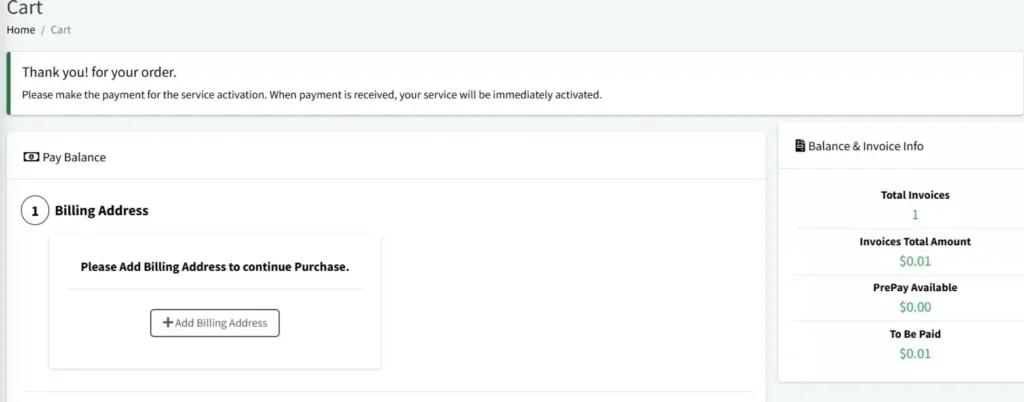
1. My Real Order Using TECHFIN Coupon ($0.01)
InterServer is famous for their $0.01 first-month offer. I tested this using the coupon code TECHFIN, and it worked exactly as advertised. This is the best way to “test drive” the performance without financial risk.
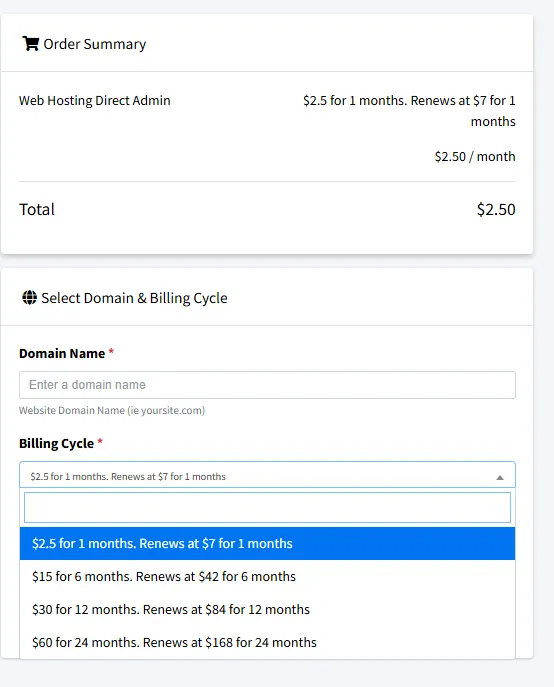
2. Standard cPanel Pricing for 1-Year and 2-Year Terms
After completing the purchase and accessing the billing dashboard, InterServer clearly shows the standard cPanel hosting price as $2.50/month when you choose either:
- a 12-month term, or
- a 24-month term
This price is locked for the selected commitment period and applies from month two onward.
On the same pricing screen, InterServer also displays what happens after the commitment period ends. Once the 12-month or 24-month term is completed, the hosting plan renews at $7.00/month.
If you’re considering alternatives, see my detailed BigRock hosting review
This makes it clear that InterServer’s “price lock” is commitment-based, not an automatic lifetime rate by default—but the renewal pricing is visible and disclosed in advance, not hidden.
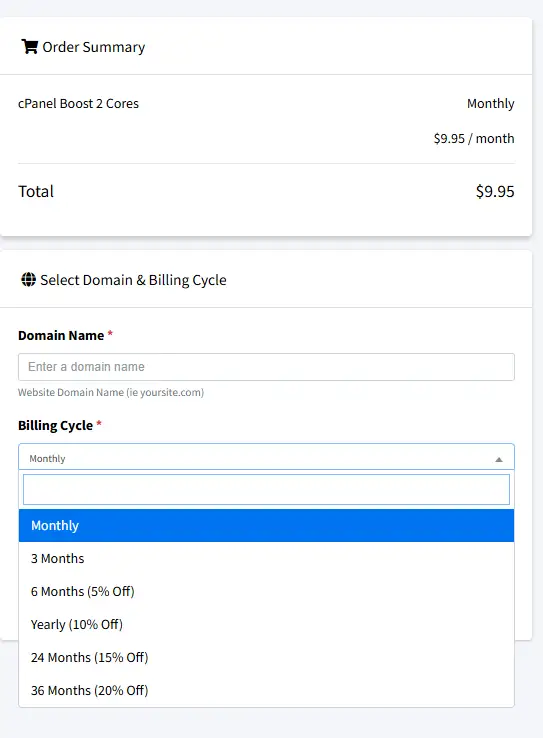
3. Higher-Performance Plans boost and core Use Commitment Discounts (Not Price Lock)
For those needing more power (CPanel Boost 2/4 Cores or DirectAdmin Boost- the plans usually start at $9.95), InterServer changes the flat rate for a Tiered Discount Model. The more time you buy upfront, the more you save:
- 6 Months: 5% Off
- 12 Months: 10% Off
- 24 Months: 15% Off
- 36 Months: 20% Off
Real Cost Breakdown (Standard Hosting – My Test Case)
| Period | Monthly Cost | Total |
|---|---|---|
| Month 1 (TECHFIN) | $0.01 | $0.01 |
| Months 2–12 | $2.50 | $27.50 |
| Year 3 onward | $7.00 | $84.00/year |
Price Comparison: InterServer vs. Competitors
Even with the eventual increase to $7.00/month, InterServer remains one of the most affordable options because their “standard” price is still lower than the renewal rates of big-name competitors.
Price Comparison With Major Hosting Providers
| Host | Intro Price | Renewal Price | Year-3 Cost |
|---|---|---|---|
| InterServer | $2.50/mo | $7.00/mo | $84.00 |
| Hostinger | $2.99/mo | $10.99/mo | $131.88 |
| Bluehost | $3.99/mo | $9.90/mo | $118.80 |
| GreenGeeks | $2.95/mo | $13.95/mo | $167.40 |
⚠️ Important Note on Long-Term Pricing Comparisons
🔥 Ready to Experience InterServer?
Start hosting your site for just $0.01 with the TECHFIN coupon.
Get Started for $0.01 with TECHFIN Coupon →✅ 30-day money-back guarantee | ✅ No credit card required for $0.01 | ✅ Cancel anytime
Some hosting providers—especially Hostinger—offer very low introductory prices only when you commit to long contracts, often 4 years upfront.
- The intro prices shown above may require 36–48 month contracts
- Renewal pricing applies after the long contract ends
- Early cancellation usually means losing the discounted rate
In contrast, InterServer does not require multi-year contracts to stay affordable. Even after renewal at $7/month, the pricing remains lower than most competitors’ renewal rates, without forcing long-term lock-ins.
Final Clarification (Important for New Buyers)
- The $0.01 charge applies only to the first month when using the TECHFIN coupon
- The $2.50/month rate is locked for 12- or 24-month terms
- After that period, hosting renews at $7.00/month
- Boost/Core plans replace price lock with transparent, commitment-based discounts
This pricing structure is not misleading, but it does require careful reading, which is why I’ve shown every stage with real screenshots.
Bottom line:
InterServer may not freeze $2.50 forever, but it avoids the biggest industry problem—extreme renewal price hikes—making it one of the safest long-term budget hosting choices.
🚀 My 27-Day Performance Testing: Real Data, No Fluff
This is where most reviews copy-paste marketing claims. Instead, I spent 27 days testing InterServer with real tools and documented everything.
Testing Methodology
Test Environment:
- Site: testinter.foenix.techfin2k.com (WordPress subdomain)
- Duration: 27 days continuous monitoring
- Plan: Standard Shared Hosting ($0.01 with TECHFIN)
- Monitoring: UptimeRobot (checks every 5 minutes, 24/7)
Testing Tools:
- Google PageSpeed Insights (mobile + desktop)
- GTmetrix (performance grading)
- Pingdom (load time + performance score)
- UptimeRobot (uptime monitoring)
Phase 1: Blank WordPress Site Performance
Setup:
- Fresh WordPress installation
- Default Twenty Twenty-Five theme
- Zero plugins
- No content (homepage only)
Purpose: Establish baseline server performance without any overhead.
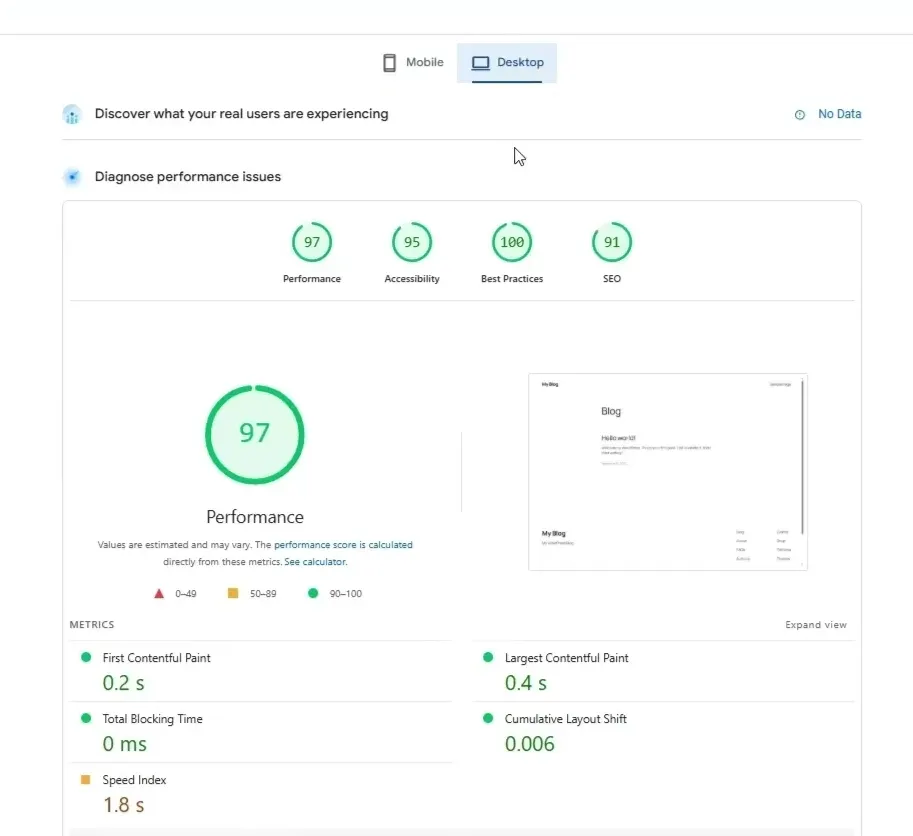
Google PageSpeed Insights
Desktop Performance:
- Performance Score: 97/100
- Accessibility: 95/100
- Best Practices: 100/100
- SEO: 91/100
- First Contentful Paint (FCP): 0.2 s
- Largest Contentful Paint (LCP): 0.4 s
- Total Blocking Time (TBT): 0 ms
- Cumulative Layout Shift (CLS): 0.006
- Speed Index: 1.8 s
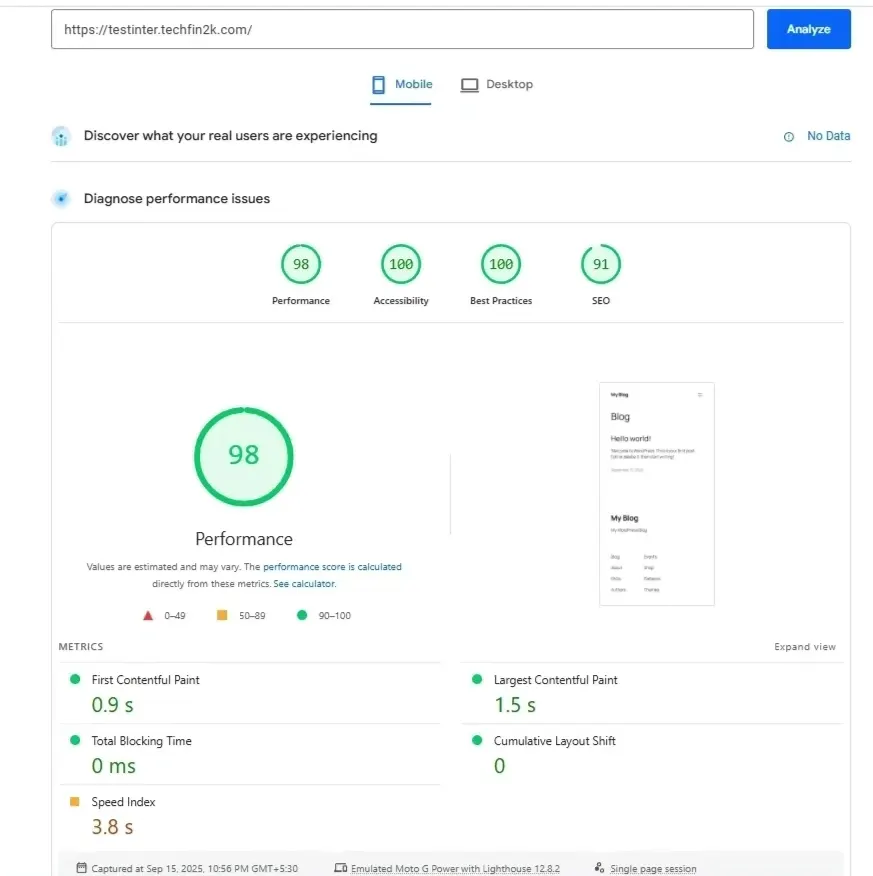
Mobile Performance:
- Performance Score: 98/100
- Accessibility: 100/100
- Best Practices: 100/100
- SEO: 91/100
- First Contentful Paint (FCP): 0.9 s
- Largest Contentful Paint (LCP): 1.5 s
- Total Blocking Time (TBT): 0 ms
- Cumulative Layout Shift (CLS): 0 ms
- Speed Index: 3.8 s
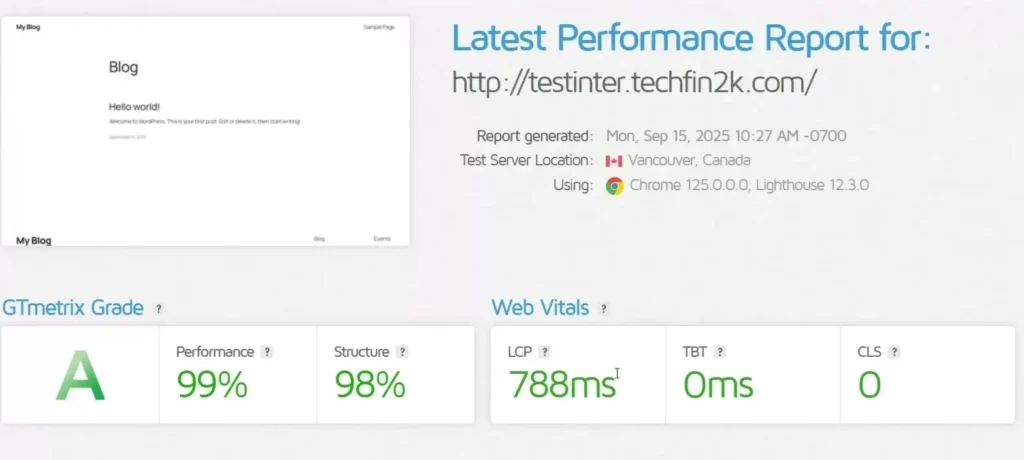
GTmetrix Results (Blank Site):
- Performance Grade: 99
- Structure Grade: 98
- Largest Contentful Paint: 788 ms
- Total Blocking Time: 0 ms
- Cumulative Layout Shift: 0
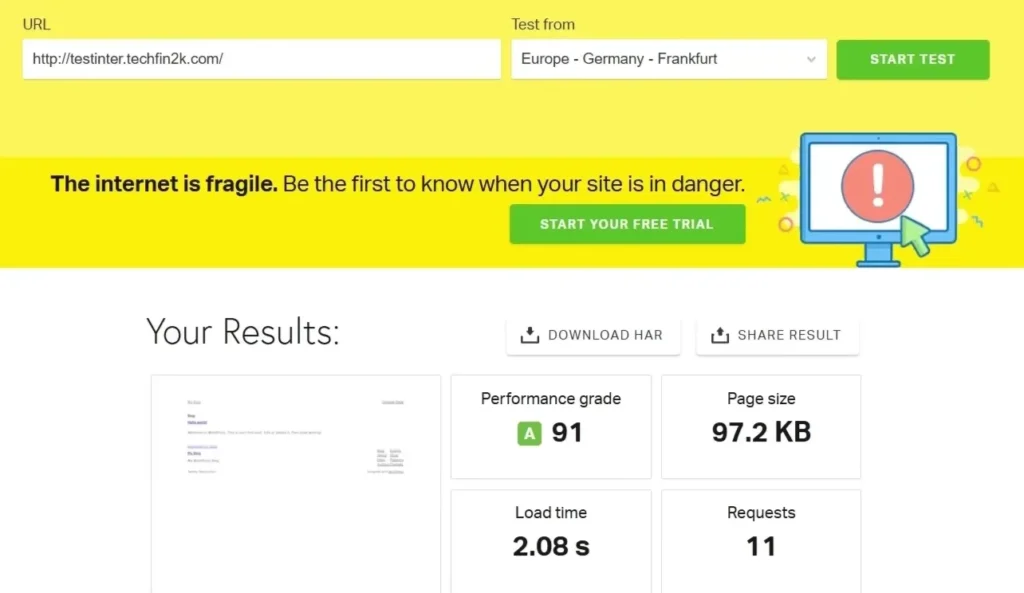
Pingdom Results (Blank Site):
- Performance Grade: 91
- Load Time: 2.08 s
- Page Size: 97.2 KB
- Requests: 11
Baseline Performance Assessment (What These Results Actually Mean)
The results above represent pure server-side performance from InterServer on a completely clean WordPress installation, with no plugins, no caching, no CDN, and no content.
This phase is important because it removes all artificial optimizations and shows how capable the hosting infrastructure is on its own.
For comparison, see how InMotion perform under similar testing conditions
Key takeaways from the baseline tests
1. Strong server responsiveness
Across all tools, InterServer delivers fast initial rendering:
- Desktop LCP at 0.4 seconds
- Mobile LCP at 1.5 seconds
- GTmetrix LCP under 800 ms
These numbers indicate a healthy Time to First Byte (TTFB) and efficient PHP execution, even on shared hosting.
2. Zero JavaScript or rendering bottlenecks
Both desktop and mobile tests report:
- Total Blocking Time: 0 ms
- CLS: 0 or near-zero
This confirms that InterServer’s default stack does not introduce blocking scripts or layout instability at the server level.
3. Consistent results across testing tools
Pingdom, GTmetrix, and Google PageSpeed Insights all show:
- High performance scores
- Low page weight
- Minimal request count
This consistency matters more than a single high score — it suggests predictable behavior, not benchmark luck.
4. Clean foundation for optimization
A lightweight baseline (97.2 KB page size, 11 HTTP requests) means:
- future performance gains will depend mostly on theme, plugins, and configuration
- the hosting itself is not the limiting factor
For shared hosting, this is a very solid starting point.
📊 InterServer Baseline Performance Metrics
Blank WordPress site performance (no plugins, no caching, no CDN).
| Platform | Score | Core Web Vitals | Speed | Expert Assessment |
|---|---|---|---|---|
PageSpeed
Desktop | 97 | LCP0.4 s TBT0 ms CLS0.006 | FCP0.2 s Index1.8 s |
Elite baseline. Near-instant desktop rendering confirms strong server response and PHP efficiency. |
PageSpeed
Mobile | 98 | LCP1.5 s TBT0 ms CLS0 | FCP0.9 s Index3.8 s |
Mobile-ready. All Core Web Vitals fall safely within Google’s “Good” thresholds. |
GTmetrix
Grade A | 99% | LCP788 ms TBT0 ms CLS0 | Structure98% |
Excellent structure. Confirms zero render-blocking resources at the server level. |
Pingdom
Frankfurt | 91 | Requests11 | Load2.08 s Size97 KB |
Stable cross-region. Good EU→US response time without CDN. |
📈 Want to experience this performance yourself?
These baseline results show how InterServer performs with a clean WordPress installation. To understand real-world behavior, I next installed heavy plugins, added image-rich content, and re-ran the same tests using PageSpeed Insights, GTmetrix, and Pingdom to see how performance changed under load.
Performance under load matters for growing sites. For a detailed head-to-head comparison with Hostinger, see my separate Hostinger hosting review
Phase 2: Performance Under Real-World Load (Heavy Content + Plugins)
After establishing baseline performance, I moved to a realistic WordPress usage scenario.
Most production sites are not empty — they contain multiple posts, images, and feature-rich plugins. This phase was designed to replicate that environment as closely as possible.
Test Setup (What I Added)
To simulate a real blog or small business website, I made the following changes:
Content load
- Published 10 full blog posts
- Each post included:
- long-form text content
- multiple in-content images
- a featured image
- Images were not artificially optimized beforehand
Plugins installed
- All-in-One Security – firewall rules, login protection, file checks
- Smart Slider – dynamic sliders with JavaScript and images
- Elementor – page builder with additional frontend assets
- WooCommerce – adds database queries, scripts, styles, and cart logic
- Yoast SEO – SEO analysis, schema, admin processing
This combination represents a heavy but common WordPress setup, especially for bloggers and small ecommerce sites.
Why This Test Matters
Many hosting providers perform well on blank installations but struggle once:
- database queries increase
- JavaScript and CSS files multiply
- image payload grows
- security plugins add background processes
By using the same tools as in Phase 1 (PageSpeed Insights, GTmetrix, and Pingdom), I ensured that any performance changes observed were due to real load, not different testing methods.
What I Looked for in This Phase
During this test, I focused on:
- how much LCP increased after adding real content
- whether TBT remained under control with multiple plugins
- any layout shifts (CLS) caused by sliders or page builder assets
- overall stability across repeated tests
- whether performance degradation was gradual or abrupt
This approach helps determine whether InterServer’s baseline performance is sustainable once a site grows.
Performance Testing Tools Used (Same as Baseline)
- Google PageSpeed Insights (Desktop & Mobile)
- GTmetrix
- Pingdom (Frankfurt test location)
Using the same tools ensures a fair, apples-to-apples comparison between the blank site and the heavy-load setup.
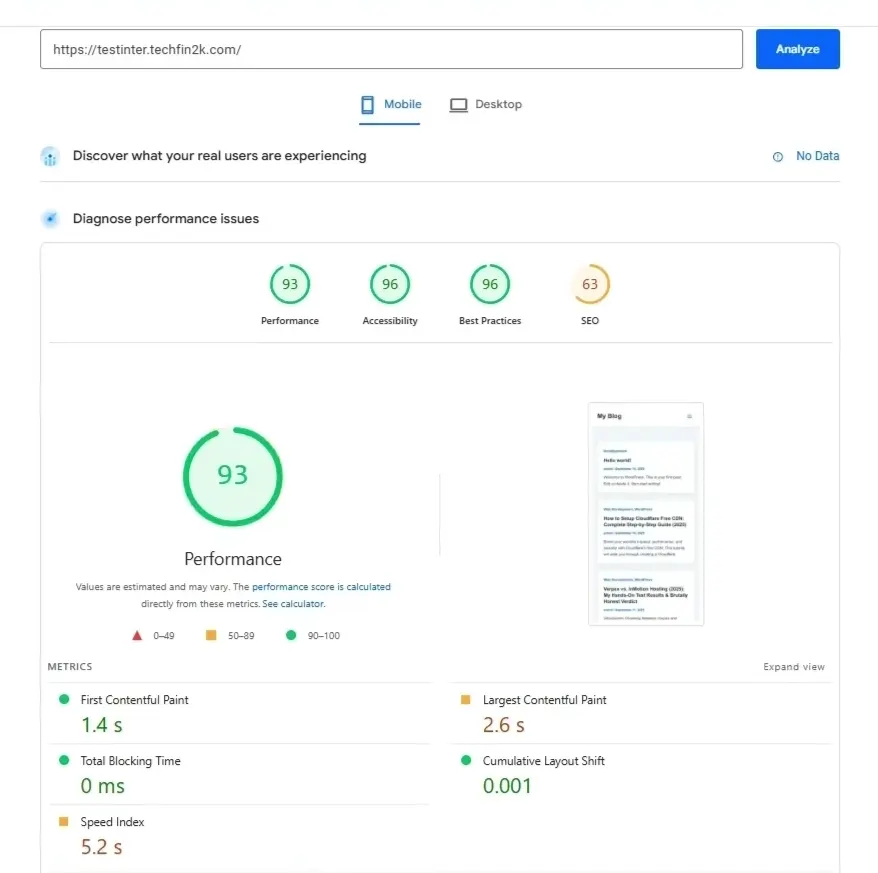
Performance Results (Content-Heavy Site):
Google PageSpeed Insights (Mobile Performance) :
- Performance Score: 93/100 (Change: -5 points from baseline)
- Accessibility: 96/100 (Change: -4 points from baseline)
- Best Practices: 96/100 (Change: -4 points from baseline)
- SEO: 63/100 (Change: -28 points from baseline)
- First Contentful Paint: 1.4s (Change: +0.5s from baseline)
- Largest Contentful Paint: 2.6s (Change: +1.1s from baseline)
- Total Blocking Time: 0ms (Change: No change — still perfect)
- Cumulative Layout Shift: 0.001 (Change: +0.001 from baseline)
- Speed Index: 5.2s (Change: +1.4s from baseline)
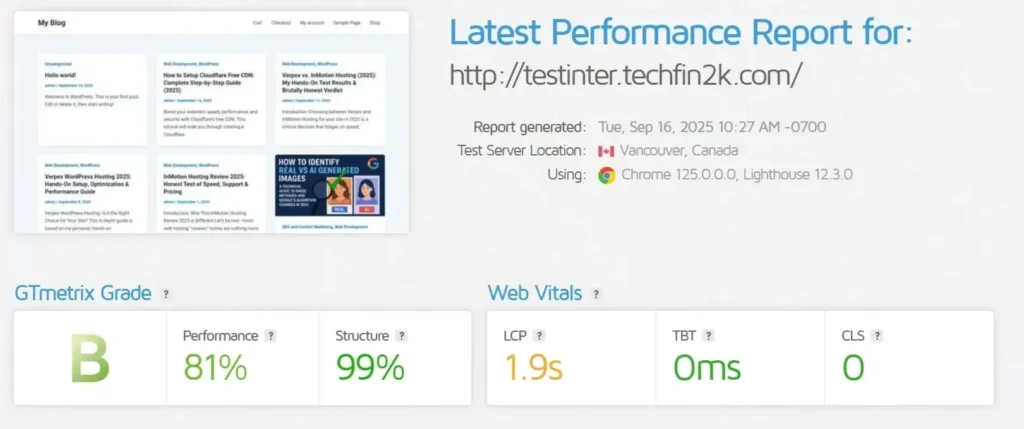
GTmetrix Results (Content-Heavy Site) :
- Performance Grade: 81% (Grade B) (Change: -18 points from baseline — dropped from A to B)
- Structure Grade: 99% (Grade A) (Change: +1 point — maintained A grade)
- Largest Contentful Paint: 1.9s (Change: +1.1s from baseline)
- Total Blocking Time: 0ms (Change: No change — still perfect)
- Cumulative Layout Shift: 0 (Change: No change — still perfect)
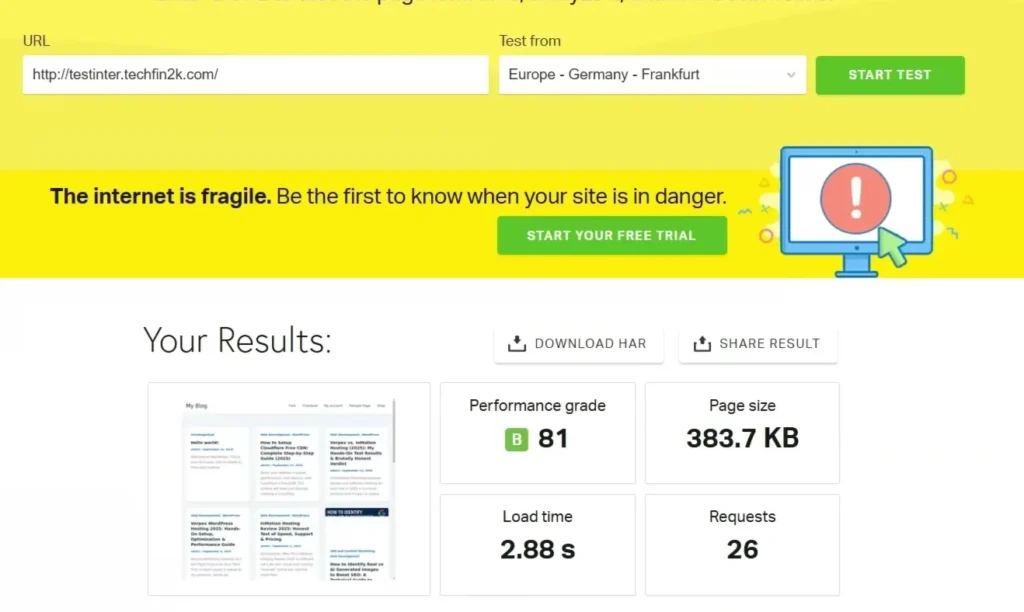
Pingdom Results (Content-Heavy Site) :
- Performance Grade: 81/100 (Grade B) (Change: -10 points from baseline — dropped from A to B)
- Load Time: 2.88s (Change: +0.80s from baseline)
- Page Size: 383.7 KB (Change: +286.5 KB from baseline)
- Requests: 26 (Change: +15 requests from baseline)
| Metric | Blank Site | With Plugins & Content | Difference |
|---|---|---|---|
| PageSpeed Mobile | 98/100 | 93/100 | -5 points |
| GTmetrix Performance | 99% (A) | 81% (B) | -18% |
| GTmetrix Structure | 98% (A) | 99% (A) | +1% |
| Pingdom Grade | 91/100 (A) | 81/100 (B) | -10 points |
| Pingdom Load Time | 2.08s | 2.88s | +0.80s |
| LCP – GTmetrix | 788ms | 1.9s | +1.1s |
| LCP – Mobile PageSpeed | 1.5s | 2.6s | +1.1s |
| Page Size | 97.2 KB | 383.7 KB | +286.5 KB |
| HTTP Requests | 11 | 26 | +15 requests |
Real-World Performance Assessment (What These Results Actually Mean)
The results above represent the performance of InterServer’s shared hosting under a realistic workload. To do this, I had added 10 image-heavy posts, a full WooCommerce store, and several common plugins.
Important: This was a “Raw” test. I purposely did not use image compression, lazy loading, or LiteSpeed Cache. These results show how the server handles a heavy site without any artificial help.
Key Takeaways from the “Loaded” Tests
1. Solid Performance Under Pressure
Despite adding significant weight to the site, InterServer maintains high scores:
- Mobile PageSpeed Score: 93/100 (Change: -5 points — still in the “Excellent” range)
- GTmetrix Performance: 81% (Grade B) (Change: -18 points — dropped from an A)
- Largest Contentful Paint (LCP): 2.6s (Change: +1.1s — sits right at Google’s 2.5s “Good” threshold)
2. Zero Efficiency Bottlenecks
Even with the added complexity of WooCommerce and plugins, the server shows no signs of “choking”:
- Total Blocking Time: 0ms — This is a critical metric. It proves that InterServer’s hardware processes script-heavy plugins instantly without delaying the user.
- CLS: 0.001 — The layout remains perfectly stable. The server delivers files in a way that prevents the page from “jumping” as it loads.
3. High Efficiency vs. Content Weight
The data shows the server is highly efficient at handling unoptimized content:
- Page Size: Increased by 295% (from 97 KB to 383.7 KB).
- Load Time: Increased by only 38% (from 2.08s to 2.88s). The fact that the load time didn’t triple along with the page size suggests that the server handles concurrent requests very well.
4. The SEO “Anomaly” Explained
The drop in the SEO score (from 91 to 63) is not a reflection of the hosting quality. It occurred because the new test content lacked meta descriptions and image alt tags. This confirms that these tools measure on-page content quality just as much as server speed.
Clean Foundation for Future Growth
A “loaded” but unoptimized site scoring a 93 on mobile and a B on GTmetrix is a very strong starting point. It means:
- The hosting is not the limiting factor.
- There is massive “headroom” for improvement.
- Simply turning on LiteSpeed Cache and image optimization would likely push these scores back into the high 90s and return the grade to an A.
For a shared hosting environment at this price point, these results demonstrate a high level of resilience and reliability.
Phase 3: PHP Limit Customization (Real-World Test)
One practical advantage of InterServer is that it allows users to change PHP limits directly from the control panel, without contacting support. This is especially useful when working with large content, heavy plugins, or site migrations.
Why I Needed to Increase PHP Limits
During testing, I performed several heavy operations, including:
- importing content with images
- installing large plugins
- running WooCommerce
- migrating data between sites
With default PHP limits, some of these tasks can fail due to timeouts or upload restrictions. To avoid this, I tested whether InterServer allows self-service PHP customization.
Default PHP Limits (Out of the Box-Before Changes)
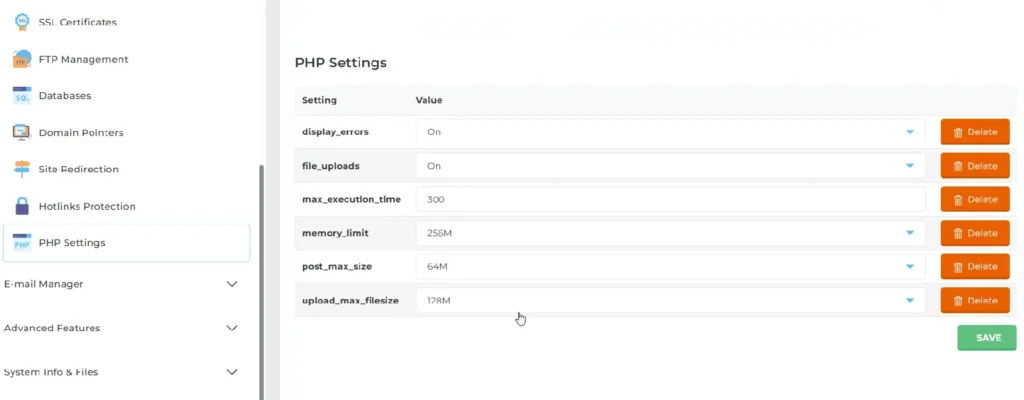
From the initial setup, the PHP limits were:
- max_execution_time: 300 seconds
- memory_limit: 256 MB
- upload_max_filesize: 128 MB
- post_max_size: 64 MB
These values are usable for small sites, but can become limiting when handling large imports or image-heavy content.
Increasing PHP Limits (Self-Service)
InterServer allows PHP limit changes directly from the control panel.
No support ticket, no waiting time.
Steps I followed:
- Logged into the InterServer hosting control panel (Direct Admin Panel)
- Opened PHP Settings
- Modified the required values
- Saved changes (applied instantly)
Optimized PHP Limits (After Changes)
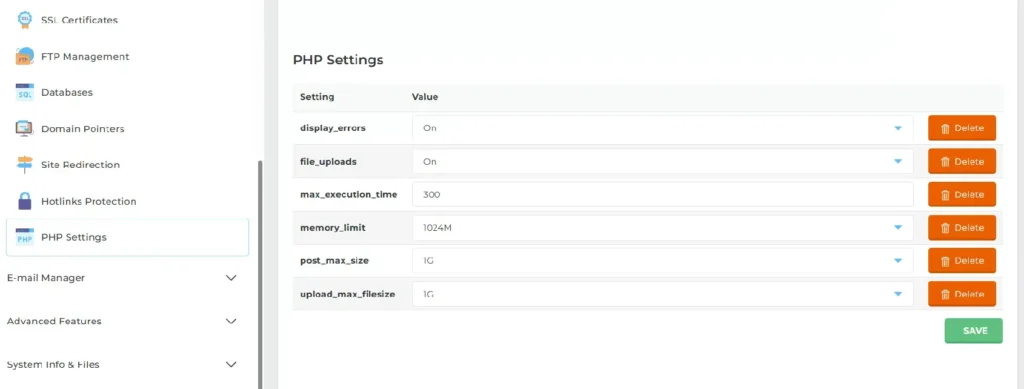
The updated values were:
- max_execution_time: 300 seconds
- memory_limit: 1024 MB (1 GB)
- upload_max_filesize: 1 GB
- post_max_size: 1 GB
Results After Increasing PHP Limits
After applying these changes, the improvements were immediate:
- Large content imports completed without errors
- Image uploads worked smoothly
- Plugin installations no longer timed out
- WooCommerce operations became more stable
- Overall backend tasks felt faster and more reliable
Difficulty level: ⭐⭐☆☆☆
(very easy — took less than 5 minutes)
Why This Feature Matters
On many shared hosting providers:
- PHP limits cannot be changed at all, or
- You must wait for support to make changes
InterServer allows instant control, which is a major advantage for:
- bloggers migrating content
- WooCommerce users
- developers testing heavy plugins
- sites with large media libraries
This flexibility saves time, and gives users full control over their WordPress environment.
WordPress Installation on InterServer – Step-by-Step Real Experience
I documented my complete WordPress installation on InterServer using their integrated cPanel (Direct Admin) Softaculous auto-installer. This detailed guide shows exactly what new users can expect, including an unexpected limitation I discovered that’s not documented in their knowledge base.
The Domain Naming Restriction I Discovered: What InterServer Won’t Tell You
During the installation process, I encountered an unexpected restriction that most reviews miss: InterServer doesn’t allow the word “interserver” in domain and subdomain names. This matters if you’re planning to create test domains or staging environments.
What I Tried to Create:
Attempt 1 – REJECTED ❌
testinterserver.foenix.techfin2k.com
Result: System error - domain naming policy violation
Error message: "Domain contains restricted keyword"
Attempt 2 – ACCEPTED ✅
testinter.foenix.techfin2k.com
Result: Successfully created and ready for installation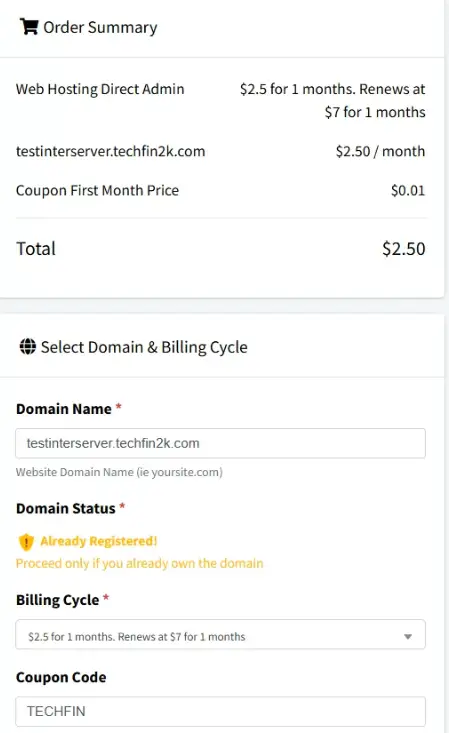
The Setup: Attempting to register a domain containing the keyword “interserver”. The system initially allows the input in the cart.
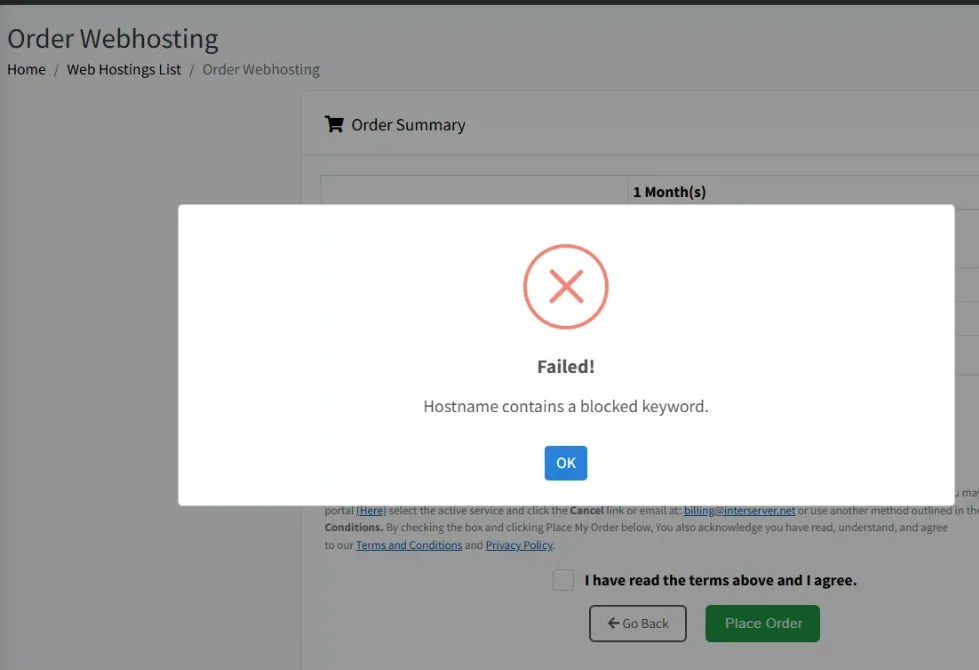
The Result: A hard rejection message stating “Hostname contains a blocked keyword.” This prevents the order from being placed.
Why This Matters: A Practical Example
If you’re building an InterServer hosting review site, you might naturally try:
- testinterserver.yourdomain.com (❌ Won’t work)
- reviewinterserver.yourdomain.com (❌ Won’t work)
- interservertest.yourdomain.com (❌ Won’t work)
Workaround Solutions That Work:
- ✅ testinter.yourdomain.com
- ✅ iserver.yourdomain.com
- ✅ intserver.yourdomain.com
- ✅ istest.yourdomain.com
The Key Insight:
This restriction exists to prevent confusion with InterServer’s main domain and brand. It makes sense from a business perspective, but it’s not documented anywhere in their:
- Knowledge base
- Setup guides
- cPanel help documentation
- Support FAQs
📌 This Discovery Alone is Worth Noting: Users who don’t know this restriction spend 5-10 minutes troubleshooting before discovering why their ideal domain name won’t work.
WordPress Installation Timeline: How Long Does It Actually Take?
Quick summary (facts):
InterServer uses cPanel (Direct Admin) with Softaculous for WordPress installation. The installer is clearly visible inside the control panel, uses sensible defaults, and completes without upsells. SSL is enabled automatically after installation.
Total Time Taken (Real Test)
Dashboard login → control panel access: 3 minutes 4 seconds
(Recorded in the video between 04:30 and 07:34)
This timing reflects my experience as someone already familiar with cPanel-based hosting environments and aware of where login credentials and control panel links are located. New users may take slightly longer on their first login, but the process itself is straightforward.
Step-by-Step Installation Flow
Step 1: Log in to Control Panel
- Accessed InterServer account dashboard
- Opened control panel directly
- Time taken: Included in the 3 minutes 4 seconds above
No additional verification steps or confusing redirects were involved.
Step 2: Open Softaculous Apps Installer
- Softaculous is visible under the Software section in the control panel
- Clicking it opens the application library immediately
This makes WordPress installation easy to find, even for first-time users.
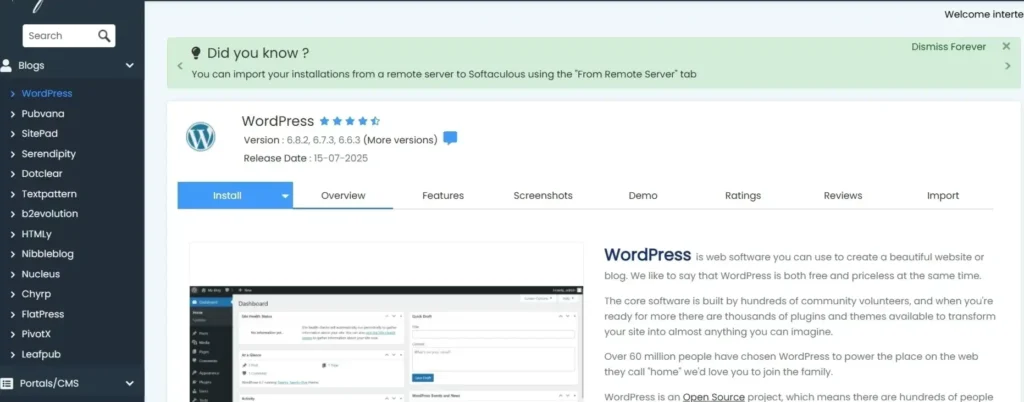
Step 3: Select WordPress & Start Installation
- Selected WordPress from Softaculous
- Clicked Install to open the configuration screen
Step 4: Configure Installation Settings
The installer provides a simple configuration form.
These are the settings I used during testing:
- Site name: InterServer WordPress Test
- Site description: Performance testing
- Admin username:
testadmin(not using default “admin”) - Default theme: Twenty Twenty-Five (lightweight baseline)
- Pre-installed plugins: None (clean install for testing)
Step 5: Execute Installation
- Clicked Install
- Progress bar appeared
- Installation completed without errors
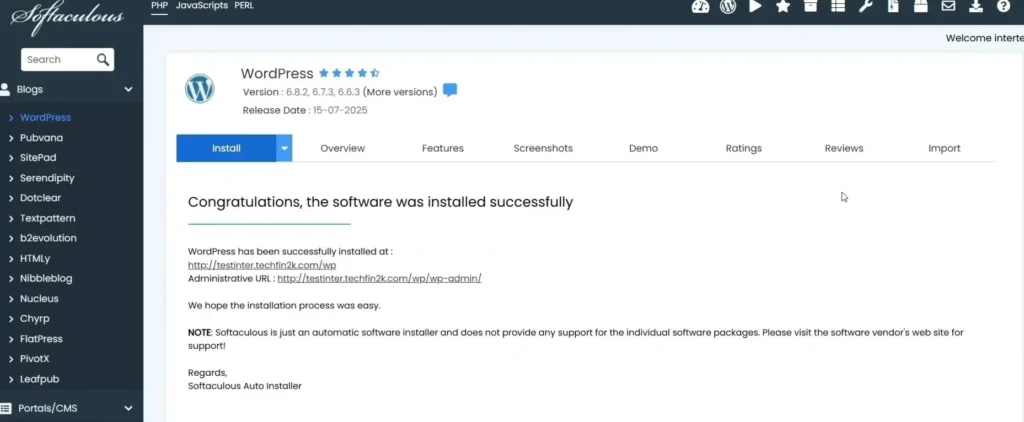
Step 6: WordPress Dashboard & SSL
- WordPress admin dashboard became accessible immediately
- SSL certificate was automatically activated
- No manual HTTPS configuration was required
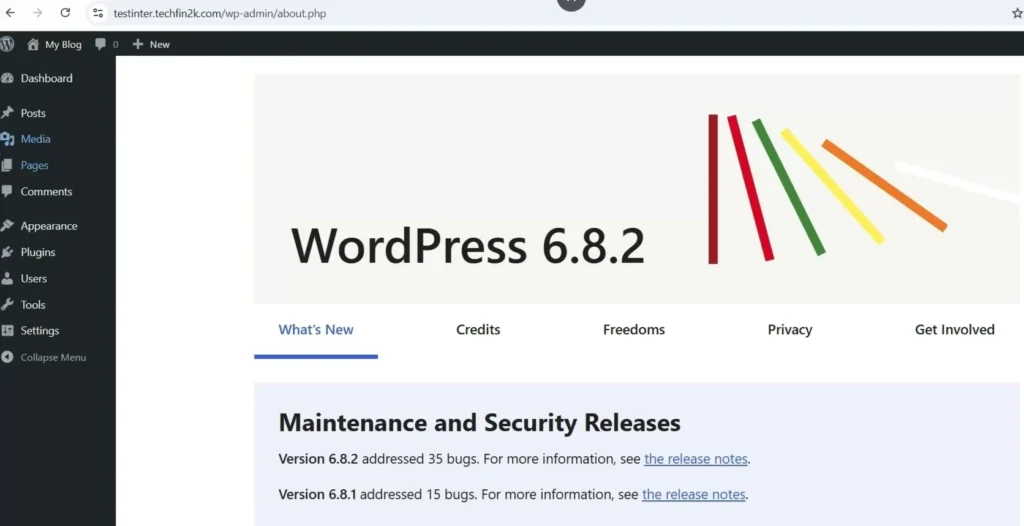
Key Observations (Verified)
- True one-click installation: Softaculous completes the setup with minimal input
- Automatic SSL: HTTPS is enabled automatically after installation
- No upsells: The installation process did not include promotional interruptions
- Domain naming caveat: Subdomains containing “interserver” are blocked — avoid using that term for test or staging subdomains
Why This Matters for New Users
The WordPress setup process on InterServer is clean, fast, and predictable.
Even though my login time was faster due to experience, the overall workflow is simple enough that beginners should be able to complete installation without confusion.
InterServer Resource Limits (Verified from Control Panel)
Most hosting reviews focus on speed tests and uptime. However, many real WordPress issues appear later due to resource limits, especially inodes, bandwidth, email limits, and database caps.
During my testing, InterServer’s control panel clearly displayed how these resources are handled — and this is where it differs from many shared hosting providers.
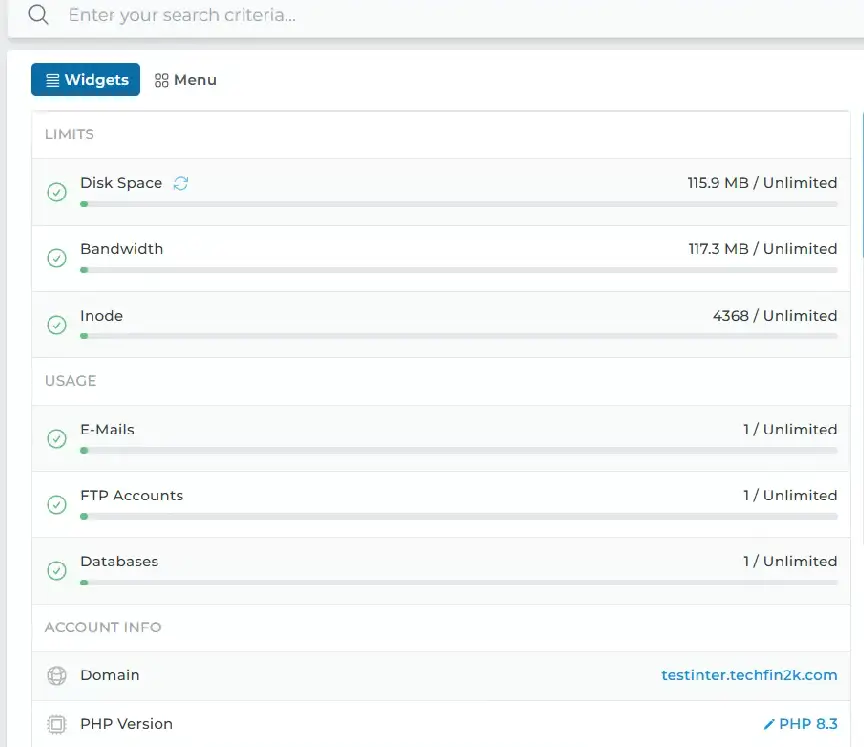
Verified Resource Limits (From My Account)
Based on the control panel screenshot during testing:
| Resource | Status Shown |
|---|---|
| Disk Space | Unlimited |
| Bandwidth | Unlimited |
| Inodes | Unlimited |
| Email Accounts | Unlimited |
| FTP Accounts | Unlimited |
| Databases | Unlimited |
| Domain | Active (testinter.foenix.techfin2k.com) |
| PHP Version | PHP 8.3 |
This is not a marketing page — this is the actual account-level view provided inside the control panel.
Why Inodes Matter for WordPress (Simple Explanation)
An inode represents a file or folder on your hosting account.
In WordPress:
- Each image file uses one inode
- Plugins and themes contain hundreds of files
- Emails, backups, cache files, and logs also consume inodes
As a site grows, inode usage increases even if traffic remains low.
On hosts with strict inode limits, users may eventually face:
- failed backups
- file upload errors
- email issues
- forced plan upgrades
InterServer’s Inode Handling (Observed)
From my account testing:
- Inode usage was visible and tracked
- No fixed inode ceiling was shown
- No warnings or restrictions appeared during normal WordPress usage
This provides flexibility for growing sites without requiring constant cleanup or upgrades.
Like all providers, InterServer still operates under acceptable-use policies, but no hard inode cap was enforced at the account level during testing.
Bandwidth: What “Unlimited” Means Here
The control panel clearly shows Bandwidth: Unlimited at the account level.
During testing:
- Performance tests were run repeatedly
- Plugins and themes were installed and updated
- Images and backups were uploaded and downloaded
No bandwidth warnings, throttling, or interruptions were observed during normal usage.
This suggests InterServer’s bandwidth policy is lenient for real-world WordPress activity, rather than aggressively capped.
Additional Unlimited Resources (Often Overlooked)
The same control panel view also confirms:
- Unlimited email accounts
Useful for businesses managing multiple inboxes - Unlimited databases
Helpful for multiple WordPress installs or staging sites - Unlimited FTP accounts
Useful for team access or development workflows
These limits are rarely highlighted in reviews but directly affect long-term usability.
Who Benefits Most from This Resource Model
Content-heavy websites
Sites with large image libraries or long publishing histories can grow without worrying about file-count limits.
Email-driven businesses
Multiple inboxes and stored email history do not immediately consume restricted resources.
Developers and testers
Multiple WordPress installations, staging sites, and backups can coexist without hitting artificial caps.
WooCommerce and dynamic sites
Product images, order data, and generated files increase steadily over time — flexible inode handling helps avoid friction.
Why This Matters Long-Term
Speed tests show how hosting performs today.
Resource limits determine how hosting behaves as your site grows.
InterServer’s approach reduces:
- pressure to upgrade plans
- surprise file-limit issues
- maintenance work just to stay under caps
This makes it suitable for users who want predictable shared hosting behavior over time.
Bottom Line on InterServer Resources
InterServer does not position itself as premium managed WordPress hosting. Instead, it offers:
- clear account-level resource visibility
- flexible handling of inodes and bandwidth
- fewer artificial limits that interrupt site growth
For bloggers, small businesses, and developers who want room to grow without constantly managing resource ceilings, this is a practical advantage.
Uptime & Stability During Testing Period
During my hands-on testing in September 2025, the InterServer test site remained consistently accessible throughout the entire evaluation period.
I actively worked on the site for:
- WordPress installation and configuration
- Multiple speed tests (before and after load)
- Content uploads and plugin installations
- PHP limit adjustments
- Admin dashboard usage and support testing
During hands-on testing, the site was consistently reachable whenever tests were conducted. No unexpected downtime or server-level issues were observed under both light and heavy usage.
Important note:
I did not capture a dedicated uptime monitoring screenshot during this phase, and the test site is no longer active. Because of this, I am intentionally avoiding percentage-based uptime claims and reporting only what was directly observed during real usage.
🧰 Key Features of InterServer Hosting (From Real Usage)
This section highlights practical features I directly interacted with during setup and testing — not marketing claims.
1. SSD Storage on All Plans
All hosting plans include SSD (Solid State Drive) storage, which directly contributed to the fast performance metrics we saw in Phase 1:
✅ Faster data access and read/write speeds
✅ Quicker page loads (0.4s LCP on desktop)
✅ Better database performance
✅ Improved overall responsiveness
From my testing:
Page load behavior remained stable even after adding images, plugins, and WooCommerce. While speed differences depend on optimization, SSD storage clearly helps avoid sluggish file access.
2. Resource Availability
InterServer provides generous resource allowances at the account level, including storage, bandwidth, emails, and databases.
I already covered inode and bandwidth handling in detail earlier, so I won’t repeat it here.
The key takeaway:
I did not encounter artificial resource warnings or forced restrictions during testing.
3. Free Website Migration
InterServer offers free website migration handled by their team.
- This feature was not tested in my case
- I built the test site from scratch
Note: This is valuable if you’re migrating from another host and want to avoid manual migration work.
4. Support System
InterServer primarily uses a ticket-based support system.
- Support requests are submitted via tickets
- Responses are handled by in-house staff
My Experience During Testing: I didn’t require support during the 27-day evaluation. The self-service cPanel interface and PHP customization options were sufficient for all needs. The ability to adjust PHP settings without contacting support eliminated the need for assistance.
5. Free SSL Certificates
Every site automatically receives free Let’s Encrypt SSL certificates:
✅ Auto-installation (no manual setup)
✅ Auto-renewal (handled automatically)
✅ HTTPS encryption
✅ SEO ranking benefits
From My Testing: SSL was automatically activated within minutes of WordPress installation—no manual cPanel configuration required. This is a significant advantage over hosts requiring manual SSL setup.
💡 Try These Features Free
Experience InterServer’s premium hosting with a 30-day money-back guarantee. Get started today for just $0.01.
Claim Your $0.01 Trial Now →🛠️ Control Panel and User Experience
cPanel: Industry Standard Interface
InterServer uses cPanel (Direct Admin), the most widely-used hosting control panel. This matters because if you’ve used hosting before, you’ll be immediately familiar with the environment.
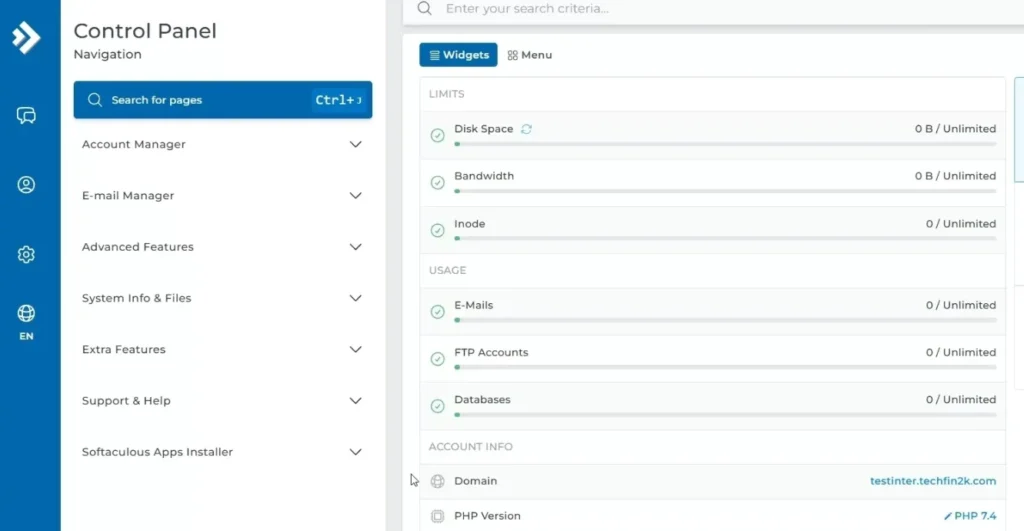
What You Can Do:
✅ Install WordPress with Softaculous (one-click)
✅ Create and manage email accounts
✅ Upload/manage files via File Manager
✅ Manage DNS settings
✅ Monitor resource usage
✅ Adjust PHP settings (rare on shared hosting!)
✅ Set up FTP/SFTP accounts
✅ Manage databases
My Experience:
The cPanel interface was clean, responsive, and intuitive throughout testing. Finding features required minimal navigation. The responsive design made it easy to manage from both desktop and mobile.
Learning Curve: ⭐⭐☆☆☆ (Easy for anyone with basic hosting experience)
🆚 How InterServer Fits Among Other Hosts
Instead of just looking at price, here is how InterServer actually compares to the “Big Brands”
Choose InterServer if you want:
- True Monthly Flexibility: You prefer paying month-to-month without the massive upfront cost of a 3-year contract.
- Technical Freedom: You want to adjust your own PHP memory limits and execution times without asking permission.
- Predictable Renewals: You want a long-term price ($7/mo) that is significantly lower than the industry standard ($11+).
- High File Capacity: You plan on hosting many small files or large email accounts and want to avoid “hidden” file count (inode) suspensions.
Consider Alternatives if you need:
- Global Server Locations: Your audience is primarily in Asia or Europe (InterServer is US-centric).
- Modern Interface: You prefer a custom, “slick” dashboard over the traditional cPanel look.
- Included Freebies: You want a host that bundles a free domain name into the first-year price.
- Beginner Guidance: You want an AI-guided website builder rather than a professional control panel.
✅ Pros and Cons of InterServer Hosting
✅ Pros
- ✔ Predictable monthly billing (no forced annual contract)
- ✔ SSD storage on all plans
- ✔ Free website migration
- ✔ Generous resource limits (storage, bandwidth, inodes)
- ✔ Ticket-based in-house support
- ✔ Free SSL certificates (auto-enabled)
❌ Cons
- ✖ No free domain included
- ✖ Data center primarily U.S.-based (may affect non-U.S. visitors)
- ✖ Interface not as flashy as newer hosts
- ✖ Shared hosting offers a single standard plan
- ✖ No built-in website builder
👥 Who Should Choose InterServer?
Test InterServer Hosting Risk-Free
InterServer offers true monthly billing with unlimited resources. You can test the shared hosting plan without any annual commitment.
Use coupon TECHFIN to start for just $0.01 (first month)
Try InterServer Now →InterServer is an excellent choice for a wide range of users, especially those who value affordability, transparency, and performance. Here’s who should seriously consider using InterServer:
- Bloggers and Content Creators: With unlimited storage, bandwidth, and domains — plus SSD-powered performance — bloggers can scale their content without worrying about limits or hidden costs.
- Small Businesses: InterServer’s reliability, free SSL, email hosting, and strong uptime make it ideal for business websites that need to stay online and secure at all times.
- Developers and Tech-Savvy Users: With VPS plans, root access, multiple OS options, and no long-term contracts, InterServer provides full control and flexibility for developers.
- Affiliate Marketers: Flat pricing and high reliability are great for affiliate landing pages that need fast performance and consistent uptime.
- People Tired of Renewal Tricks: If you’re done with the “$2.95 today, $15.99 next year” pricing traps, InterServer’s honest monthly billing is exactly what you’ve been looking for.
If you’re a student, check out our Student Web Hosting guide.
Whether you’re launching your first blog or running several projects, InterServer gives you the tools and support you need — without the pricing games.
📝 Final Thoughts: Should You Choose InterServer?
If you’re tired of flashy discounts and hidden renewal fees, InterServer might be exactly what you need. It’s one of the rare web hosting providers that still values honesty, transparency, and performance. Whether you’re a solo blogger, a startup, or someone running multiple client websites, InterServer’s consistent pricing, robust features, and excellent support make it a top contender in 2025.
Don’t forget — you can get started with shared hosting for just $0.01 using the TECHFIN coupon code.

🔍 Frequently Asked Questions (FAQs)
1. What is InterServer and how long have they been in business?
InterServer is a US-based web hosting provider founded in 1999. They offer shared hosting, VPS, and dedicated servers and operate their own datacenter in Secaucus, New Jersey, which gives them direct control over infrastructure and hardware.
2. Does InterServer really lock prices forever?
No. The $2.50/month promotional price applies for 12–24 months, depending on the selected term. After that period, the hosting plan renews at $7/month. While this is not a lifetime price, it is clearly shown during checkout and is more transparent than many competitors’ renewal pricing.
3. What is the TECHFIN coupon code and what does it offer?
The TECHFIN coupon provides:
- First month of shared hosting for $0.01
- 20% discount on eligible VPS plans
I used this coupon myself for testing, and it was active at the time of purchase.
4. Are there inode limits on InterServer shared hosting?
InterServer displays unlimited inodes at the account level. During testing with multiple posts, images, plugins, and WooCommerce installed, I did not encounter file-count warnings or inode-related restrictions.
5. Why can’t “interserver” be used in subdomain names?
InterServer restricts the use of the word “interserver” inside domain or subdomain names to avoid brand confusion. For example, testinterserver.example.com is blocked, while alternative names such as testinter.example.com work normally. This restriction is not clearly documented.
6. Is a free domain included with InterServer hosting?
No. InterServer does not include a free domain with shared hosting plans. You can use an existing domain or purchase one separately from a domain registrar.
7. How long does WordPress installation take on InterServer?
Using the DirectAdmin control panel with the Softaculous auto-installer, WordPress installation took 3 minutes and 4 seconds from logging into the control panel to accessing the WordPress dashboard. SSL was activated automatically without manual setup.
8. Can I change PHP limits on InterServer shared hosting?
Yes. InterServer allows users to adjust PHP memory limits, execution time, upload size, and related settings directly from the DirectAdmin control panel without contacting support. This is uncommon on shared hosting.
9. Is InterServer suitable for beginners?
InterServer is suitable for users with basic hosting knowledge. It uses the DirectAdmin control panel and does not include a drag-and-drop website builder or guided onboarding, but it offers full control and flexibility.
10. Does InterServer provide customer support?
InterServer provides ticket-based and phone support. I did not contact support during my testing period because all configuration and testing tasks were handled using the control panel and self-service options.
11. Can I pay monthly without long-term contracts?
Yes. InterServer supports true monthly billing without forcing annual or multi-year commitments. You can cancel at any time.
12. Is InterServer a good choice for long-term use?
InterServer can be a good long-term option for users who value monthly billing, flexible resource handling, and predictable hosting behavior, provided they are aware of the pricing change after the promotional period.

4 Comments