

Last Updated on February 12, 2026 by RADHIKA VATLAM
13+ Days of Hands‑On WordPress Testing (Setup, Performance, UI & Support) + About 30 Days of Uptime Monitoring
- 13+ Days of Hands‑On WordPress Testing (Setup, Performance, UI & Support) + About 30 Days of Uptime Monitoring
- Introduction, Transparency & Test Methodology
- 🔹 What This Review Covers
- 🔹 Test Environment
- What Is Thamara Cloud? (Company Background & Hosting Scope)
- Installing WordPress via Plesk
- Stage 1: Blank WordPress Site Performance Test (Baseline)
- Stage 2: Performance Test with Commonly Used WordPress Plugins
- Stage 3: Performance Test with Real Content and Media Files
- Thamara cloud Hosting Review: Performance Comparison Across All Tests
- Overall Performance Verdict
- User Interface, Control Panel & Key Features
- Pricing Overview
- 💎 Lifetime Plans (One-Time Payment)
- Customer Support Experience (AI + Live Technical Team)
- Uptime Monitoring (30-Day Observed Stability)
- Pros and Cons
- Final verdict — should you choose Thamara Cloud?
- Frequently Asked Questions (FAQs)
Introduction, Transparency & Test Methodology
Choosing a web hosting provider in 2026 is no longer about reading feature lists or trusting “blazing fast” claims. Almost every host promises speed, uptime, and security — but very few reviews actually show what happens after WordPress is installed, plugins are added, content is uploaded, and real users start visiting the site.
This Thamara Cloud Hosting review is based on 13+ days of continuous, real‑world hands‑on testing, not a demo environment or a marketing sandbox. The testing covered WordPress installation, real content migration, performance checks at multiple stages, in‑depth control panel evaluation, and direct interaction with support.
In addition to this active usage testing, the site was also monitored independently with UptimeRobot over roughly 30 days, and those uptime results are documented in a separate section below.
Important transparency note:
This review is based on 13+ days of active hands‑on usage combined with approximately one month of continuous uptime monitoring during a limited‑time test access period. The monitoring window has now concluded, so ongoing uptime observation is not part of this review. The article may be updated in the future if plans, pricing, or platform features change, or if later usage reveals materially different behavior.
🔹 What This Review Covers
✅ What I tested
- WordPress installation & SSL setup
- Performance on:
- Blank WordPress site
- Site with plugins
- Fully loaded site with real content
- 15+ active plugins
- 20+ published posts
- 222 media files uploaded
- PageSpeed Insights (mobile & desktop)
- GTmetrix
- Pingdom
- Incognito testing
- Plesk control panel UI
- WordPress Toolkit (plugin/theme management from panel)
- Backups & restore options
- Security (Imunify360)
- Email & DNS management
- Chat support (AI + live agent)
- Uptime monitoring (UptimeRobot, 5-minute interval)
❌ What I did NOT do
- Artificial load or stress testing (misleading on shared/managed hosting)
- Cherry-picked best-only results
- VPS or enterprise-level benchmarking
- Long-term uptime claims beyond the observed window
This keeps the review fair, realistic, and useful for bloggers, affiliate marketers, and small site owners — which is exactly who Thamara Cloud appears to target.
🔹 Test Environment
Here is the exact environment used for all tests:
- CMS: WordPress (latest stable version)
- Theme: Active production theme (not default)
- Plugins: 15+ active plugins
- Content:
- 20+ real articles
- Image-heavy posts
- Media Library: 222 images
- Caching: LiteSpeed enabled
- Testing Mode: Logged-out + Incognito
- Monitoring: UptimeRobot (5-minute interval)
Before diving into first impressions and performance results, it’s worth clarifying what Thamara Cloud actually is, how it positions itself in the hosting space, and who it is designed for.
What Is Thamara Cloud? (Company Background & Hosting Scope)
Thamara Cloud is a managed WordPress and WooCommerce–focused hosting platform, designed primarily for content-driven websites rather than general-purpose server workloads.
Unlike traditional shared hosting providers that attempt to support every CMS and use case, Thamara Cloud intentionally narrows its focus to:
- WordPress
- WooCommerce
- Performance-optimized PHP environments
- Managed tooling through a modern control panel (Plesk)
This focus explains certain platform choices — for example, the absence of one-click installers for non-WordPress CMSs. The platform is clearly optimized for WordPress users who want a managed experience rather than raw server control.
Is Thamara Cloud a New Hosting Company?
Yes, Thamara Cloud is relatively new as a hosting brand, which naturally raises questions around reliability and long-term viability. That’s a fair concern — and one I also considered before testing.
What’s relevant here is that Thamara Cloud is backed by Affsquare, a broader digital services group involved in affiliate and performance-driven online platforms.
You can verify this independently on Affsquare’s official website, where Thamara Cloud is listed as part of their ecosystem:
👉 https://affsquare.io/
While backing alone doesn’t guarantee longevity, it does indicate that Thamara Cloud is not an anonymous or one-off hosting operation, which adds an extra layer of confidence when evaluating a newer provider.
What Thamara Cloud Is — and Is Not
Thamara Cloud is:
- Managed WordPress hosting
- WooCommerce-compatible hosting
- Built on a LiteSpeed-based stack
- Aimed at bloggers, affiliate sites, and small businesses
- Structured for long-term site ownership (including lifetime plans)
Thamara Cloud is not:
- A general cloud platform like AWS or GCP
- VPS or dedicated server hosting
- Enterprise-scale infrastructure
- A “host anything” environment
Understanding this scope is important, because the platform should be evaluated within its intended use case, not against unrelated hosting categories.
Why This Context Matters Before Performance Testing
Many negative hosting experiences come from mismatched expectations, not poor infrastructure.
By design, Thamara Cloud prioritizes:
- Ease of WordPress management
- Predictable performance
- Managed features over low-level server access
With that context in mind, the rest of this review evaluates Thamara Cloud based on what it aims to deliver, not what it was never intended to be.
“If you’re specifically looking for managed WordPress or WooCommerce hosting — and not a DIY cloud server — this context will help you interpret the performance results that follow.”
🔹 First Impressions of Thamara Cloud
At first glance, Thamara Cloud positions itself differently from mainstream shared hosts:
- Uses Plesk instead of cPanel
- Focuses heavily on managed WordPress
- Offers lifetime hosting plans (with conditions)
- Markets long-term value rather than ultra-cheap entry pricing
This immediately tells me one thing:
👉 This hosting is not trying to be everything for everyone.
That’s usually a good sign — provided execution matches the promise.
With those initial impressions in mind, I moved on to installing WordPress, enabling SSL, running baseline speed tests on a clean setup, and then gradually adding plugins and real content to observe how Thamara Cloud performs in practical use.
Installing WordPress via Plesk
To keep this test realistic, I started from the client area and installed WordPress on a new subdomain using Plesk. From adding the subdomain to having a working WordPress site, the entire process took around one minute.
Watch my hands-on testing of Thamara Cloud to see installing WordPress, the real speed results and dashboard walkthrough.
Below is the exact sequence I followed.
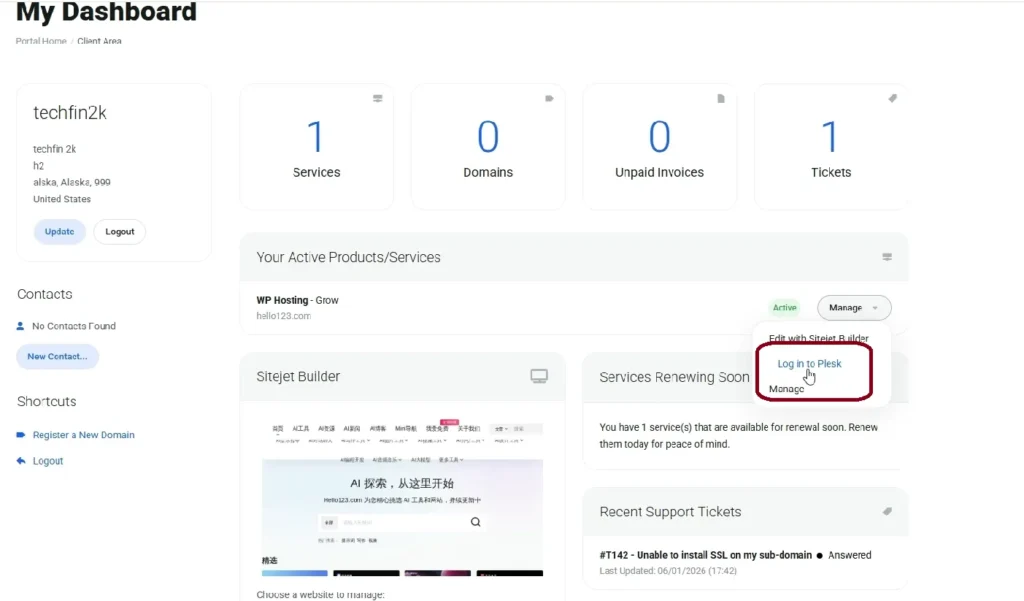
Step 1: Log in to the Client Area and Access Plesk
After logging into the Thamara client area, I accessed the Plesk control panel directly from the dashboard. The panel loaded quickly and provided immediate access to domain and WordPress management tools.
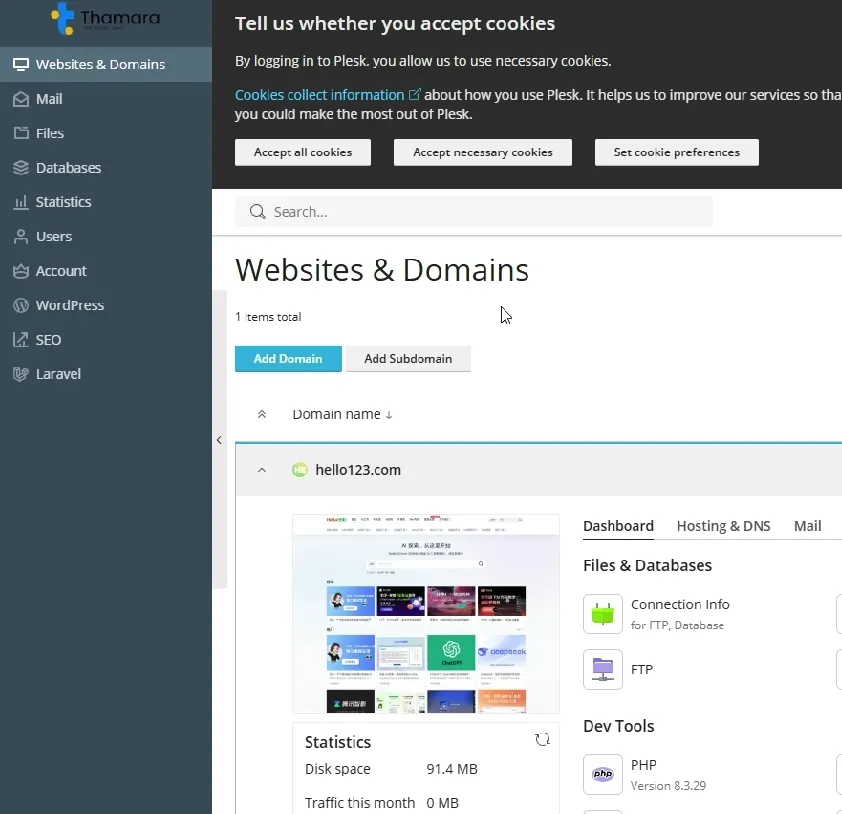
Step 2: Adding a Subdomain and Choosing WordPress in Plesk
After logging into the Plesk control panel, I initiated the setup by adding a new domain/subdomain for testing. At this stage, Plesk does not just ask for a domain name — it also asks how you want to create the website.
This makes the setup more streamlined, especially for WordPress users.
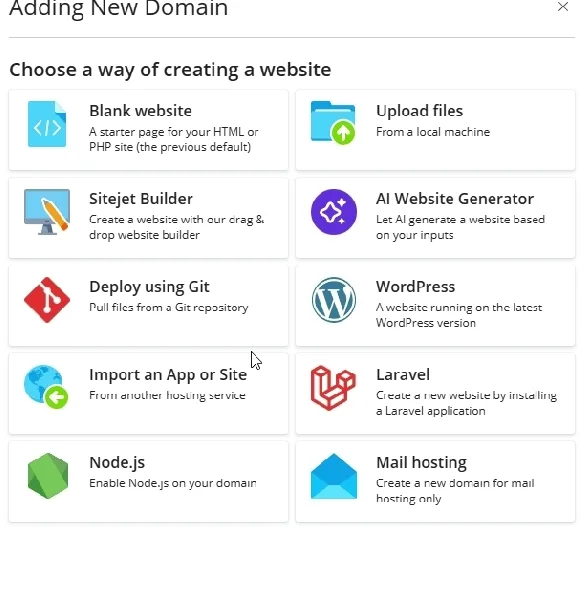
Choosing the Website Type During Domain Creation
While adding the subdomain, Plesk presented multiple options for how the website should be created, including:
- Blank website
- Upload files
- Sitejet Builder
- AI Website Generator
- Deploy using Git
- WordPress
- Laravel
- Node.js
- Mail hosting
Since this test was focused on WordPress performance, I selected the WordPress option directly at this stage.
This selection is important because it allows Plesk to automatically continue into the WordPress installation process instead of requiring a separate step later.
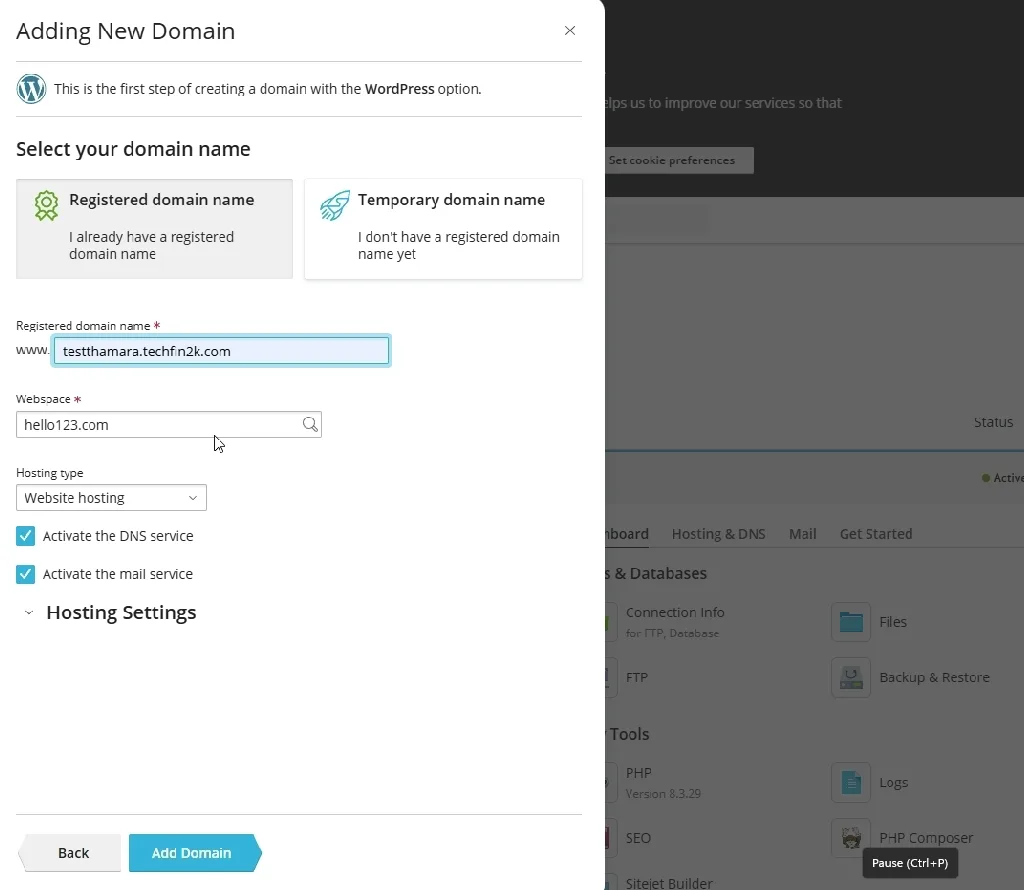
Adding the Subdomain Details
After choosing WordPress as the website type, I entered the subdomain details and confirmed the creation. The subdomain was created almost instantly.
Creating the subdomain took only a few seconds (roughly 13–18 seconds), and there was no delay before proceeding to WordPress installation.
Step 3: Installing WordPress (Automatically Triggered)
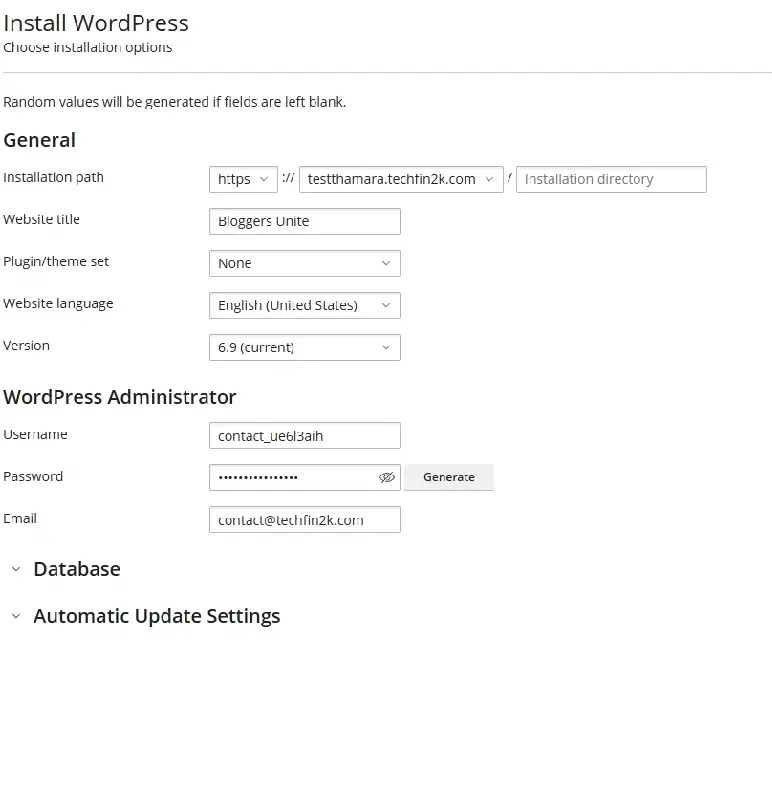
Because WordPress was selected during domain creation, Plesk immediately redirected me to the WordPress installation screen without requiring any additional navigation.
On this screen, I configured:
- Website title
- WordPress version (latest stable)
- Admin username and password
- Admin email address
Database creation and file setup were handled automatically by Plesk.
Installation Completion
After submitting the installation form, WordPress was installed successfully in under one minute. The site became immediately accessible, and the WordPress Toolkit detected the installation correctly.
At this point:
- WordPress was live on the subdomain
- No manual database or file configuration was needed
- The site was ready for SSL activation and testing
With WordPress installed through Plesk’s guided flow, the next step was to enable SSL and establish a clean baseline for performance testing.
Step 4: SSL/TLS Setup – From Warning to Secure Site
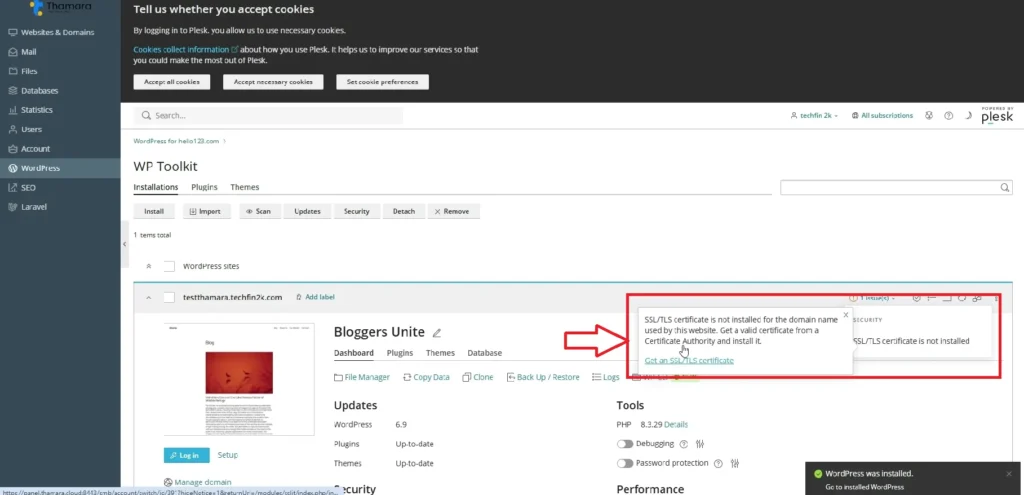
Immediately after WordPress installation, the WordPress Toolkit in Plesk displayed a notification indicating that SSL/TLS was not yet enabled for the newly created subdomain.
Rather than silently ignoring this, Plesk highlights the issue clearly and provides a direct option to resolve it.
Initial SSL Warning in WordPress Toolkit
Inside the WordPress Toolkit dashboard, an alert was shown stating that the site was not secured with SSL/TLS. Clicking the warning opened the SSL configuration flow directly.
This approach is helpful because:
- It prevents running WordPress on HTTP unintentionally
- It guides users toward securing the site early
- It avoids the need to hunt through server settings
Choosing an SSL Certificate Type
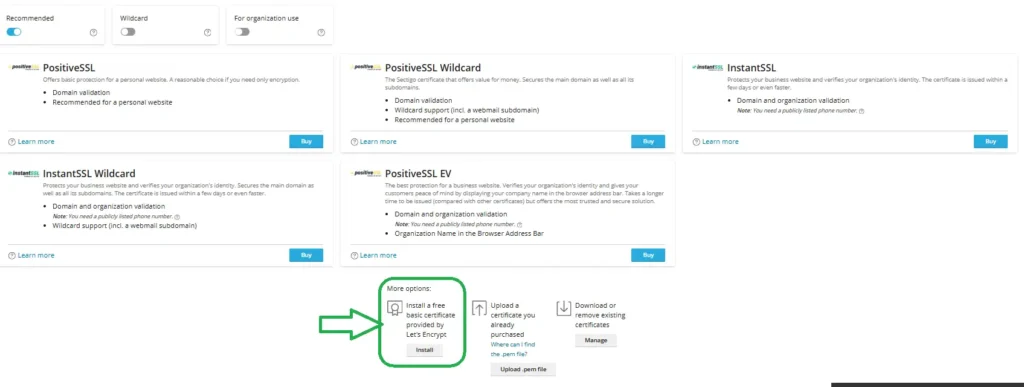
After clicking the option to resolve the SSL issue, Plesk redirected me to the SSL/TLS certificate selection screen.
Here, multiple certificate options were displayed, including:
- PositiveSSL (paid)
- PositiveSSL Wildcardv(paid)
- InstantSSL (paid)
- InstantSSL Wildcard (paid)
- PositiveSSL EV (paid)
- Basic Let’s Encrypt (Free)
Most of the options shown are paid certificates, which may initially feel confusing to new users. However, Plesk clearly includes a free Let’s Encrypt SSL option at the bottom.
For standard WordPress and WooCommerce websites, this basic Let’s Encrypt SSL is more than sufficient. It provides:
- Full HTTPS encryption
- Browser trust
- Automatic renewals
- No additional cost
Installing the Free Let’s Encrypt SSL
I selected the Basic Let’s Encrypt SSL option and proceeded with the installation. The process was straightforward and required no manual configuration.
Once applied:
- HTTPS was enabled immediately
- WordPress Toolkit reflected the secure status
- No mixed-content issues appeared
The SSL installation completed in under a minute, and the site became accessible via HTTPS without any additional steps.
Why the Free SSL Is Enough
It’s worth clarifying this point, especially for beginners:
- You do not need a paid SSL for most WordPress sites
- Let’s Encrypt SSL provides the same encryption level for normal use
- Paid SSLs are typically needed only for:
- Large enterprises
- Extended Validation (EV) branding
- Specialized compliance requirements
For blogs, business sites, and WooCommerce stores, Let’s Encrypt is perfectly adequate.
With SSL enabled and the site fully secured, the next step was to test performance on a completely clean WordPress installation before adding plugins or content.
If you’re also using Cloudflare, proper Cloudflare DNS and SSL configuration is important to avoid SSL or validation issues during setup.
Stage 1: Blank WordPress Site Performance Test (Baseline)
Before installing any plugins or importing content, I tested Thamara’s performance on a fresh WordPress installation. This baseline test is important because it shows how the server performs without optimizations, caching plugins, or heavy themes influencing the results.
At this stage:
- Default WordPress theme was active
- No additional plugins were installed
- SSL was enabled using Let’s Encrypt
- No content or media files were added
This provides a clean reference point for understanding how performance changes as the site becomes more complex.
GTmetrix Results (Blank Site)
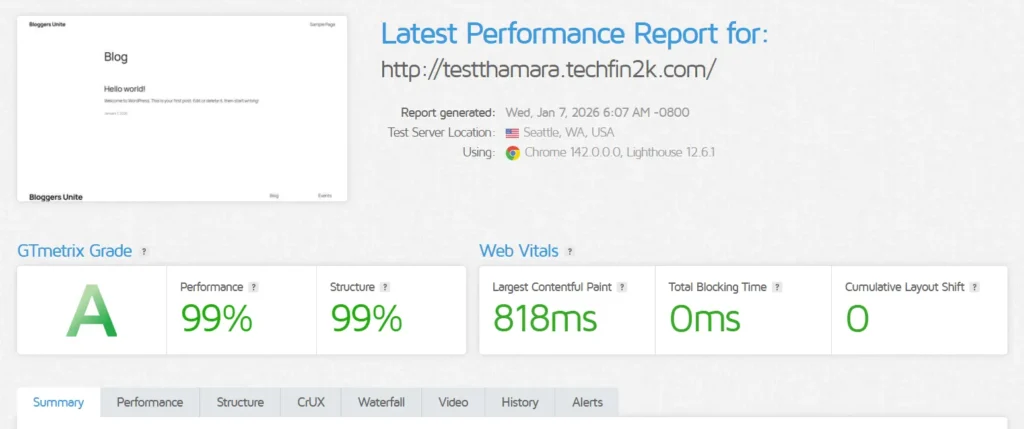
The first test was conducted using GTmetrix from a North American test location.
Key results:
- GTmetrix Grade: A
- Performance: 99%
- Structure: 99%
- Largest Contentful Paint (LCP): 818 ms
- Total Blocking Time (TBT): 0 ms
- Cumulative Layout Shift (CLS): 0
These results indicate that the server responds quickly and does not introduce layout instability or render-blocking delays on a clean setup.
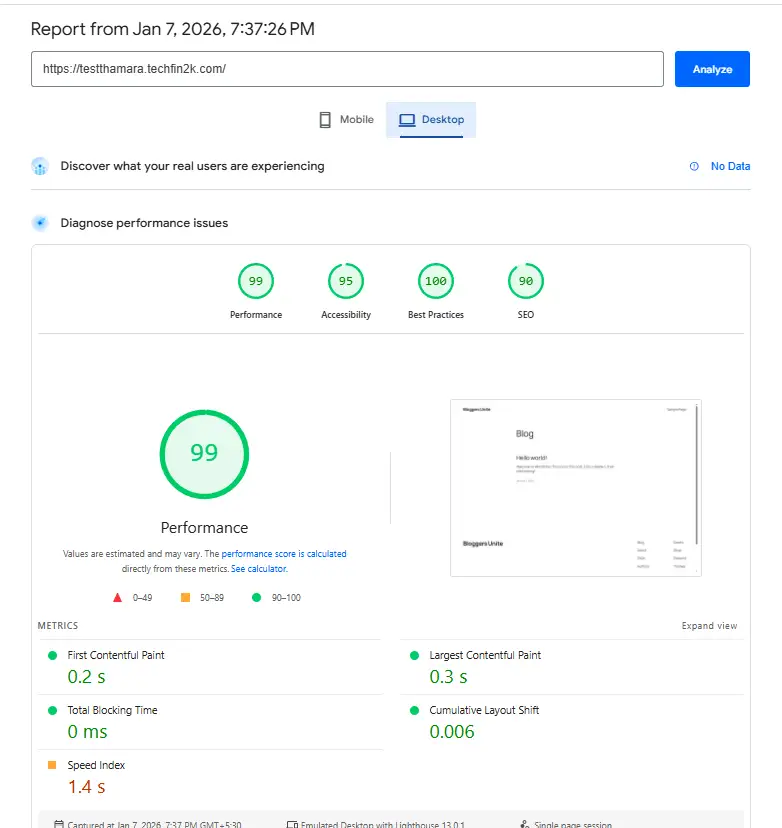
Google PageSpeed Insights – Desktop
Next, I tested the same blank site using Google PageSpeed Insights (Desktop).
Desktop metrics:
- Performance Score: 99
- First Contentful Paint (FCP): ~0.2 s
- Largest Contentful Paint (LCP): ~0.3 s
- Total Blocking Time: 0 ms
- Cumulative Layout Shift: 0.006
- Speed Index : 1.47 s
These values show that the page renders almost instantly on desktop, with no blocking scripts or layout shifts.
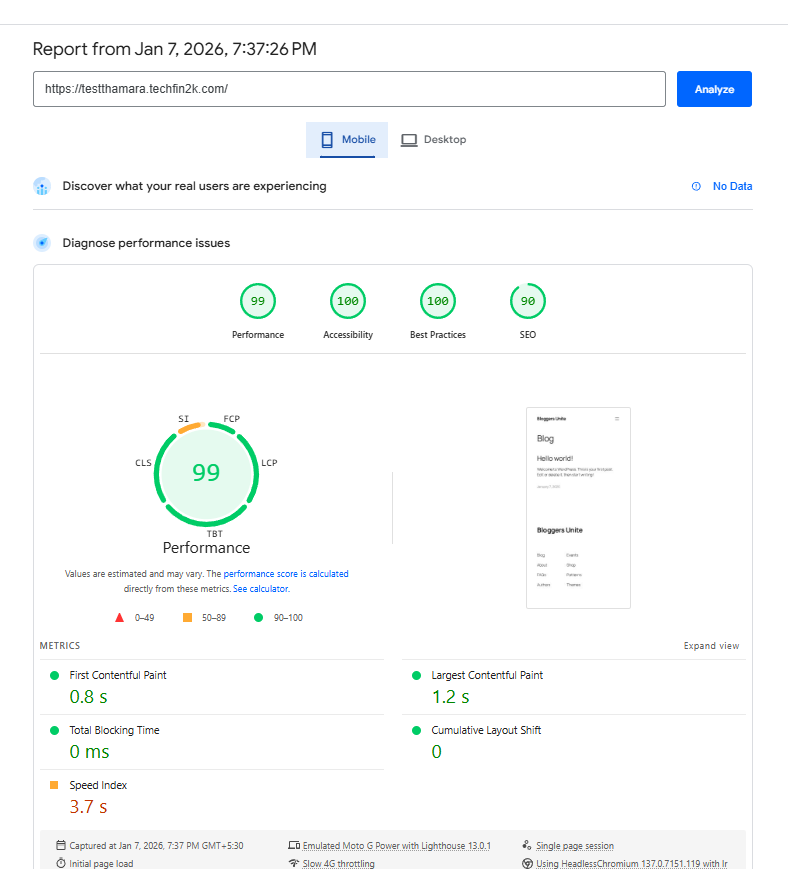
Google PageSpeed Insights – Mobile
I also tested the blank site using Google PageSpeed Insights (Mobile) to simulate real-world mobile conditions.
Mobile metrics:
- Performance Score: 99
- First Contentful Paint (FCP): ~0.8 s
- Largest Contentful Paint (LCP): ~1.2 s
- Total Blocking Time: 0 ms
- Cumulative Layout Shift: 0
- Speed Index : 3.7 s
Even under mobile throttling, the site loaded smoothly with no blocking or instability.
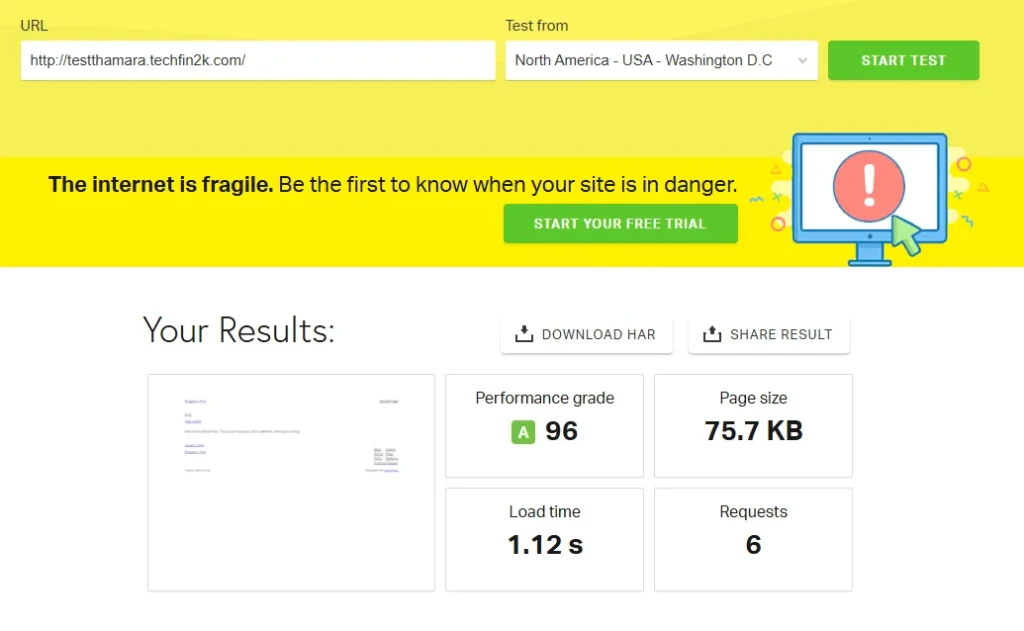
Pingdom Website Speed Test
Finally, I ran a Pingdom test to measure real-world load behavior.
Pingdom results:
- Performance Grade: A (96)
- Load Time: ~1.12 s
- Page Size: 75.7 KB
- Requests: 6
This confirms that the site remains lightweight and responsive with minimal HTTP requests.
What This Baseline Tells Us
At the blank-site level, Thamara’s infrastructure shows:
- Fast server response times
- No render-blocking issues
- Stable layout behavior
- Consistent results across multiple tools
However, a blank site alone does not reflect real usage. Most WordPress sites run multiple plugins, SEO tools, and media-heavy content.
That’s why the next stage focuses on performance under realistic conditions.
With the baseline established, the next step was to install commonly used WordPress plugins and observe how performance changes under a more realistic setup.
Stage 2: Performance Test with Commonly Used WordPress Plugins
After establishing the baseline performance on a clean WordPress installation, the next step was to test how Thamara Cloud performs under realistic conditions.
In real-world usage, WordPress sites rarely run without plugins. Most blogs and business sites use a combination of SEO, security, caching, page builder, and utility plugins.
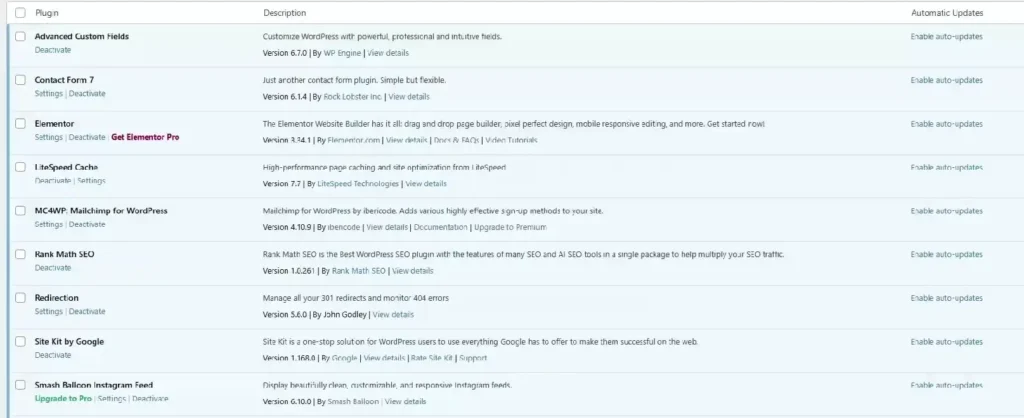
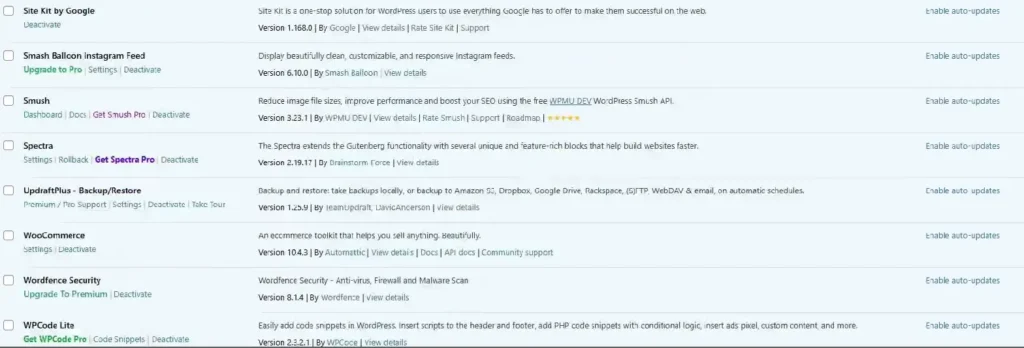
For this test, I installed a total of 15 commonly used WordPress plugins, split across two screenshots for clarity.
Plugins Installed for This Test
Instead of listing every plugin name upfront, I’ve shown the installed plugins visually below. These include tools typically used for:
- SEO and metadata management
- Performance optimization
- Security and firewall
- Forms and UI components
- Image handling and utilities
These are not lightweight demo plugins, but tools commonly found on real production WordPress sites.
Performance Results with Plugins Enabled
With all plugins activated, I repeated the same performance tests using GTmetrix, Google PageSpeed Insights, and Pingdom.
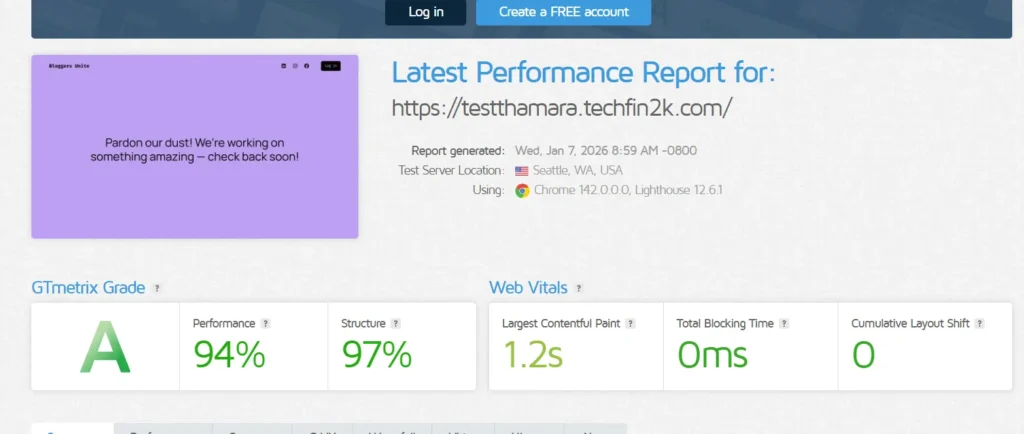
GTmetrix Results (With Plugins)
Key observations:
- GTmetrix Grade: A
- Performance: 94%
- Structure: 97%
- Largest Contentful Paint (LCP): ~1.2 s
- Total Blocking Time: 0 ms
- Cumulative Layout Shift: 0
Despite the additional plugins, the site maintained strong performance with no blocking scripts or layout instability.
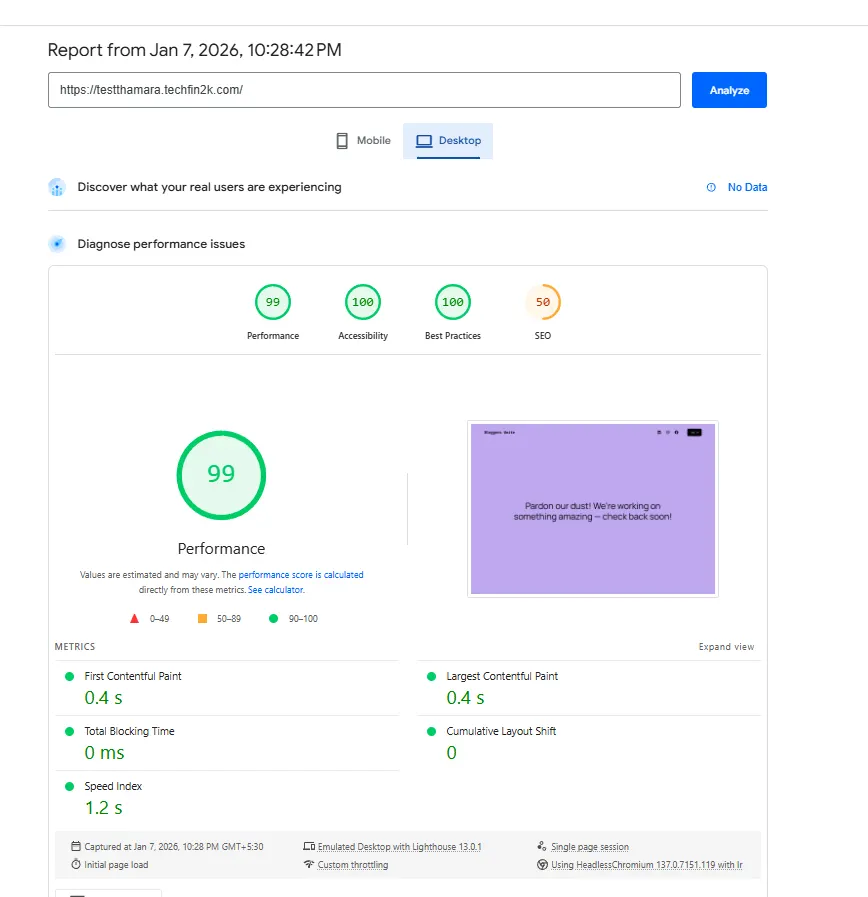
Google PageSpeed Insights – Desktop (With Plugins)
Desktop metrics:
- Performance Score: 99
- First Contentful Paint (FCP): ~0.4 s
- Largest Contentful Paint (LCP): ~0.4 s
- Total Blocking Time: 0 ms
- Cumulative Layout Shift: 0
- Speed Index: 1.2 s
The desktop results show that plugin overhead did not introduce render-blocking issues.
Important Note About the SEO Score in PageSpeed Results:
You may notice that the SEO score appears lower (around 50) in some of the PageSpeed Insights results shown above.
This is intentional and not related to Thamara’s hosting performance.
For this test environment, I enabled the WordPress setting:
“Discourage search engines from indexing this site”
This was done to:
- Prevent duplicate content issues
- Avoid affecting the SEO of my main site (foenix.techfin2k.com)
- Keep this subdomain purely as a controlled testing environment
When this setting is enabled, PageSpeed Insights flags it as an SEO issue, which automatically lowers the SEO score — even though page performance, accessibility, and best practices remain unaffected.
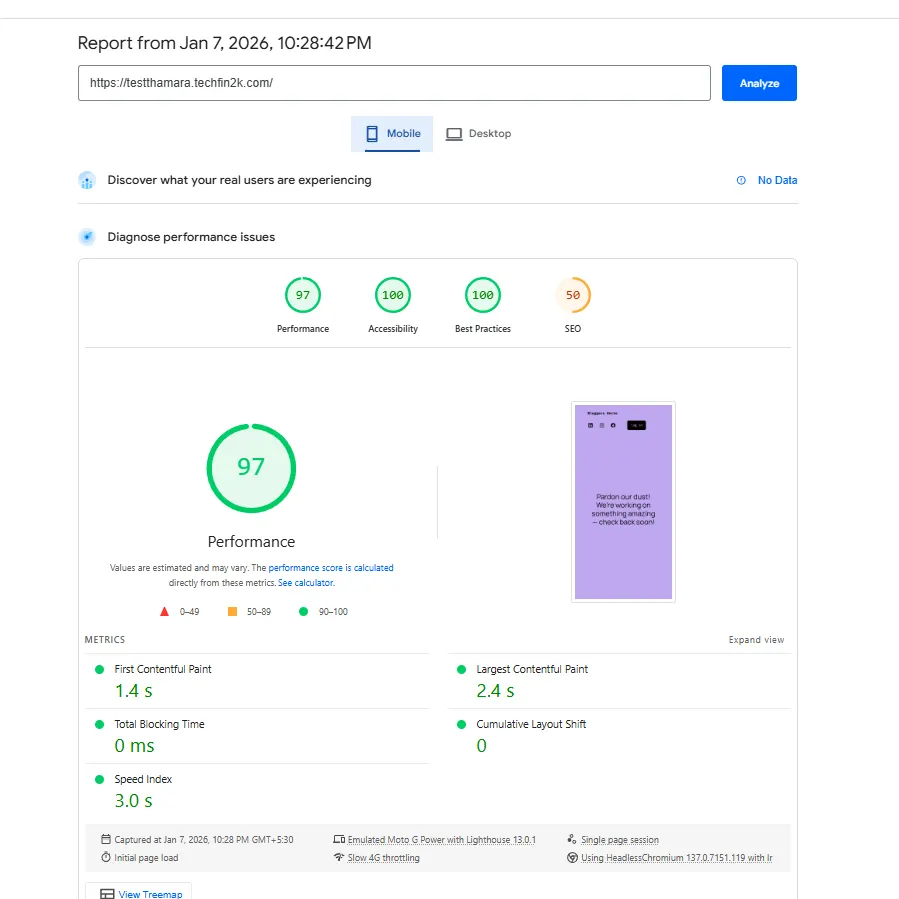
Google PageSpeed Insights – Mobile (With Plugins)
Mobile metrics:
- Performance Score: 97
- First Contentful Paint (FCP): ~1.4 s
- Largest Contentful Paint (LCP): ~2.4 s
- Total Blocking Time: 0 ms
- Cumulative Layout Shift: 0
- Speed Index: 3.0 s
As expected, mobile performance shows a slight drop compared to the blank site, but remains within healthy limits for real-world usage.
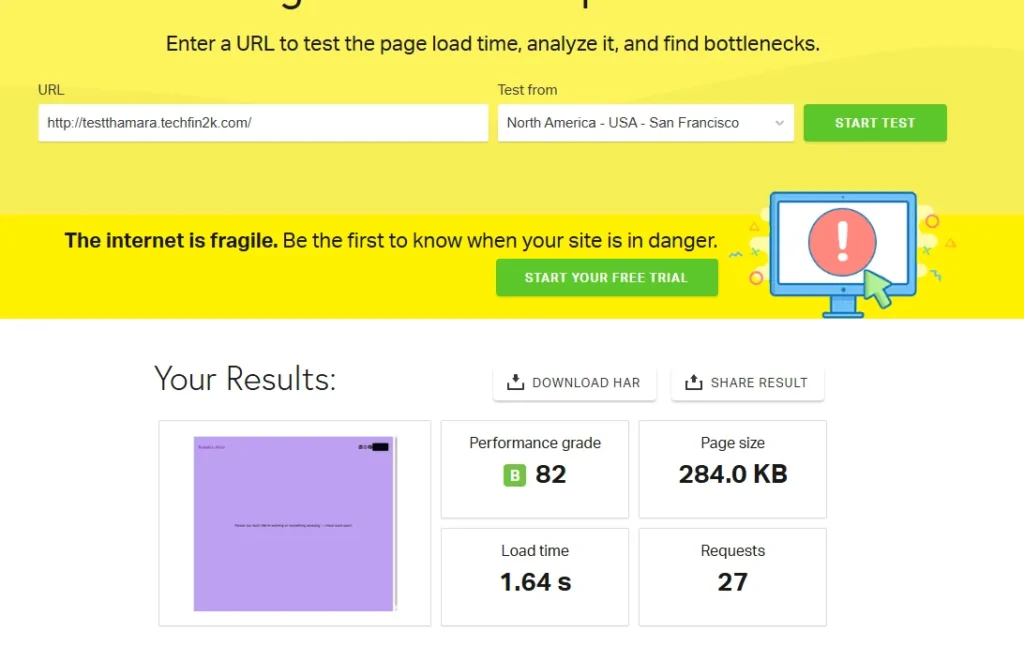
Pingdom Results (With Plugins)
Pingdom metrics:
- Performance Grade: B (82)
- Load Time: ~1.64 s
- Page Size: ~284 KB
- Requests: 27
Compared to the blank site, the increase in requests and page size is expected due to plugin assets. Even so, the overall load time remained reasonable.
What These Results Mean
At this stage, Thamara Cloud demonstrated:
- Stable performance under plugin load
- No JavaScript blocking delays
- No layout shifts
- Predictable degradation compared to a blank site
This indicates that the hosting environment can handle moderately complex WordPress setups without immediate performance bottlenecks.
With plugins installed and performance remaining stable, the final test was to introduce real content — including posts and media files — to evaluate how Thamara Cloud handles a fully loaded WordPress site.
Stage 3: Performance Test with Real Content and Media Files
To simulate a real-world usage scenario, I next introduced actual content and media into the test site.
The posts were imported using WordPress’s built-in importer, bringing in over 20 published articles from my main site. After that, all media files were transferred by downloading the uploads directory via FTP from Hostinger and uploading the same files to Thamara using FTP, preserving the original structure.
At this stage, the site contained:
- 20+ published posts
- 200+ media files (images)
- Previously installed plugins remaining active
This setup closely reflects how a typical content-driven WordPress site operates, allowing performance to be measured under realistic load rather than an empty or demo environment.
With the content and media in place, I repeated the same speed tests to evaluate how Thamara Cloud handles a fully populated WordPress site.
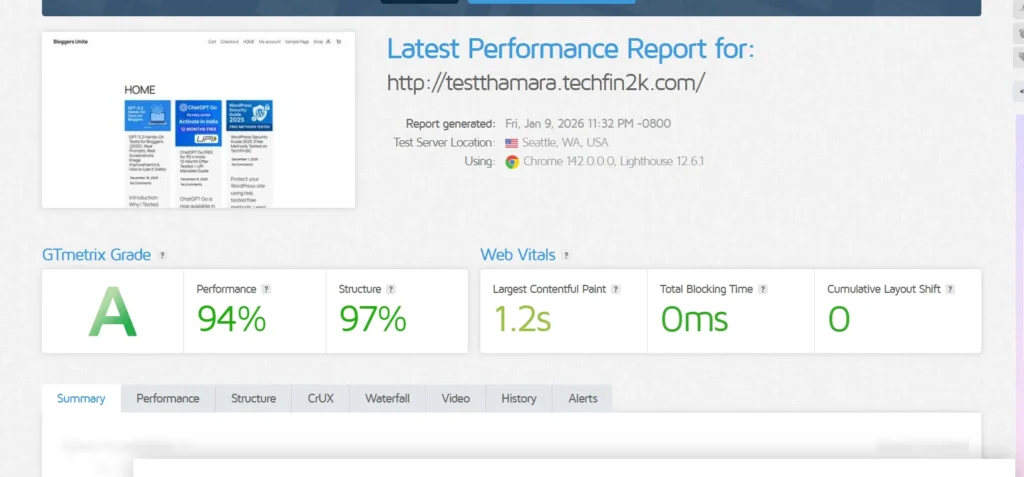
GTmetrix Results (With Content and Media)
With posts and images added, I first tested the site using GTmetrix to observe how real content impacts performance.
Observed results:
- GTmetrix Grade: A
- Performance Score: ~94%
- Structure Score: ~97%
- Largest Contentful Paint (LCP): ~1.2 s
- Total Blocking Time (TBT): 0 ms
- Cumulative Layout Shift (CLS): 0
Despite the additional content and media files, the site maintained a stable rendering profile. There were no layout shifts, no blocking JavaScript delays, and no sudden spikes in load behavior.
This indicates that Thamara Cloud handles image-heavy pages and real post layouts predictably, without introducing performance instability.
Next, I checked how the same fully loaded page performs under Google PageSpeed Insights on desktop and mobile.
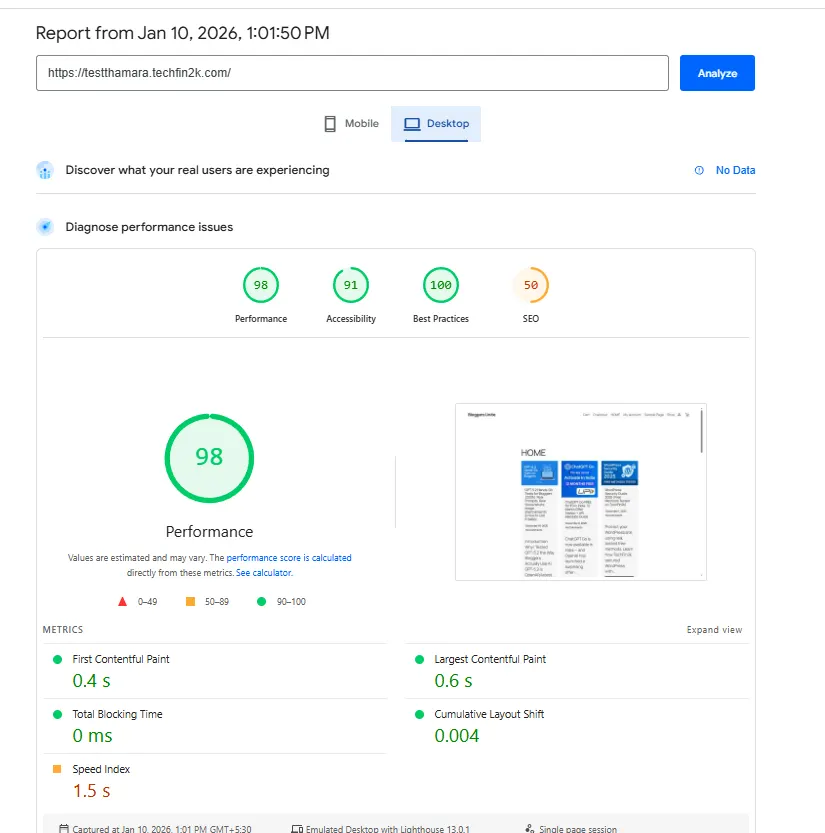
Google PageSpeed Insights – Desktop (With Content)
I then tested the same fully loaded page using Google PageSpeed Insights (Desktop).
Key metrics:
- Performance Score: 98
- First Contentful Paint (FCP): ~0.4 s
- Largest Contentful Paint (LCP): ~0.6 s
- Total Blocking Time: 0 ms
- Cumulative Layout Shift: ~0.004
- Speed Index: 1.5 s
On desktop, adding posts and images had minimal impact on render speed. The page continued to load quickly with no blocking behavior.
Google PageSpeed Insights – Mobile (With Content)
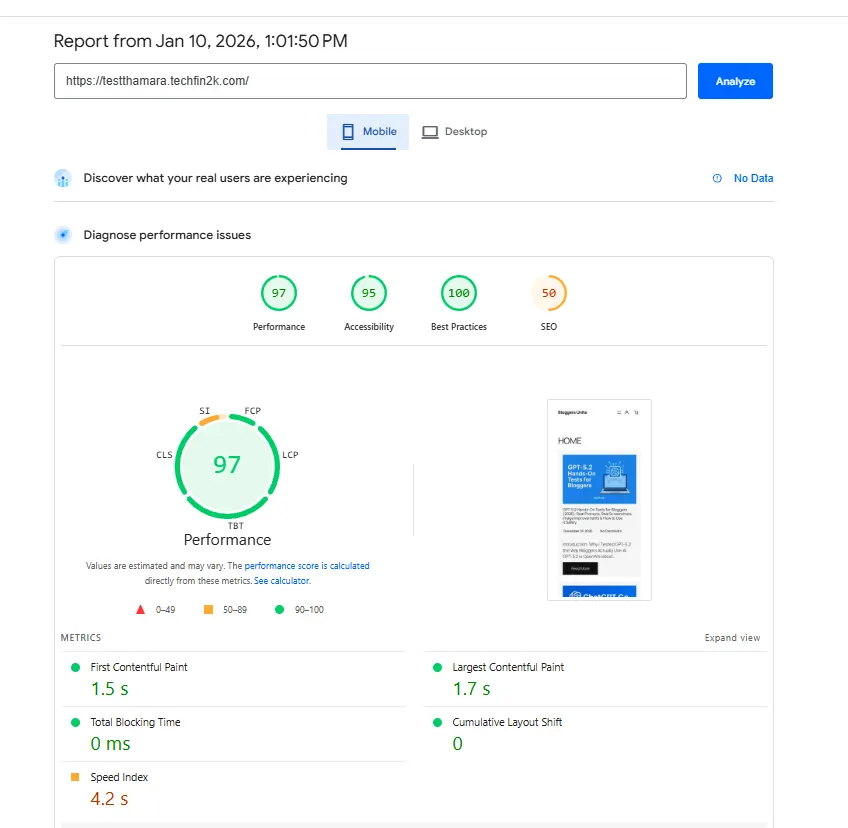
To simulate real-world user conditions, I also tested the page under mobile throttling.
Key metrics:
- Performance Score: ~97
- First Contentful Paint (FCP): ~1.5 s
- Largest Contentful Paint (LCP): ~1.7
- Total Blocking Time: 0 ms
- Cumulative Layout Shift: 0
- Speed Index: 4.2 s
As expected, mobile load times increased slightly due to image assets, but remained within healthy Core Web Vitals thresholds.
Pingdom Website Speed Test (With Content)
Finally, I ran a Pingdom test to observe real-world load behavior.
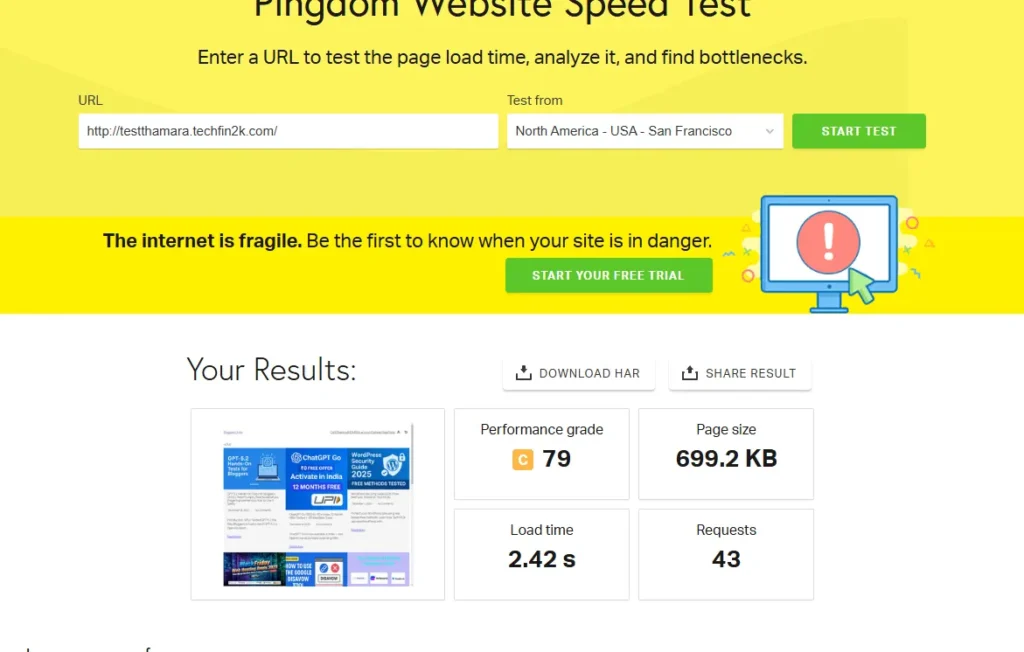
Pingdom results:
- Performance Grade: C
- Load Time: ~2.42 s
- Page Size: ~699.2 KB
- Requests: ~43
The increase in page size and requests is expected for a content-heavy homepage. Even so, overall load time remained reasonable for a fully populated WordPress site.
Thamara cloud Hosting Review: Performance Comparison Across All Tests
To make the results easy to understand, here’s a side-by-side comparison of how Thamara performed at each stage of testing — from a blank WordPress install to a fully populated site with plugins, posts, and media.
Performance Comparison Across All Test Stages
| Test Stage | Setup | GTmetrix | PageSpeed (Desktop) | PageSpeed (Mobile) | Pingdom Load Time | Stability |
|---|---|---|---|---|---|---|
| Stage 1: Blank Site | Fresh WordPress install | A (99%) | 99 | 99 | ~1.1 s | Excellent |
| Stage 2: With Plugins | 15+ common plugins | A (94%) | 99 | 97 | ~1.6 s | Very Stable |
| Stage 3: With Content | Posts + 200+ images | A (94%) | 98–99 | ~97 | ~2.4 s | Stable |
Performance naturally changes as plugins and content are added. The key takeaway is consistency and stability — not identical scores across all stages.
Overall Performance Verdict
Based on all three test stages, Thamara performs consistently and predictably for WordPress hosting.
Here’s what stood out:
- The blank site results were excellent, showing strong server fundamentals
- Adding 15+ real-world plugins caused only minor, expected impact
- Even with real posts and 200+ images, performance remained stable
- No layout shifts, no blocking scripts, and no sudden speed drops were observed
- Mobile performance degraded slightly (as expected) but stayed within healthy limits
In short:
Thamara doesn’t rely on “empty demo results.” It holds up when the site starts looking like a real blog.
Who This Hosting Is a Good Fit For
Thamara is well-suited for:
- Bloggers and content creators
- WordPress and WooCommerce sites
- Users who want managed WordPress without server maintenance
- Sites that grow gradually in plugins and content
It is not positioned as a raw cloud VPS, but rather as managed WordPress hosting — and the performance results align with that positioning.
If you’re looking for managed WordPress or WooCommerce hosting that remains stable as your site grows — instead of relying only on impressive empty-site benchmarks — Thamara is worth evaluating based on the real-world results shared above.
👉 Check Thamara Hosting PlansUser Interface, Control Panel & Key Features
All site management on Thamara Cloud is handled through the Plesk control panel, which serves as a central interface for WordPress management, security, backups, email, and server-level configuration.
Rather than spreading controls across multiple dashboards, Thamara keeps most day-to-day tasks accessible from one place. This reduces complexity, especially for users managing more than one WordPress site.
Control Panel Experience (Plesk)
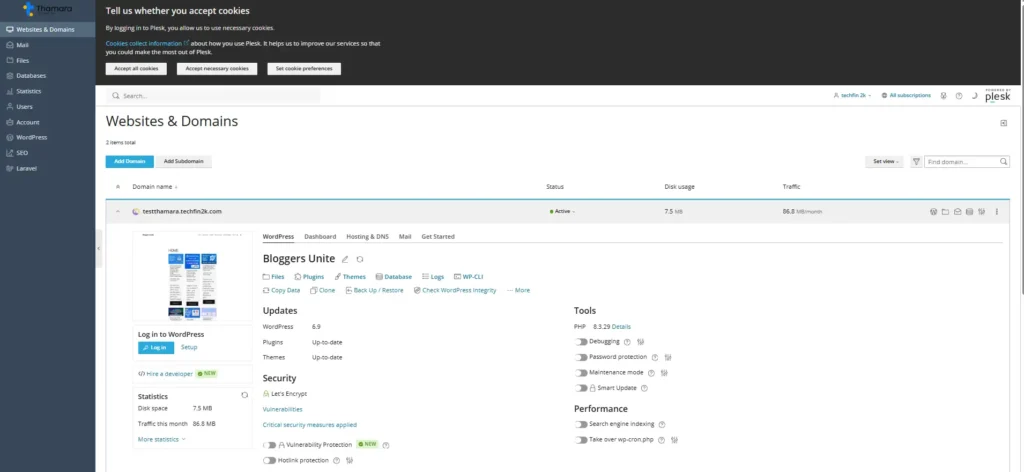
From hands-on usage, the Plesk interface feels structured and purpose-built, particularly for WordPress users.
Key observations:
- Clear separation between websites, WordPress installs, and server tools
- Logical navigation without unnecessary clutter
- Responsive UI with no noticeable lag during routine actions
- Common tasks require fewer clicks compared to traditional shared hosting panels
For users familiar only with cPanel, the layout may feel different at first. However, after a short adjustment period, workflows such as site management and maintenance become straightforward.
WordPress Toolkit (Core Management Layer)
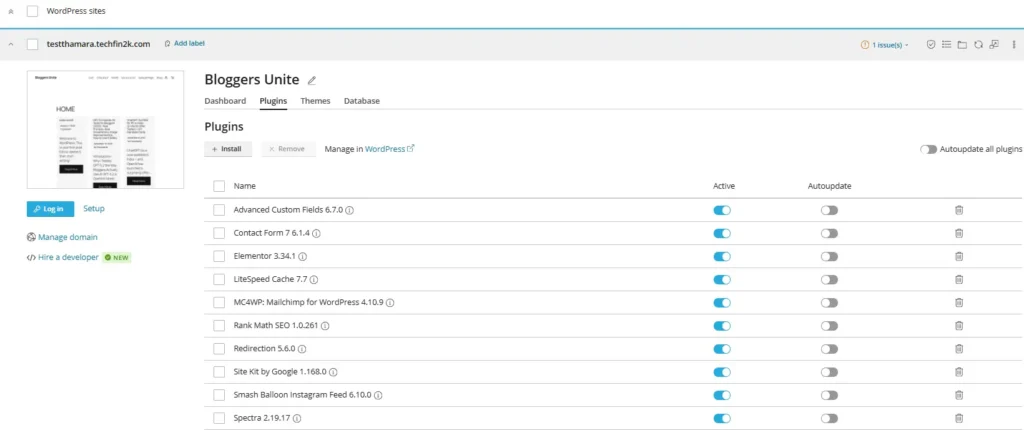
One of the most practical features in Thamara’s UI is the WordPress Toolkit, which allows WordPress sites to be managed directly from the control panel without logging into wp-admin.
From the panel, it is possible to:
- Install or remove WordPress
- Enable or disable plugins and themes
- Update WordPress core safely
- Check site security and SSL status
- Access the WordPress admin instantly
This is particularly useful when managing multiple sites or when WordPress admin access is temporarily unavailable.
Email Creation & Management

Thamara also includes email hosting and mailbox management directly within the control panel.
From the Plesk interface, you can:
- Create and manage email accounts
- Assign mailbox limits based on the plan
- Configure domain-based email without external services
This is helpful for users who want professional email addresses tied to their domain without relying on third-party providers.
Security & Protection (Including Imunify360)
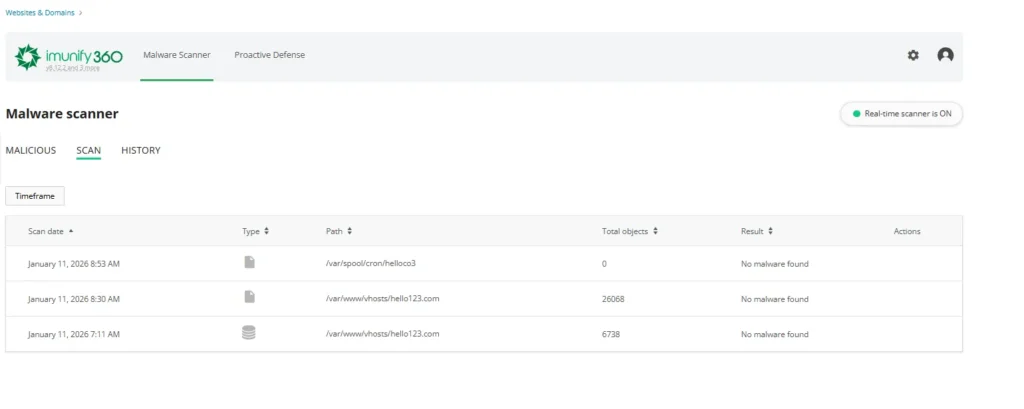
Security is largely handled at the platform level, reducing the need for multiple security plugins.
Thamara’s security stack includes:
- Imunify360 for malware scanning and threat protection
- Web Application Firewall (WAF)
- Enhanced DDoS protection
- Secure access manager
- Free SSL certificates (Let’s Encrypt)
Imunify360 adds an extra layer of protection by monitoring files and activity for potential threats, helping maintain site integrity without manual intervention.
Backups & Restore Options
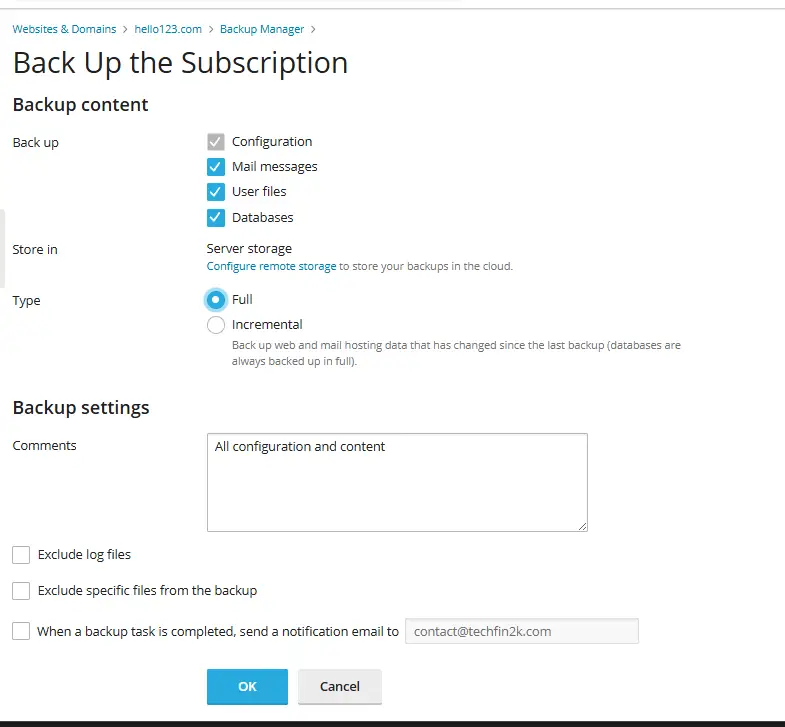
Backup management is built into the control panel rather than being handled only at the plugin level.
From the UI, you can:
- Create on-demand backups
- View backup size and timestamps
- Rely on daily automatic backups (plan-dependent)
This provides a safety net before updates or configuration changes and reduces dependency on third-party backup plugins.
File Manager, DNS & Domain Controls
The control panel also includes:
- A built-in file manager for quick edits and uploads
- DNS management without requiring external services
- Domain and subdomain management from a single interface
These features make it easier to manage site structure and infrastructure without advanced technical knowledge.
Developer & Advanced Tools
For users who need more flexibility, Thamara includes several developer-oriented tools that remain optional:
- SSH access
- Git version control support
- Multiple PHP versions
- Cron job management
- Unlimited FTP accounts
- Database creation and management
These tools are available when needed but do not interfere with basic WordPress workflows.
Who This Interface Is Best Suited For
Based on hands-on use, this control panel is best suited for:
- WordPress and WooCommerce site owners
- Bloggers and content creators
- Users managing multiple sites or subdomains
- Those who prefer managed hosting without server-level complexity
It is not positioned as a raw VPS interface, which aligns with Thamara’s managed WordPress focus.
With the control panel, security, and management features covered, the next step is to look at Thamara’s pricing structure — including long-term plans, renewals, and lifetime options.
Pricing Overview
Thamara offers managed WordPress and WooCommerce hosting across three tiers — Startup, Grow, and Scale — plus a newly introduced VPS line for users who need full server control.
Pricing favors longer commitments (higher discounts on yearly/2-year terms). Below is a simplified breakdown focused on what matters most: billing term, core resource limits, renewal clarity, and the availability (or absence) of lifetime deals.
WordPress & WooCommerce Hosting Pricing (1-Year, 2-Year & 3-Year Plans)
Thamara offers managed WordPress hosting with flexible billing terms.
Longer plans include additional free years, reducing the effective monthly cost, while renewal prices remain transparent.
Important clarification: Thamara’s WooCommerce hosting uses the same infrastructure and pricing as its managed WordPress plans. Because WooCommerce is a WordPress-based platform, there is no separate pricing table — the plans below apply equally to blogs, business sites, and online stores.
📌 Startup
1 Year Plan +3 MONTHS FREE $2.87/mo With 10% Off Coupon Renews at $10.49/mo
2 Year Plan +1 YEAR FREE $2.09/mo With 10% Off Coupon Renews at $10.49/mo
3 Year Plan +2 YEARS FREE $1.61/mo With 10% Off Coupon Renews at $10.49/mo Reveal & Copy Coupon | MOST POPULAR 🚀 Grow
1 Year Plan +3 MONTHS FREE $3.59/mo With 10% Off Coupon Renews at $14.49/mo
2 Year Plan +1 YEAR FREE $2.69/mo With 10% Off Coupon Renews at $14.49/mo
3 Year Plan +2 YEARS FREE $2.15/mo With 10% Off Coupon Renews at $14.49/mo Reveal & Copy Coupon | 📈 Scale
1 Year Plan +3 MONTHS FREE $8.09/mo With 10% Off Coupon Renews at $24.49/mo
2 Year Plan +1 YEAR FREE $5.09/mo With 10% Off Coupon Renews at $24.49/mo
3 Year Plan +2 YEARS FREE $4.31/mo With 10% Off Coupon Renews at $24.49/mo Reveal & Copy Coupon |
- Free domain for the first year
- Free professional email accounts
- Premium SEO toolkit
- Unlimited subdomains
- 30-day money-back guarantee
Note: Prices shown above were accurate at the time of testing and may change over time. For the latest pricing and current offers, please check the official Thamara plans page below.
Lifetime Hosting Plans (WordPress & WooCommerce)
Thamara also offers Lifetime hosting plans for both WordPress and WooCommerce, where you pay once upfront instead of recurring monthly or yearly fees.
In this context, “Lifetime” means the hosting remains active for as long as Thamara continues to operate and provide the service.
💎 Lifetime Plans (One-Time Payment)
Pay once. No monthly bills. Hosting for the life of the service.
Startup Lifetime Regular: US$ 498
US$ 199.20PRICE AFTER 60% DISCOUNT
One-time payment RENEWAL: NO RENEWALS Reveal Coupon & Copy | MOST POPULAR Grow Lifetime Regular: US$ 598
US$ 239.20PRICE AFTER 60% DISCOUNT
One-time payment RENEWAL: NO RENEWALS Reveal Coupon & Copy | Scale Lifetime Regular: US$ 798
US$ 319.20PRICE AFTER 60% DISCOUNT
One-time payment RENEWAL: NO RENEWALS Reveal Coupon & Copy |
Customers on a Startup Lifetime plan can upgrade to Grow, and Grow can be upgraded to Scale, by paying the difference between the plans at the time of upgrade. Please read the section who is thamara before purchasing any life time plan
Important Notes About Lifetime Plans
- The discounted prices shown above reflect an active 60% Lifetime promotion with coupon
- No recurring monthly or yearly renewal fees apply
- Includes the same managed environment, security, and support as subscription plans
- There is no upgrade path to VPS or dedicated servers later
- Best suited for long-term, stable websites
Transparency Disclaimer
Lifetime pricing and discounts are based on the offers available at the time of testing.
Pricing, coupons, or availability may change in the future.
VPS Pricing
Thamara’s VPS plans are designed for developers, agencies, and sites that need dedicated CPU/RAM and full server control. Unlike the managed WordPress plans, VPS does not offer lifetime deals—all VPS billing is recurring with introductory discounts and standard renewal rates.
| VPS Plan | vCPU / RAM | Storage | Bandwidth | Best price (yearly*) | Renewal |
|---|---|---|---|---|---|
| Standard | 2 / 4 GB | 40 GB NVMe | 20 TB | US$ 6.49/mo* | US$ 13.99/mo |
| Plus | 4 / 8 GB | 80 GB NVMe | 20 TB | US$ 10.99/mo* | US$ 16.99/mo |
| Pro | 8 / 16 GB | 160 GB NVMe | 20 TB | US$ 17.99/mo* | US$ 36.99/mo |
| Ultra | 16 / 32 GB | 320 GB NVMe | 20 TB | US$ 35.99/mo* | US$ 66.99/mo |
Note: Pricing as of February 12, 2026. Monthly billing starts at US$ 8.99/mo (Standard), but yearly billing offers better value. 2-year terms have slightly lower intro rates (e.g., Standard at US$ 5.99/mo, renewing at US$ 11.99/mo). All plans include IPv4, NVMe storage, 20 TB bandwidth, and a 30-day money-back guarantee. Renewal rates are higher than intro pricing—see the “Renewal” column above.
Customer Support Experience (AI + Live Technical Team)
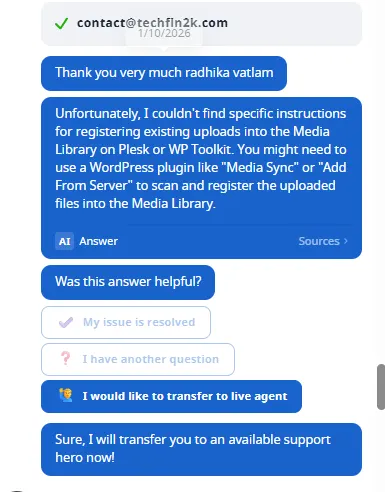
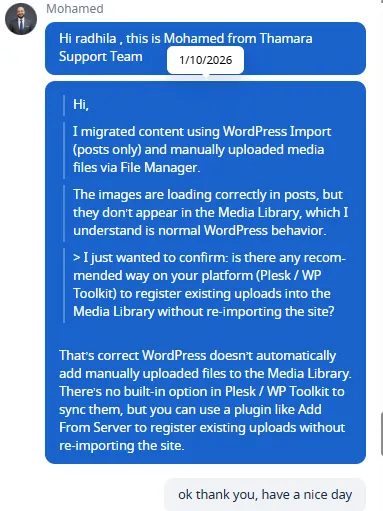
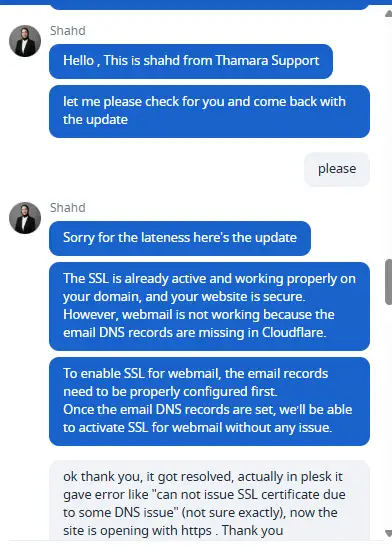
During testing, I interacted with Thamara’s support team multiple times for technical, account, and platform-related queries. The support system combines AI-assisted responses with the ability to escalate to live agents when deeper verification is required.
How the Support Flow Works
- Initial response via ThamaraAI
- Instant replies for common technical and configuration questions
- Helpful for DNS checks, SSL errors, CMS installation guidance, and general platform usage
- Escalation to Live Support Agent
- If clarification or verification is needed, the AI offers an option to transfer the conversation
- Live agents joined the chat without requiring ticket creation or repeated explanations
- Ticketing & follow-up (when required)
- Most issues were resolved directly within the live chat, without the need to create a separate support ticket.
- For cases that required backend verification, the conversation effectively continued as a tracked support case, and the support team followed up with a clear confirmation once the issue was resolved.
Technical Accuracy & Transparency
One notable aspect during testing was that live agents did not overpromise.
For example:
- When asked about installing Joomla or Drupal, the AI initially explained that manual installation was possible.
- A live agent later clarified the actual package limitation:
only WordPress, Sitejet Builder, and Laravel are officially supported, while other CMS platforms can be uploaded manually without native installers.
This correction demonstrates honest communication, rather than marketing-driven responses.
Issue Resolution Examples
SSL Certificate Issue
- An SSL issuance error was reported via Plesk (“Authorization for the domain failed”)
- The AI provided structured diagnostic steps (DNS, firewall, Cloudflare proxy)
- A live agent verified the setup and identified missing email-related DNS records
- SSL was confirmed active on the website, with guidance provided for webmail SSL activation
WordPress Media Library Clarification
- After importing posts and uploading images manually via File Manager, images did not appear in the Media Library
- Support clearly explained that this is standard WordPress behavior
- No misleading workaround was suggested
- A plugin-based solution (“Add From Server”) was recommended as the practical option
Response Time Observations
- AI responses: instant
- Live agent response (normal hours): under 30 seconds
- Live agent response (off-hours): approximately 1–2 minutes
Support Tone & Professionalism
- Communication remained polite, clear, and non-scripted
- Agents followed up to confirm resolution
- No pressure to upsell during support conversations
- Post-resolution feedback was optional, not forced
Overall, the support experience felt practical and technically aware, rather than purely customer-service-driven.
Uptime Monitoring (30-Day Observed Stability)
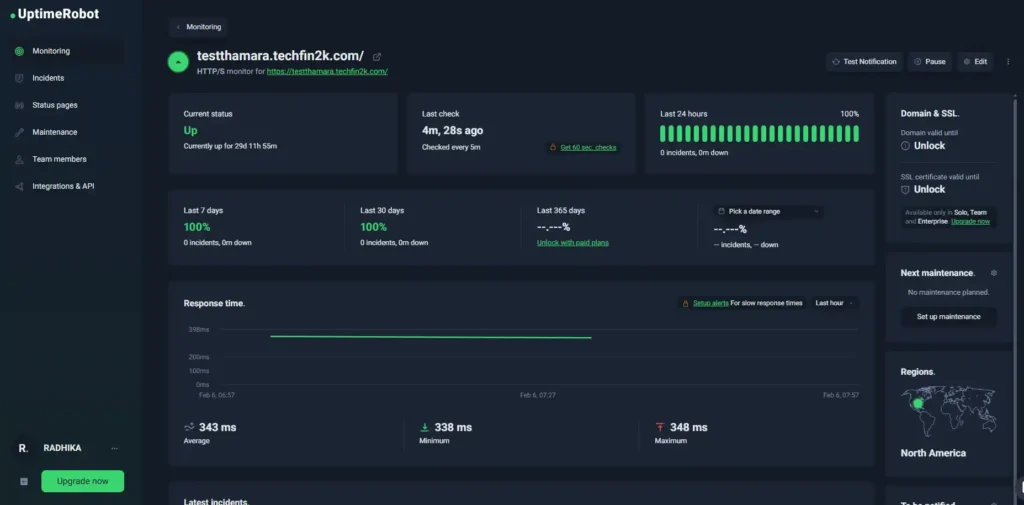
To evaluate reliability beyond short-term speed tests, I monitored Thamara Cloud using UptimeRobot with a 5-minute check interval.
During the monitoring window, the test site remained continuously online with no recorded downtime incidents.
The monitoring tool also recorded how quickly the server responded to each check:
- Average response time: 343 ms
- Minimum response time: 338 ms
- Maximum response time: 348 ms
The narrow variation range indicates consistent backend performance without noticeable load spikes during normal operation.
This monitoring used the same real-world environment as all performance and plugin tests, so the results reflect practical usage conditions rather than an idle or synthetic benchmark setup.
Pros and Cons
| Pros | Cons |
|---|---|
| +Excellent real-world performance under load | −Renewal prices increase significantly after initial term |
| +100% uptime during 30-day monitoring period (0 incidents) | −Limited server-level control on managed WordPress plans |
| +Managed hosting with LiteSpeed acceleration | −Relatively new hosting brand (long-term track record still building) |
| +Clean, beginner-friendly Plesk control panel | −Lifetime plans only last as long as Thamara remains operational |
| +Free SSL, domain, and premium SEO toolkit included | |
| +Comprehensive built-in security stack (Imunify360) | |
| +Fast support with AI + live agent fallback | |
| +Managed VPS option now available for users needing dedicated resources |
Final verdict — should you choose Thamara Cloud?
Based on 13+ days of hands-on testing, real content migration, approximately 30 days of uptime monitoring, and multiple support interactions, Thamara Cloud has evolved into a dual-purpose hosting provider: managed WordPress/WooCommerce hosting with optional lifetime pricing, and managed VPS hosting for users who need dedicated resources and server control.
The core value proposition remains stability, real-world performance, and reduced maintenance burden—not raw DIY infrastructure or enterprise-scale cloud platforms.
What Thamara Cloud Does Well
Proven uptime and performance: Zero downtime incidents during 30 days of continuous monitoring, with stable speed across blank installs, plugin-heavy setups, and 200+ media files.
Comprehensive managed experience: LiteSpeed acceleration, SSL automation, Imunify360 security, backups, and email management—all integrated and accessible through Plesk without manual server configuration.
Transparent pricing structure: Long-term WordPress plans (including lifetime options) offer strong value when you commit upfront; renewal rates are clearly shown, not buried in fine print. VPS plans follow standard recurring billing with no lifetime offers.
Reliable support: AI-assisted triage for common issues with consistent escalation to knowledgeable live agents who verify problems and deliver accurate solutions.
Flexibility for growth: With the addition of managed VPS hosting, users can now scale beyond shared WordPress plans if their sites outgrow managed environments or need full server access.
Where Thamara Cloud Has Limitations
Relatively new brand: While backed by Affsquare, Thamara Cloud is still building its long-term track record—lifetime deals carry the inherent risk that they only last as long as the company operates.
Renewal price increases: Like most hosting providers, introductory discounts are substantial, but renewal rates increase significantly after the initial term ends.
Limited advanced control on WordPress plans: Managed WordPress hosting prioritizes ease of use over granular server tuning—users needing custom PHP configurations or advanced server tweaks should consider the VPS tier instead.
Who Should Choose Thamara Cloud
WordPress/WooCommerce site owners who want hands-off hosting with strong performance, built-in caching, security, and no server management headaches.
Bloggers and affiliate marketers seeking lifetime hosting deals to eliminate recurring costs (understanding the business continuity risk).
Developers and agencies managing multiple WordPress client sites who value Plesk’s streamlined workflow over cPanel.
Growing projects that may eventually need VPS resources—Thamara now offers a clear upgrade path with managed VPS plans.
Who Should Look Elsewhere
Users requiring bare-metal dedicated servers or fully unmanaged VPS environments with zero provider oversight.
Projects needing custom application stacks beyond WordPress, WooCommerce, and standard PHP environments.
Buyers seeking the absolute lowest entry price regardless of features—budget hosts with $1/month intro rates exist, but rarely match Thamara’s managed feature set or performance consistency.
Bottom Line
Thamara Cloud delivers on its managed WordPress hosting promise with documented performance, genuine uptime stability, and a well-integrated control panel experience. The addition of VPS hosting expands its audience beyond traditional managed WordPress users.
If you value predictable performance, reduced maintenance, and transparent pricing over ultra-cheap hosting or full DIY server control, Thamara Cloud is worth serious consideration—especially if you’re planning a multi-year commitment or considering lifetime plans.
For short-term projects or users uncomfortable with a newer hosting brand, traditional established providers may offer more reassurance, even if they lack some of Thamara’s managed conveniences.
If you’re still comparing, you can also explore other affordable hosting options I’ve tested before making a final decision.
Ready to Test Thamara for Your Own Website?
If you’re looking for managed WordPress or WooCommerce hosting that stays fast even after plugins, content, and media are added — Thamara is worth trying based on the real test results shared in this review.
👉 View Thamara Hosting Plans 30-day money-back guarantee • Free SSL • Managed WordPress & WooCommerceFrequently Asked Questions (FAQs)
What type of hosting is Thamara Cloud?
Thamara Cloud provides managed WordPress and WooCommerce hosting, plus managed VPS hosting for users who need dedicated resources and server control. The WordPress/WooCommerce plans are fully managed, handling performance optimization, security, backups, and updates automatically. VPS plans offer more control but follow standard recurring billing (no lifetime options).
Is Thamara suitable for WooCommerce stores?
Yes. WooCommerce runs on WordPress, and Thamara uses the same optimized LiteSpeed stack for both. The plans, pricing, and renewal terms apply equally to WordPress blogs and WooCommerce stores, with store-ready features and security already enabled.
Does Thamara use cPanel?
No. Thamara uses Plesk, which offers a modern interface for managing WordPress installations, domains, DNS, SSL certificates, email accounts, backups, and PHP versions. During testing, most common tasks were accessible directly from Plesk without needing to log into the WordPress dashboard.
Can I install CMS platforms other than WordPress?
WordPress, Sitejet Builder, Laravel, and Node.js are supported with built-in installers. Other CMS platforms (such as Joomla or Drupal) can be manually uploaded if you have the files, but there are no native one-click installers for them on this platform.
Is a free SSL certificate included?
Yes. A free Let’s Encrypt SSL certificate is included with all plans. SSL can be issued directly from Plesk’s WordPress Toolkit. During testing, SSL activation required correct DNS records (especially for email/webmail subdomains), after which HTTPS worked immediately.
Are email accounts included?
Yes. All plans include professional email hosting, with mailbox limits depending on the selected tier. Email accounts, forwarders, and DNS records are managed directly from Plesk.
How reliable is Thamara’s performance under real load?
In real-world testing—from a blank install through 15+ plugins, 20+ posts, and 222 media files—page speed and Core Web Vitals remained consistently strong. Additionally, 30 days of continuous uptime monitoring with UptimeRobot showed zero downtime incidents and stable response times averaging around 343 ms.
How does customer support work?
Support begins with AI-based assistance for instant replies on common questions, with seamless escalation to live agents when verification or backend investigation is required. During testing, most issues were resolved directly in chat without needing to open a separate ticket system.
Is there a VPS or dedicated server upgrade path?
Yes. Thamara now offers managed VPS hosting as a separate product line, so users can upgrade from managed WordPress plans to VPS if they need dedicated CPU/RAM or root-level server access. However, Thamara does not provide bare-metal dedicated servers or fully unmanaged VPS environments.
Do the lifetime plans really have no renewals?
Yes. Lifetime WordPress/WooCommerce plans require only a one-time payment, with no monthly or yearly renewal fees. “Lifetime” refers to the operational lifespan of the service as long as Thamara continues to provide hosting. VPS plans do not offer lifetime pricing and follow standard recurring billing.
Can I upgrade a lifetime plan later?
Yes. Customers can upgrade from Startup → Grow → Scale on lifetime plans by paying the price difference between tiers at the time of upgrade.
Is there a money-back guarantee?
Yes. Thamara offers a 30-day money-back guarantee on all plans, including VPS. Lifetime plans follow the refund terms shown at checkout.
Are the prices fixed forever?
No. Pricing, discounts, lifetime availability, and promotional offers may change over time. The prices shown in this review reflect what was available during testing in February 2026. Always verify current pricing on Thamara’s official website before purchasing.
