
Last Updated on March 22, 2026 by RADHIKA VATLAM
Introduction: Why This Comparison Matters
When choosing web hosting, marketing claims mean nothing. What matters is real-world performance—actual speed tests, genuine uptime data, and honest user experience. I’ve tested all three of these platforms extensively on live subdomains, measuring performance with multiple tools, stress-testing with plugins, and comparing the data directly. This isn’t an affiliate roundup or generic comparison; this is hands-on evidence.
In this article, I compare InterServer vs Verpex vs InMotion Hosting across every metric that actually impacts your website: performance, pricing transparency, support quality, and real-world usability. Each platform has distinct strengths, and I’ll show you which one fits your specific needs.
Quick Comparison Table: At a Glance
| Feature | InterServer Cheapest | Verpex Best Choice | InMotion Hosting |
|---|---|---|---|
| Entry Pricing (First Month) | $0.01 (First Month only)- after $2.5 per month | $0.59 (First Month only) after $2.7 per month varies on choosing the term like 2 years and 3 years | $2.99/month |
| Renewal Pricing | $7/month ($2.5 locked for 1-2 years, then $7) | $5.90+ (NVMe advantage) | $11.99+/month |
| LCP (Blank Site) | 788 milli seconds | 775 milli seconds | 517 milli seconds |
| Load Time (With Plugins) | 1.9 Seconds (without Optimization) | 2.8 Seconds (without Optimization) | ~820 milli seconds (With Optimization) |
| Uptime Guarantee | 99.9% | 99.9% | 99.9% |
| Free SSL | Yes | Yes | Yes |
| Support Response Time | Ticket Based Support | 40-50 Seconds | 30 seconds -20 Minutes (phone + chat) |
| Customizable PHP Limits | Yes (real feature), Increase PHP limits on your own- execution time, upload size | Limited documentation | Yes- with support |
| Best For | Budget-conscious bloggers, price-lock guarantee seekers (Less renewal prices compared to other hosts) | Speed-focused sites, WordPress performance | Premium support seekers, US traffic as data centers located in US, Europe – Amsterdam and Asia- Singapore (*coming soon) as per official page |
Pricing Reality: InterServer vs Verpex vs InMotion Costs Explained
InterServer — Low Entry Price with Resource Freedom
InterServer immediately stands out with its extremely low entry offer. The first month costs just $0.01 with the TECHFIN coupon, followed by $2.50/month for your selected billing term (typically 1–2 years).
After that prepaid term ends, the plan renews at $7/month.
While the renewal is higher than the introductory rate, InterServer offsets this with genuinely unlimited resources — including unlimited storage, unlimited emails, unlimited databases, unlimited FTP accounts, and unlimited inodes. Many shared hosts place hidden limits on these, but InterServer keeps them open, which makes it practical for growing or resource-heavy WordPress sites.
This makes InterServer attractive for users who prioritize maximum flexibility and the lowest starting cost.
Verpex — Lower Renewal with Performance Infrastructure
Verpex takes a different approach by focusing on performance and infrastructure rather than extreme discounts.
Plans include NVMe SSD storage and LiteSpeed caching, both of which directly impact loading speed and WordPress responsiveness. According to the pricing table, Verpex renews at approximately $5.90/month, which is actually lower than InterServer’s $7 renewal rate.
🚀 Maximize Your Speed: For complete speed benchmarks, LiteSpeed performance tests, and detailed pricing analysis, see our full Verpex Hosting Review .
This creates a strong middle ground:
- lower renewal cost than InterServer
- faster infrastructure stack
- optimized specifically for WordPress performance
Verpex appeals to users who want speed consistency and modern server technology at a reasonable long-term price.
InMotion Hosting — Support and Stability First
InMotion sits at a slightly higher price tier but emphasizes premium support and reliability.
Entry plans start around $2.99/month, and renewals are more transparent compared to heavy discount models. What differentiates InMotion is its 24/7 phone and chat support, along with WordPress-specific optimizations and hands-on assistance.
🛡️ Reliability Check: For a detailed breakdown of uptime tests, support experience, and full feature coverage, check our complete InMotion Hosting Review .
This makes InMotion well suited for:
- business websites
- client projects
- users who prefer direct human support
Rather than competing purely on price, InMotion competes on service quality and stability.
Quick Performance Snapshot
Blank-site LCP results: InterServer – 788 ms • Verpex – 775 ms • InMotion – 517 ms
(Detailed benchmarks are covered in the next section: Performance Testing)
Start for $0.01 Today
Use coupon TECHFIN and launch with InterServer’s lowest entry price.
Try InterServer →Premium Support & Stability
24/7 phone and chat support with optimized hosting environment.
Choose InMotion →2. Setup Experience: WordPress Installation, Control Panels & SSL Activation
Before measuring speed or benchmarks, I first tested something more practical:
How fast can a beginner actually launch a site?
So for each host, I:
- logged into the dashboard
- opened the control panel
- installed WordPress using the native installer
- enabled SSL
- accessed the WordPress dashboard
No manual coding. No SSH. Only what a normal user would do.
Here’s what really happened.
InterServer — DirectAdmin + Softaculous (Fast & Automatic)
InterServer uses DirectAdmin with Softaculous for app installations. The Softaculous installer is clearly visible inside the control panel and provides a true one-click WordPress setup Interserver
My real installation timeline
- Dashboard → control panel access: 3 minutes 4 seconds
- WordPress installation: one-click via Softaculous
- SSL: automatically enabled
- WordPress admin: accessible immediately
What stood out
- No upsells during install
- No manual SSL configuration
- Clean, predictable workflow
- WordPress dashboard ready instantly
CMS availability
Because Softaculous is included, you can also install:
- Joomla
- Drupal
- Magento
- PrestaShop
- 400+ other apps
Experience summary
InterServer felt technical but very straightforward.
Not flashy — but fast, minimal, and efficient.
Verpex — cPanel + WP Toolkit (Fastest Install)
Verpex uses cPanel with WP Toolkit / WordPress Management.
This turned out to be the fastest installation among all three.
Video 1: Watch the real-time setup of a WordPress site on Verpex. The Softaculous installer makes this a sub-2-minute process.
My real installation time
- Click “WordPress Management”
- Fill basic details
- Site live in 55 seconds total
No exaggeration — under one minute.
What stood out
- Dedicated WordPress button inside cPanel
- Extremely streamlined
- Beginner-friendly
- No technical steps required
CMS availability
Inside cPanel you also get:
- Softaculous / app installers
- WordPress
- Joomla
- Drupal
- OpenCart
- plus other CMS platforms
Additionally, Verpex includes SiteJet AI builder for users who don’t want a CMS at all Verpex
Experience summary
Verpex felt the most beginner-friendly and fastest.
If someone wants a site live immediately, this was the quickest path.
InMotion Hosting — cPanel + Softaculous (Simple & Guided)
Video 3: Navigating the InMotion Account Management Panel (AMP) to deploy a fresh WordPress instance.
InMotion uses cPanel with Softaculous, similar to many traditional hosts.
My setup process
- Login → AMP dashboard
- Open cPanel
- Launch WordPress Management
- Install via Softaculous
The process required only a few clicks and fields like:
- site title
- admin username
- password
Everything else was automatic
SSL setup
After WordPress installation:
- opened SSL/TLS Manager
- clicked Enable SSL
- HTTPS active within about a minute
Inmotion
What stood out
- traditional cPanel environment
- very beginner-friendly
- clear labels and guided steps
- manual SSL toggle (but extremely easy)
CMS availability
Through Softaculous:
- WordPress
- Joomla
- Drupal
- Magento
- many others
Experience summary
InMotion felt safe and guided, especially for beginners who prefer step-by-step clarity.
Quick Installation Comparison
| Host | Control Panel | Install Time | SSL Setup | Difficulty |
|---|---|---|---|---|
| InterServer | DirectAdmin + Softaculous | around 3 minutes | ✔ Automatic | Easy |
| Verpex Fastest Setup | cPanel + WP Toolkit | 55 seconds | ✔ Automatic | Very Easy |
| InMotion | cPanel + Softaculous | Few clicks | ✔ ~1 min toggle | Very Easy |
Practical Takeaway
- Fastest installation: Verpex
- Most automated SSL: InterServer
- Most guided beginner flow: InMotion
All three allowed launching WordPress without technical complexity.
With setup complete, the next logical question becomes:
How fast do these sites actually perform once live?
3. Performance Testing: Real Speed Data from Blank Sites to Full WordPress Installations
Video 2: A comprehensive deep dive into InterServer, covering the $0.01 sign-up process and live performance verification.
Phase 1: Blank WordPress Installation Performance
To measure pure server performance, I first tested each hosting provider using a fresh WordPress installation with only the default theme.
No cache plugins, no heavy content, and no optimization tweaks were applied.
This baseline test shows how fast the hosting infrastructure is without any external help.
All results below were measured using:
- Google PageSpeed Insights (Mobile)
- GTmetrix
- Pingdom
Blank site Performance Results
| PageSpeed – Mobile (Blank WordPress Install) | ||||||
|---|---|---|---|---|---|---|
| Host | Performance | FCP | LCP | TBT | CLS | Speed Index |
| Verpex | 99 🥇 | 1.4s 🥈 | 1.5s 🥈 | 0 🥇 | 0 🥇 | 1.4s 🥇 |
| InterServer | 98 🥈 | 0.9s 🥇 | 1.5s 🥈 | 0 🥇 | 0 🥇 | 3.8s 🥉 |
| InMotion | 93 🥉 | 2.1s | 2.7s | 0 🥇 | 0 🥇 | 3.1s |
| GTmetrix Results | ||||||
| Host | Grade | FCP | LCP | TBT | CLS | – |
| Verpex | 99 🥈 | – | 775ms 🥈 | 0 🥇 | 0 🥇 | – |
| InterServer | 99 🥈 | – | 788ms 🥉 | 0 🥇 | 0 🥇 | – |
| InMotion | 100% 🥇 | – | 517ms 🥇 | 0 🥇 | 0 🥇 | – |
| Pingdom Results | ||||||
| Host | Grade | Load Time | Page Size | Requests | – | – |
| Verpex | 90 | 343ms 🥇 | 98.9 KB | 12 | – | – |
| InterServer | 91 🥇 | 2.08s | 97.2 KB 🥇 | 11 🥇 | – | – |
| InMotion | 91 🥇 | 1.39s 🥈 | 219.4 KB | 21 | – | – |
Blank Site Performance Analysis
The blank WordPress installation test highlights the raw server capability of each hosting provider before any caching, CDN, or optimization is applied. This allows us to see which infrastructure is inherently faster at delivering content.
🟦 PageSpeed (Mobile) – Server Responsiveness
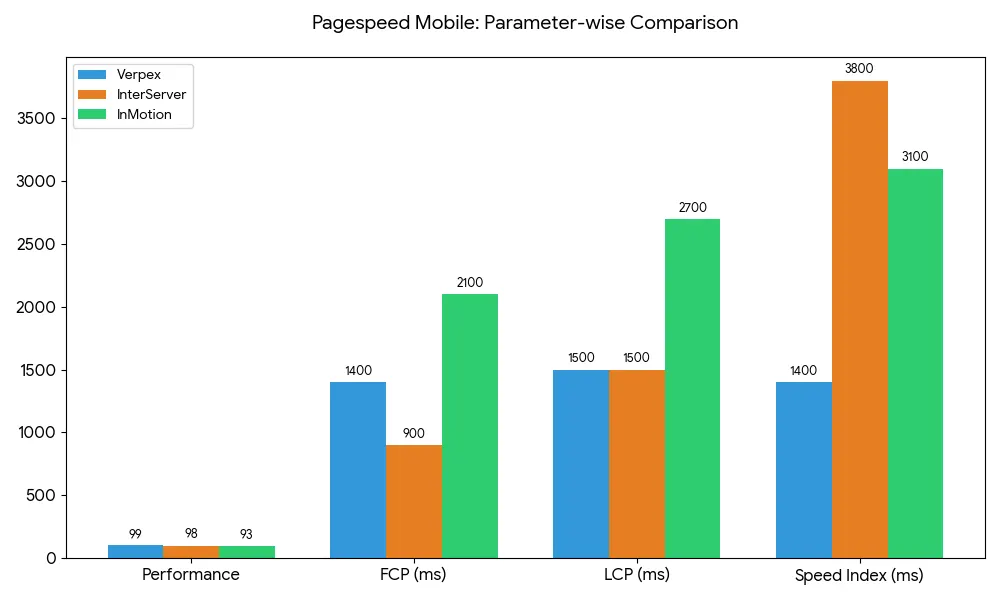
- ⭐ Verpex (99 performance score) delivers the highest overall Lighthouse score with stable metrics across FCP, LCP, and CLS.
- ⚡ InterServer records the fastest First Contentful Paint (0.9s), meaning content appears on screen the quickest.
- 🟢 InMotion remains consistent, though slightly slower on initial paint and LCP compared to the other two.
Takeaway:
Verpex wins on overall score, while InterServer feels the fastest visually during first load.
🟦 GTmetrix – Core Web Vitals Focus
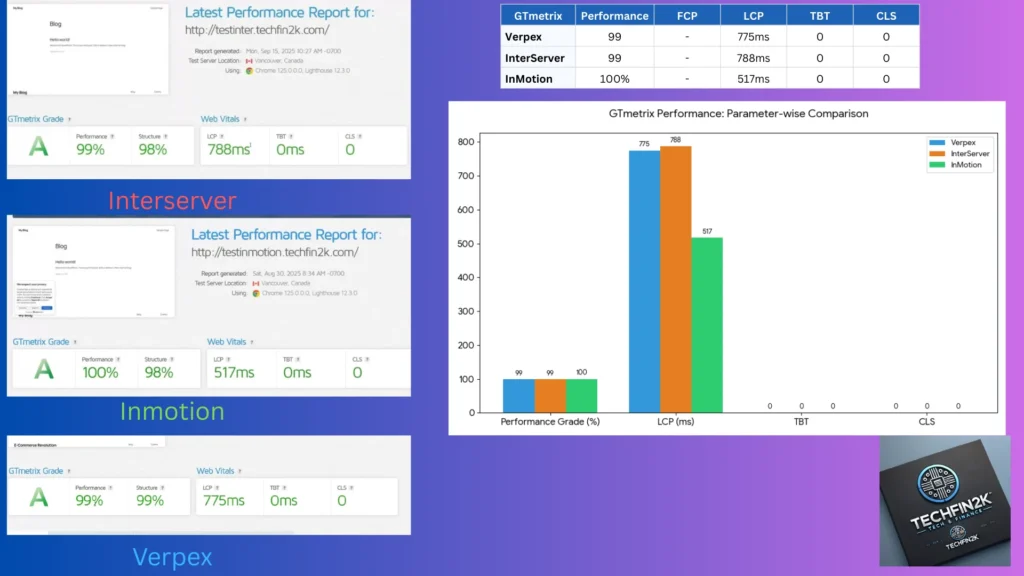
- 🥇 InMotion – 517 ms LCP (fastest)
- 🥈 Verpex – 775 ms LCP
- 🥉 InterServer – 788 ms LCP
All three show:
- TBT = 0
- CLS = 0
This means:
- no blocking scripts
- no layout shifts
- clean, stable rendering
Takeaway:
All hosts perform excellently here, but InMotion edges out slightly with the quickest largest paint.
🟦 Pingdom – Real Load Behavior
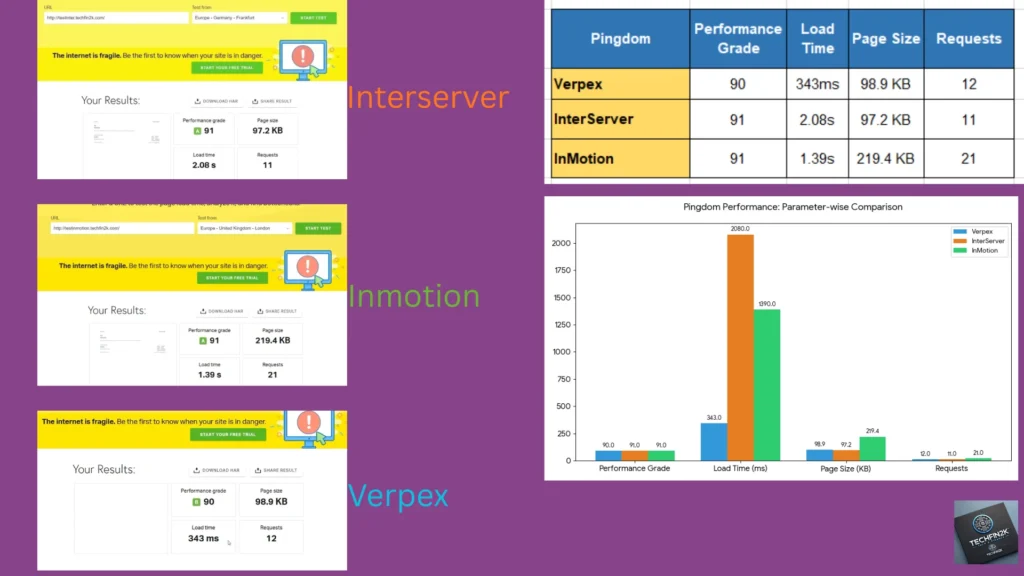
- 🥇 Verpex – 343 ms load time (fastest)
- 🥈 InMotion – 1.39s
- 🥉 InterServer – 2.08s
- ⭐ InterServer uses the fewest requests (11) which indicates lightweight delivery
Takeaway:
Verpex loads fastest overall, while InterServer keeps the site lean with fewer requests.
🏆 Quick Winners Summary
To make it easier:
- ⚡ Fastest first paint → InterServer
- 🏅 Best overall performance score → Verpex
- 🚀 Fastest LCP (core metric) → InMotion
- 📦 Fewest requests → InterServer
- 🟢 Most balanced overall → Verpex
Final Observation
All three hosts perform very well on a clean WordPress install. The differences are small and measured in milliseconds, which means real-world performance will depend more on caching, optimization, and content load rather than just the base server.
This is why the next phase — testing with plugins and real content — is more practical for choosing the right host.
Phase 2: Performance Under Real-World Load (Plugins + Content)
Testing Methodology & Transparency
Before sharing the results, here is an important note about how the tests were conducted.
These hosts were not tested with identical page builds.
- InterServer and InMotion were tested using WordPress with the same plugin stack and optimized content.
- Verpex was tested using a Sitejet-built homepage that contained significantly more high-resolution images and media content.
Because of this, the page weight varied:
- Verpex: 721.3 KB (heavy, image-rich layout)
- InterServer: 240.2 KB (moderate blog layout)
- InMotion: 99.7 KB (lean, optimized layout)
This means the results reflect both hosting performance and page composition.
Heavier pages naturally take longer to paint (higher LCP), regardless of server quality.
So this section should be read as:
- “How each host behaved with the workload tested,”
not - “a strict apples-to-apples server benchmark.”
For a perfectly controlled comparison, the same WordPress setup would need to be deployed on all three hosts. Since Verpex access was time-limited during testing, these results represent the real environment available at the time of review.
Real-World Performance Performance Results (Content+Plugins):
| PageSpeed Insights – Mobile (With Content + Plugins) | ||||||
|---|---|---|---|---|---|---|
| Host | Performance | FCP | LCP | TBT | CLS | Speed Index |
| Verpex | 84 🥉 | 1.6s | 4.2s | 70ms | 0.007 | 3.4s 🥈 |
| InterServer | 93 🥈 | 1.4s 🥇 | 2.6s 🥇 | 0ms 🥇 | 0.001 | 5.2s |
| InMotion | 99 🥇 | 2.1s 🥈 | 2.7s 🥈 | 0ms 🥇 | 0 🥇 | 3.1s 🥇 |
| GTmetrix Results (Heavy-Load Site) | ||||||
| Host | Performance | FCP | LCP | TBT | CLS | – |
| Verpex | 79% 🥉 | – | 2.8s | 0 🥇 | 0 🥇 | – |
| InterServer | 81% 🥈 | – | 1.9s 🥈 | 0 🥇 | 0 🥇 | – |
| InMotion | 100% 🥇 | – | 517ms 🥇 | 0 🥇 | 0 🥇 | – |
| Pingdom – Global Page Load | ||||||
| Host | Grade | Load Time | Page Size | Requests | – | – |
| Verpex | 83 🥈 | 310ms 🥇 | 721.3 KB | 17 🥈 | – | – |
| InterServer | 81 🥉 | 2.88s | 383.7 KB 🥈 | 26 | – | – |
| InMotion | 87 🥇 | 730ms 🥈 | 99.7 KB 🥇 | 21 | – | – |
Content + Plugins — Performance Analysis
🟦 PageSpeed (Mobile) — Real-World Performance Under Load
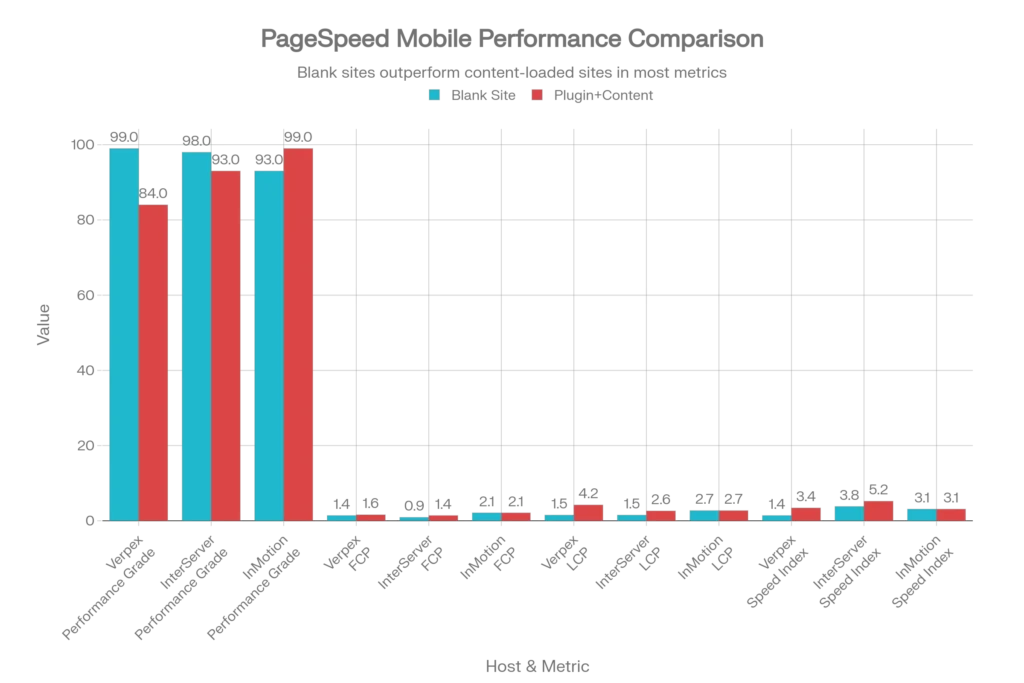
Score comparison (PageSpeed Mobile)
🥇 InMotion: 99 (excellent)
🥈 InterServer: 93 (very good)
🥉 Verpex: 84 (good)
Core Web Vitals breakdown
⚡ First Contentful Paint (FCP) — when initial content first appears
- InterServer: 1.4s — fastest initial paint (best first impression)
- Verpex: 1.6s
- InMotion: 2.1s
Insight: InterServer gives the quickest first visual, even when pages are heavier. InMotion’s slower FCP here is partly explained by its much smaller payload (99.7 KB) compared with InterServer (383.7 KB) and Verpex (721.3 KB).
🏅 Largest Contentful Paint (LCP) — the SEO-relevant render metric
- InterServer: 2.6s
- InMotion: 2.7s
- Verpex: 4.2s
Note on thresholds: Google’s guideline classifies LCP ≤ 2.5s as good. In this PageSpeed (mobile) dataset, InterServer and InMotion are close to the threshold (2.6–2.7s — borderline), while Verpex exceeds it and therefore needs attention for real-world SEO performance.
🎯 Total Blocking Time (TBT) — JavaScript responsiveness
- InterServer: 0 ms ✅
- InMotion: 0 ms ✅
- Verpex: 70 ms (some blocking detected)
Impact: Verpex’s non-zero TBT indicates brief JavaScript execution blocking on slower devices; InterServer and InMotion kept the main thread unblocked in these runs.
📐 Cumulative Layout Shift (CLS) — visual stability
- InMotion: 0 (excellent)
- InterServer: 0.001 (excellent)
- Verpex: 0.007 (minimal, acceptable)
Result: All three show strong layout stability in these tests.
📊 Speed Index — how quickly the page visually completes
- InMotion: 3.1s (best visual progression)
- Verpex: 3.4s
- InterServer: 5.2s (slower visual sequencing despite fast FCP)
Takeaway (PageSpeed): InMotion balances metrics most effectively for perceived smoothness. InterServer provides the fastest first impression; Verpex shows the biggest LCP regression when page weight increases.
🟦 GTmetrix — Core Web Vitals & lab measurements
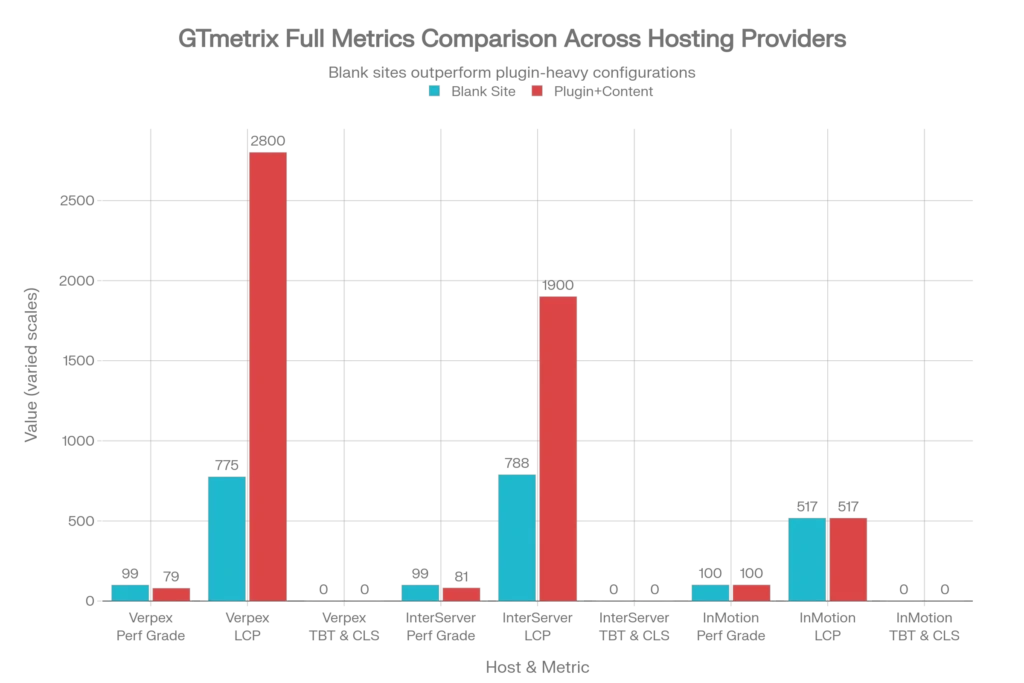
Performance Grade & GTmetrix LCP
- InMotion: 100% — LCP 517 ms (leader on this test)
- InterServer: 81% — LCP 1.9 s
- Verpex: 79% — LCP 2.8 s
Important: GTmetrix and PageSpeed use different test conditions and measurement approaches. GTmetrix’s LCP (517 ms for InMotion) can coexist with PageSpeed Mobile’s LCP (2.7 s) because the tools run different network/CPU throttles and device emulations. Treat each tool’s numbers as complementary, not identical.
Takeaway (GTmetrix): InMotion dominates GTmetrix’s LCP and grade in these runs; InterServer and Verpex perform respectably but show measurable regressions vs. InMotion.
🟦 Pingdom — server response & payload observation
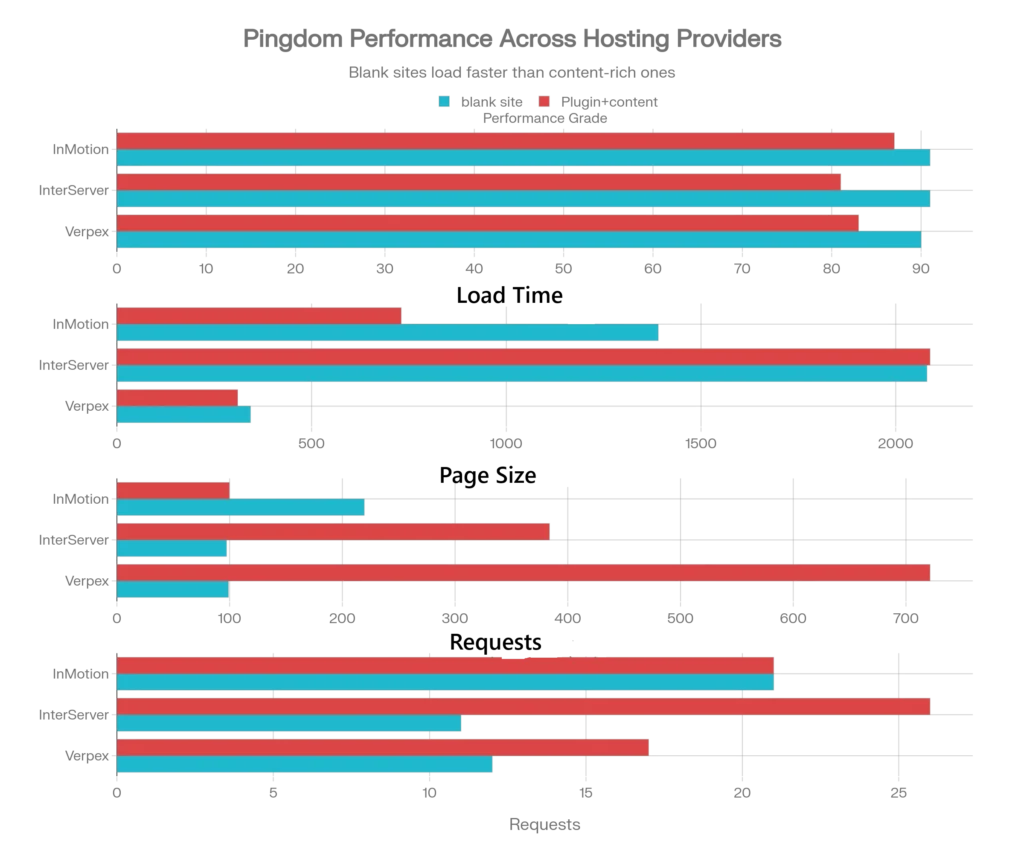
Pingdom snapshot
- Verpex: Grade 83 — Load time 310 ms — Page size 721.3 KB — Requests 17
- InMotion: Grade 87 — Load time 730 ms — Page size 99.7 KB — Requests 21
- InterServer: Grade 81 — Load time 2.88 s — Page size 383.7 KB — Requests 26
How to read this: Pingdom’s load time (raw response) is only one part of the story. Verpex returns HTML quickly (310 ms), but delivered a much larger payload in these tests — the heavier payload is the main driver of its high LCP. InMotion’s very small payload explains much of its perceived speed advantage, while InterServer’s high request count contributes to longer full-load times.
🏆 Real-world winner summary
- Best overall real-world performance: InMotion — best Speed Index and top GTmetrix LCP (517 ms); smooth perceived experience.
- Best first impression (fastest FCP): InterServer — 1.4s FCP and strong PageSpeed score.
- Fastest raw server response (in this test): Verpex — 310 ms TTFB, but with a heavy payload that inflated LCP.
- Most significant regression from blank → loaded: Verpex — clear increase in LCP when page weight rises.
What changed from the blank-site tests
- InMotion: LCP held strong in GTmetrix (517 ms) and shows robust real-world rendering in these runs.
- InterServer: Performance scaled proportionally; fast FCP remains its strength.
- Verpex: Blank-site numbers looked excellent, but the heavier Sitejet payload used in the loaded test exposed higher LCP and TBT.
Final, practical takeaway
- If you run image-heavy, builder-based sites: Verpex’s raw delivery looks promising, but you must optimize assets (image compression, lazy loading, CDN) to avoid LCP regressions.
- If you run plugin-heavy WordPress sites or require smooth progressive rendering: InMotion showed the most consistent real-world behavior in these tests.
- If budget and initial perceived speed are your priorities: InterServer gives excellent first-paint performance and value, though expect full-load times to grow with many requests.
I may earn a commission if you purchase through these links at no extra cost to you. Your support helps fund my hands-on hosting tests and reviews.
InMotion Hosting
- ✓ 99 PageSpeed score
- ✓ 100% GTmetrix grade
- ✓ 517ms fastest LCP
- ✓ Smoothest real-world performance
InterServer
- ✓ Fastest FCP (1.4s)
- ✓ Unlimited storage & emails
- ✓ Price lock guarantee
- ✓ $0.01 first month (TECHFIN)
Verpex Hosting
- ✓ 310ms fastest server response
- ✓ NVMe storage
- ✓ LiteSpeed technology
- ✓ Good for image-heavy sites (optimized)
Uptime and Stability: Real-World Reliability
All three providers advertise a 99.9% uptime guarantee.
During my hands-on testing period, I did not experience any noticeable downtime, server crashes, or extended outages on any host while:
- installing WordPress
- uploading content
- running speed tests
- browsing repeatedly across multiple days
All sites remained accessible and stable throughout testing.
Important note:
I did not run 24/7 automated uptime monitoring (such as UptimeRobot or Pingdom checks), so I am not publishing exact uptime percentages here. The observations above are based on practical usage only.
Takeaway
From real-world usage, all three hosts appear stable and production-ready.
Since uptime differences at this level are typically minimal, your decision should be based more on:
- performance
- pricing
- features
- support quality
4. Feature Comparison: Free SSL, Domains, and Setup
Before looking at advanced performance numbers, it is equally important to evaluate how easy each host makes the initial setup. For most users, the first experience with a hosting provider is not speed testing — it is installing WordPress, enabling SSL, and getting the site live securely.
So in this phase, I focused purely on practical setup tasks:
- How quickly WordPress installs
- Whether SSL is automatic or manual
- Control panel simplicity
- Backup and basic security availability
This gives a clearer picture of which host is beginner-friendly and which requires more manual effort.
Free SSL (Security Basics)
All three hosts include free Let’s Encrypt SSL certificates.
During testing:
- SSL activated automatically on all three
- No manual certificate upload required
- HTTPS worked within minutes of installation
Observation:
There is no meaningful difference here. Every host provides automatic SSL, which is now an industry standard.
Takeaway:
From a security standpoint, all three are production-ready out of the box.
WordPress Installation Experience
This is where the first real differences appear.
Verpex — Fastest Setup
Verpex uses cPanel with WP Toolkit.
In my test:
- WordPress installed in ~55 seconds
- One-click setup
- No configuration steps required
- SSL auto-enabled immediately
WP Toolkit also provides staging and management options, which makes it very convenient for beginners and non-technical users.
Experience: Extremely smooth and the quickest of the three.
InMotion — Simple & Beginner Friendly
InMotion uses cPanel with Softaculous.
Video 4: Essential Security Setup—A step-by-step walkthrough on activating your free SSL certificate within the InMotion dashboard.
In my test:
- Installation completed in under a minute
- Few clicks only
- SSL activated automatically
The process is straightforward and feels very familiar if you’ve used traditional shared hosting before.
Experience: Very easy, almost identical to Verpex in convenience.
InterServer — Slightly Slower but Still Easy
InterServer uses DirectAdmin + Softaculous.
In my test:
- Installation took ~3 minutes
- A few additional steps compared to cPanel hosts
- SSL still activated automatically
It is not difficult, but slightly slower and less polished than cPanel/WP Toolkit workflows.
Experience: Easy enough, but not as fast or modern-feeling as the other two.
Installation Speed Summary
- 🥇 Verpex → ~55 seconds (fastest)
- 🥈 InMotion → ~1 minute
- 🥉 InterServer → ~3 minutes
The difference is small in absolute time, but noticeable during first-time setup.
Backups and Basic Protection
During feature checks:
- Verpex includes automated daily backups
- InMotion includes backup/migration support
- InterServer provides standard shared hosting protections
All three offer enough baseline protection for normal WordPress use.
No host required additional paid add-ons just to secure a basic website.
Practical Takeaway
From a pure setup perspective:
- Verpex is the fastest and most streamlined
- InMotion is equally simple and very beginner friendly
- InterServer works fine but feels slightly slower and more traditional
However, the difference is measured in minutes, not hours.
Resource Limits & Flexibility (What You Actually Get)
Beyond installation and security, another major difference between these hosts is how many resources and restrictions they place on your account.
This is important because many “cheap” hosting plans quietly limit:
- number of databases
- email accounts
- storage space
- bandwidth
- inodes (file count)
- PHP execution limits
Once you hit those limits, your site slows down or you are forced to upgrade.
Here’s what I observed during testing and plan comparison.
InterServer — Truly Unlimited & Most Flexible
InterServer clearly stands out here.
It is the only provider in this comparison that offers what feels like true unlimited shared hosting, including:
- Unlimited storage
- Unlimited bandwidth
- Unlimited email accounts
- Unlimited databases
- No strict inode limits
- Unlimited FTP accounts
Read More: For complete performance benchmarks and pricing details, see my full InterServer Hosting Review.
More importantly, InterServer allows manual PHP customization directly from the control panel, where you can increase:
- memory_limit
- max_execution_time
- upload size
- post size
This is a huge advantage for WordPress users running:
- WooCommerce
- backups
- large imports
- heavy plugins
Most hosts require support tickets for these changes. InterServer lets you do it yourself.
Another unique benefit:
InterServer is also the only host among these three that accepts cryptocurrency payments, which may matter for privacy-focused or international users.
Overall:
If you want maximum freedom and fewer artificial limits, InterServer is easily the most flexible option.
Verpex — Structured but Not Unlimited
Verpex provides generous resources, but not “unlimited everywhere.”
During testing:
- storage and bandwidth are plan-based
- limits are clearly defined per tier
- fewer manual server tweaks compared to InterServer
The environment is optimized for performance (NVMe + LiteSpeed), but it is not designed around “no limits.”
Overall:
Good for performance-focused users, but not ideal if you want unlimited emails/databases or deep server control.
InMotion — Balanced & Standard Limits
InMotion sits in the middle.
It offers:
- generous storage
- standard bandwidth
- professional features
- beginner-friendly setup
But it does not provide the same “unlimited everything” flexibility as InterServer, nor the deep manual PHP controls.
Most advanced changes typically require support or higher-tier plans.
Overall:
Very stable and beginner friendly, but less customizable compared to InterServer.
Quick Summary
If your priority is:
- Maximum freedom and no limits → InterServer
- Performance optimization and modern stack → Verpex
- Beginner-friendly balance and support → InMotion
InterServer clearly wins on raw resource flexibility and control, which is rare at its price point.
One important cost-saving difference is the free domain offer. Verpex and InMotion include a free domain for the first year (typically saving $10–$15), while InterServer requires purchasing a domain separately.
| Feature | InterServer Most Flexible | Verpex Fast Setup | InMotion Beginner Friendly |
|---|---|---|---|
| Free SSL | ✅ Automatic | ✅ Automatic | ✅ Automatic |
| Free Domain (1st Year) | ❌ Not included | ✅ Included Save ~$10+ | ✅ Included Save ~$10+ |
| WordPress Install Method | DirectAdmin + Softaculous | cPanel + WP Toolkit | cPanel + Softaculous |
| Install Time (tested) | ~ 3 minutes | ~ 55 seconds 🥇 | ~ 1 minute |
| Storage | Unlimited ✅ | Plan based | Plan based |
| Bandwidth | Unlimited ✅ | Plan based | Plan based |
| Email Accounts | Unlimited ✅ | Limited | Limited |
| Databases | Unlimited ✅ | Limited | Limited |
| Inode Limits | No strict limits ✅ | Standard | Standard |
| Manual PHP Control | Self adjustable ✅ | Limited | Via support |
| Backups | Standard | Daily backups | Backup support |
| Payment Options | Card + Crypto ✅ | Standard | Standard |
5. Control Panel Experience and Ease of Use
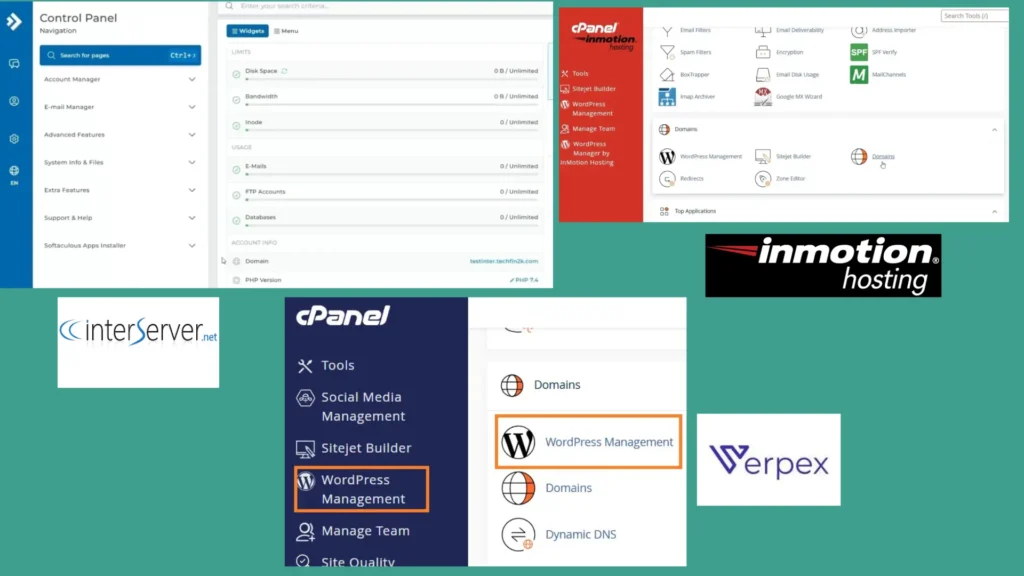
InterServer — DirectAdmin + Softaculous (config-first)
- Practical, no-frills UI suited to experienced users.
- Unique advantage: self-service PHP tuning (memory_limit, max_execution_time, upload/post sizes) without support tickets.
- Install time observed: ~3m 04s.
- Best for: developers and sites needing granular control and unlimited-account flexibility.
Verpex — cPanel + WP Toolkit (WordPress-first)
- Modern, polished UI with WP Toolkit for staging, cloning, and plugin management.
- Fastest WordPress install in our runs (~55s) and clear WP management features.
- Backups and day-to-day WordPress tasks are streamlined in the toolkit.
- Best for: users who want rapid WP setup and built-in staging.
InMotion — cPanel + guided setup (beginner-first)
- Standard cPanel augmented with onboarding overlays and checklists; phone/chat support integrated into workflows.
- Install time observed: ~1 minute.
- Best for: beginners and business owners who prefer guided setup and hands-on support.
How to use this: If you want low-level control (PHP tweaks, no inode limits) pick InterServer. If you value fast WP workflows and staging, pick Verpex. If you want guided onboarding and support, pick InMotion.
6. Customer Support Quality & Response Times
Speed is important, but support quality matters even more. A fast reply is useless if the agent cannot actually solve technical problems.
During testing, I evaluated three things:
- Available support channels (chat, phone, ticket)
- Time taken to reach a human
- How effectively issues were handled
Here’s what I observed from real usage.
InterServer — Self-Service First, Support When Needed
Support channels available:
- Ticket system
- Phone support
- Knowledge base
- Control panel tools (DirectAdmin / cPanel style)
My experience during testing:
I didn’t require support during the 27-day evaluation.
The self-service control panel and PHP customization options were sufficient for everything I needed. I could directly adjust:
- memory limits
- execution time
- upload size
- PHP settings
without opening a ticket.
Because of this flexibility, I never had to contact support.
Effectiveness assessment:
While I didn’t test response times directly, the fact that most configurations could be handled independently is actually a strength. For experienced users, fewer support dependencies mean faster workflows.
Best for:
Developers and technical users who prefer solving issues themselves rather than waiting for chat or tickets.
Verpex — Fast Live Chat with Quick Human Access
Support channels available:
- 24/7 live chat
- Ticket system
- Department-based routing (technical, billing, sales)
Observed response time:
Human agent typically joined chat in under 40 seconds after the AI assistant handoff.
Effectiveness assessment:
Agents responded clearly and handled requests quickly. The tiered system (AI → human → ticket escalation) worked well for fast troubleshooting and general questions.
This made Verpex the quickest option when immediate answers were needed.
Best for:
Users who want instant help through live chat and minimal waiting.
InMotion — Most Hands-On & Beginner Friendly
Support channels available:
- 24/7 live chat
- Phone support
- Ticket/email support
Observed response time:
- Most chats connected in ~30 seconds
- One peak-time session had a ~20 minute wait (queue position 9)
Effectiveness assessment:
InMotion’s support was the most “hands-on.”
Agents didn’t just answer questions — they actively helped with:
- DNS guidance
- PHP limit adjustments
- WordPress onboarding
- setup walkthroughs
This level of assistance is extremely helpful for beginners and business owners who don’t want to manage technical settings themselves.
Best for:
Non-technical users who want guided help and phone access.
Practical Takeaway
Each host takes a different support philosophy:
- InterServer → independence (power users rarely need support)
- Verpex → speed (fastest chat response)
- InMotion → guidance (most helpful, step-by-step assistance)
There is no single “winner” — it depends on whether you prefer self-service control or human assistance.
| Host | Support Channels | Response Time (Observed) | Support Style / Effectiveness |
|---|---|---|---|
| InterServer | Ticket + Phone + Self-service control panel | No support required during testing | Full PHP customization removes dependency on support; ideal for independent users |
| Verpex | 24/7 Live Chat + Ticket | < 40 seconds to human agent | Fastest chat response; efficient troubleshooting and quick answers |
| InMotion | 24/7 Chat + Phone + Ticket | ~30 seconds typical (one 20-minute peak wait recorded) | Most hands-on; agents actively assist with setup, DNS and configuration |
7. Pros and Cons
| Host | Pros | Cons |
|---|---|---|
| InterServer |
✓ Unlimited storage, databases, emails, bandwidth ✓ No inode limits ✓ Full PHP customization without support ✓ Strong value pricing ($7/month renewal) ✓ Crypto payments accepted |
✕ No free domain ✕ Slower WordPress install time ✕ Slower full load under heavy plugins ✕ Basic interface |
| Verpex |
✓ Lowest renewal price ($6/month) ✓ Fastest WordPress setup (~55s) ✓ NVMe + LiteSpeed stack ✓ Modern cPanel + WP Toolkit ✓ Free domain (year 1) ✓ Fast raw server response |
✕ Performance drops on heavy pages without optimization ✕ Slight JavaScript blocking observed (TBT) ✕ Needs caching/image compression for best results |
| InMotion |
✓ Most stable real-world performance ✓ 100% GTmetrix grade ✓ Fastest LCP metrics ✓ Smoothest visual loading (best Speed Index) ✓ 24/7 phone + chat support ✓ Free domain (year 1) |
✕ Highest renewal price ($11.99+/month) ✕ Slightly slower first paint than InterServer ✕ Less suitable for strict budgets |
8. Final Verdict — Who Should Use Each Platform
After testing installation speed, real-world performance, control panels, features, and support quality, one thing became clear:
There is no universal “best” host.
Each provider fits a different type of user.
Instead of chasing the highest benchmark score, choose the host that matches your priorities.
Choose InterServer If:
✅ You want strong value with mid-range renewal pricing ($7/month)
✅ You need unlimited databases, emails, storage, bandwidth, and no inode limits
✅ You prefer full control over PHP limits (memory, execution time, upload size)
✅ You are comfortable managing settings yourself without contacting support
✅ You run multiple small or medium WordPress sites
Want the full breakdown before signing up? Read our in-depth InterServer Hosting Review .
❌ Not ideal if: you want the fastest full-page load times under heavy plugins or beginner hand-holding support
Summary:
InterServer is the most flexible and developer-friendly option. It doesn’t rely on fancy optimizations — it simply gives you control and resources.
Choose Verpex If:
✅ You want the lowest long-term renewal price ($6/month)
✅ You want the fastest WordPress setup experience (~55 seconds in testing)
✅ You prefer cPanel + WP Toolkit and a modern interface
✅ You run lightweight blogs, landing pages, or optimized sites
✅ You value raw server response speed
Want to see the complete setup and real-world testing? Read our in-depth Verpex hosting review .
❌ Not ideal if: your pages are heavy (large images/builders) without optimization
Summary:
Verpex offers excellent value and very fast setup. With proper image optimization or CDN usage, it can perform extremely well.
Choose InMotion If:
✅ You want the most consistent real-world performance under plugins and content
✅ You want the best Core Web Vitals (100% GTmetrix, fastest LCP in testing)
✅ You prefer 24/7 phone + chat support
✅ You’re new to hosting and want guided help
✅ You run business, agency, or WooCommerce sites
👨💻 Pro Tip: If you prefer stronger customer support and business-focused features, read our full InMotion hosting review before deciding.
❌ Not ideal if: you’re strictly budget-focused (highest renewal at $11.99+/month)
Summary:
InMotion delivered the most stable performance during realistic WordPress usage. It’s the safest choice for serious or growing sites.
Quick Decision Guide
- Lowest renewal → Verpex
- Most control & unlimited resources → InterServer
- Best performance & support → InMotion
Now let’s look at the actual pricing and where to purchase each plan.
8. Pricing Recommendation Summary
After comparing real-world speed tests, setup experience, features, and support quality, pricing becomes the final deciding factor.
Instead of focusing only on first-month promotions, it’s smarter to look at long-term renewal costs, because that’s what you’ll actually pay after the trial period.
Here’s the practical pricing order:
- Lowest renewal → Verpex ($6/month)
- Mid-range → InterServer ($7/month)
- Premium → InMotion ($11.99+/month)
Also worth noting:
- Verpex and InMotion include a free domain for the first year
- InterServer does not include a free domain
- InterServer offers the most unlimited resources
- InMotion offers the most hands-on support
- Verpex offers the fastest setup time
Choosing between InterServer vs Verpex vs InMotion ultimately comes down to your specific needs: raw power, budget stability, or long-term scalability
| Host | Renewal Price | Free Domain (Year 1) | Best For |
|---|---|---|---|
| Verpex | $6 / month | Yes | Lowest long-term cost + fast setup |
| InterServer | $7 / month | No | Unlimited resources + developer control |
| InMotion | $11.99+ / month | Yes | Best performance + premium support |
Frequently Asked Questions (FAQs)
1. Which hosting is cheapest long-term?
Based on renewal pricing, Verpex is the lowest at $6/month, followed by InterServer at $7/month, and InMotion at $11.99+/month. If budget is your primary concern, Verpex or InterServer offers better long-term value.
2. Which host performed best in real speed tests?
In my plugin + content tests, InMotion delivered the most consistent results with the fastest Largest Contentful Paint (LCP) and a 100% GTmetrix grade. It handled heavier WordPress setups better than the others.
3. Which hosting is best for beginners?
InMotion is the most beginner-friendly because it includes phone support, live chat, and guided setup assistance. Their team helps with WordPress configuration, DNS, and general onboarding.
4. Which hosting is best for developers or technical users?
InterServer is ideal for technical users because it allows full control over PHP limits, offers unlimited databases/emails/storage, and doesn’t require contacting support for most server adjustments.
5. Do these hosts include a free domain?
Verpex and InMotion include a free domain for the first year. InterServer does not include a free domain, so you may need to purchase one separately.
6. Does faster Pingdom load time always mean better hosting?
Not always. Pingdom mainly measures server response speed. Overall performance also depends on page size, caching, images, and optimization. A smaller page can load faster even on a slightly slower server.
7. Which hosting is best for heavy WordPress sites with many plugins?
InMotion performed the most stable under heavy plugin and content load during testing, making it a safer choice for WooCommerce stores, agencies, or large content sites.
8. Can I upgrade later if my traffic increases?
Yes. All three hosts allow upgrading plans as your site grows. You can start small and move to higher resources when needed.
Still Unsure? Quick Answers
9. If you had to choose only one hosting, which would you personally pick?
For most real-world WordPress sites, I would choose InMotion.
During testing, it delivered the most consistent performance under plugins and content, and the support team was the most helpful. It’s not the cheapest, but it’s the safest “set it and forget it” option.
10. Which hosting gives the best value for money overall?
If you want the lowest long-term cost, Verpex offers the best value at $6/month renewal and includes a free domain for the first year.
If you want more flexibility and unlimited resources for multiple sites, InterServer offers better control for just $7/month.
11. Which host would you recommend for a first website?
For beginners or business owners who want guidance, InMotion is the easiest to start with because of phone support and step-by-step help.
If you’re comfortable managing hosting yourself, InterServer is also a solid and affordable starting point.
