
Last Updated on February 15, 2026 by RADHIKA VATLAM
In this step-by-step guide, you’ll learn how to use Ahrefs Webmaster Tools (AWT) — Ahrefs’ official free plan — to run a complete Site Audit, check backlinks, view organic keyword data, and track traffic with the built-in Web Analytics dashboard.
I’ve been using Ahrefs Webmaster Tools for my tech blog TechFin2k for several months, and it helped me uncover:
• hidden crawl errors
• broken internal links
• low-quality or spammy backlinks
• slow pages hurting Core Web Vitals
• and technical SEO issues even Google Search Console didn’t surface
By the end of this tutorial, you’ll know how to set up Ahref Webmaster Tools (AWT) , run your first free Site Audit, understand the Health Score, and fix real SEO problems — without paying for the premium Ahrefs plan.
Why Your Pages Are Not Indexed by Google (And How This Guide Fixes It)
Many readers come here because Google is not indexing their posts — even though the pages exist and the sitemap is submitted.
Typical symptoms:
- “Discovered – currently not indexed” in Search Console
- “Crawled – currently not indexed”
- New blog posts never appearing in Google
- Pages indexed once but later dropped
- Zero impressions after publishing
This usually does NOT mean a Google penalty.
In most cases Google sees the page but cannot properly evaluate its importance due to technical signals — not content quality.
Google Search Console shows the status, but not always the cause.
Ahrefs Site Audit helps you identify the underlying problems preventing indexing.
Inside this guide you will use Ahrefs Site Audit to:
- detect orphan pages Google cannot reach
- find internal link gaps
- locate crawl waste (redirect chains / errors)
- identify pages blocked from indexing
- discover weak pages ignored by Google
👉 If you came specifically to fix indexing:
Jump to → Run Your First Ahrefs Site Audit
What is Ahrefs Webmaster Tools?
Ahrefs Webmaster Tools (AWT) is a free SEO toolkit for verified website owners. It gives you access to Ahrefs’ powerful Site Audit and Site Explorer features so you can monitor your website’s technical health, backlinks, and organic performance — without buying a paid plan.
Unlike the full Ahrefs subscription, AWT focuses only on your own websites, not competitor research.
What You Get for Free
| Feature | What It Does | Limit |
|---|---|---|
| Site Audit | Finds broken links, crawl errors, redirects, slow pages, on-page SEO issues | 5,000 crawl credits per project per month |
| Site Explorer (your site only) | View backlinks, referring domains, organic keywords, top pages | Data for verified sites (UI shows limited rows at once) |
| Backlink Monitoring | Track new & lost backlinks | Included |
| Basic SEO Reports | Health score, issues list, improvements | Included |
What You DON’T Get
To avoid confusion, AWT does NOT include:
- Competitor backlink analysis
- Keywords Explorer (full keyword research + difficulty)
- Content Explorer
- Rank Tracker automation
- Advanced historical exports
For those, you need a paid Ahrefs plan.
Step 1: Create Your Free Ahrefs Account
Before you can run audits or check backlinks, you need a free Ahrefs Webmaster Tools account.
Log in or Sign Up
Follow these steps:
- Go to ahrefs.com/webmaster-tools
- Click Continue with Google (recommended)
OR enter your email + password - Log in to your account
No credit card is required.
💡 Pro Tip:
Use the same Gmail as your Google Search Console account. This makes verification almost instant later.
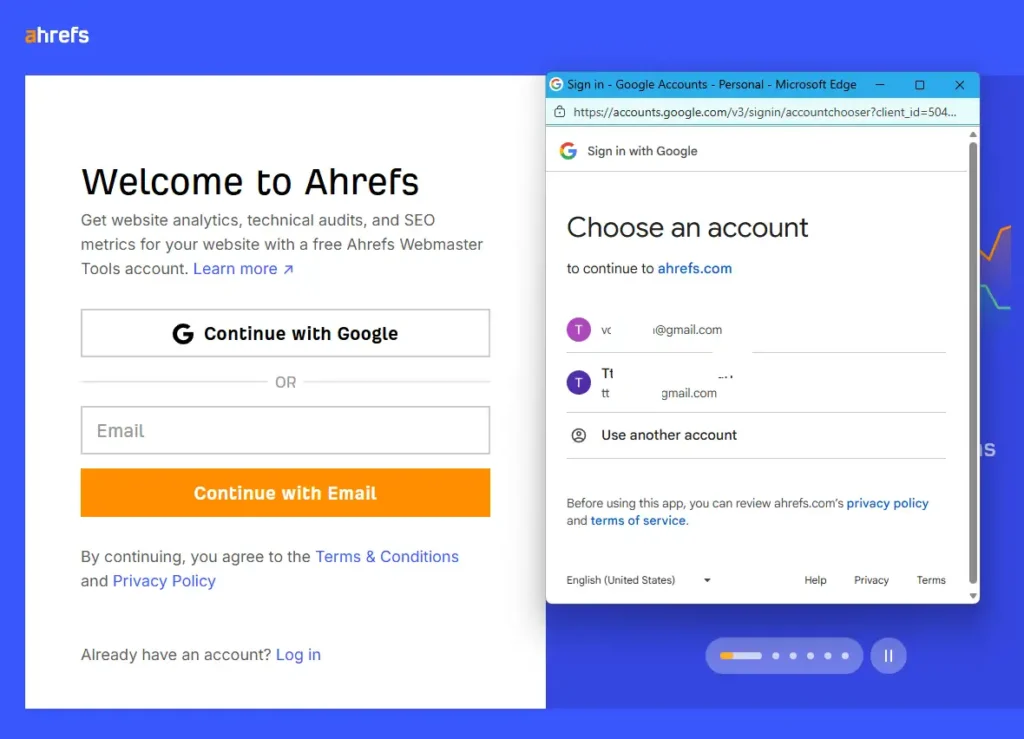
After logging in, you’ll land on the Ahrefs dashboard.
Step 2: Add Your Website (Create a Project)
Once inside the dashboard, you need to add your website as a project.
Steps:
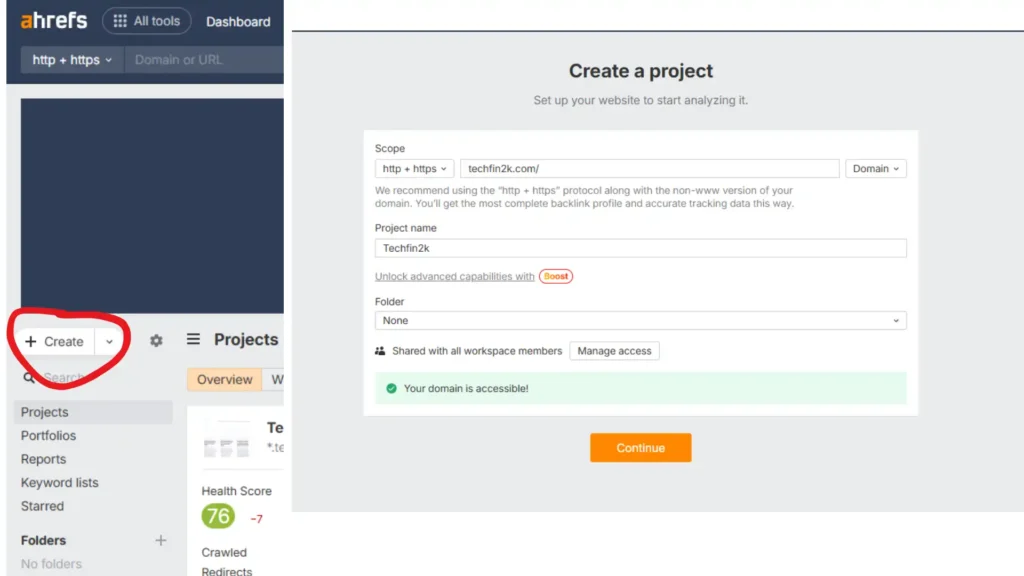
- Open Dashboard → Projects
- Click + Create
- Enter your domain
- Ahref will check for the accessibility of the domain
- Click continue for domain verification
Step 3: Verify Website Ownership
Ahref only audits websites you own, so you must verify ownership first.
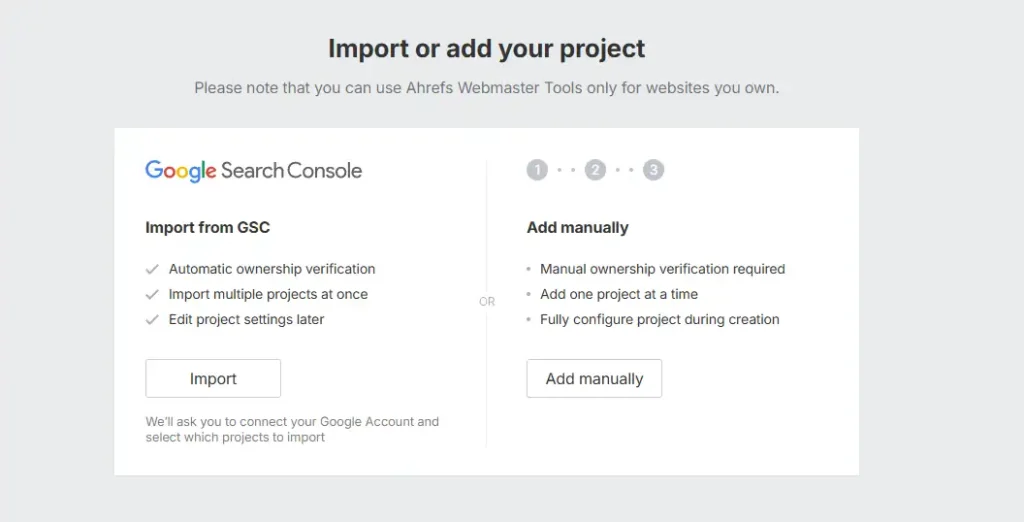
After continuing from the step-2, Ahref asks for verification of domain ownership
Here you have two methods.
✅ Option A — Import from Google Search Console (Recommended)
Steps:
- Click Import from GSC
- Sign in with your Google account – which is used for Google Search Console
- Ownership is verified automatically
That’s it — no code or setup required.
Why this method is best
- Takes 10–15 seconds
- No technical steps
- Instant verification
- Perfect for beginners
Option B — Manual Verification (HTML or Google Tag Manager)
If you don’t use Google Search Console, you can verify ownership manually by adding a small code snippet to your website.
Method 1 — Add HTML tag to your site
- Copy the verification code from Ahrefs
- Paste it inside your website’s
<head>section - Click Verify ownership
Method 2 — Use Google Tag Manager
- Create a Custom HTML tag
- Paste the verification snippet
- Publish the container
- Click Verify ownership
If verification fails
Use Recheck installation after confirming the code is correctly added and saved.
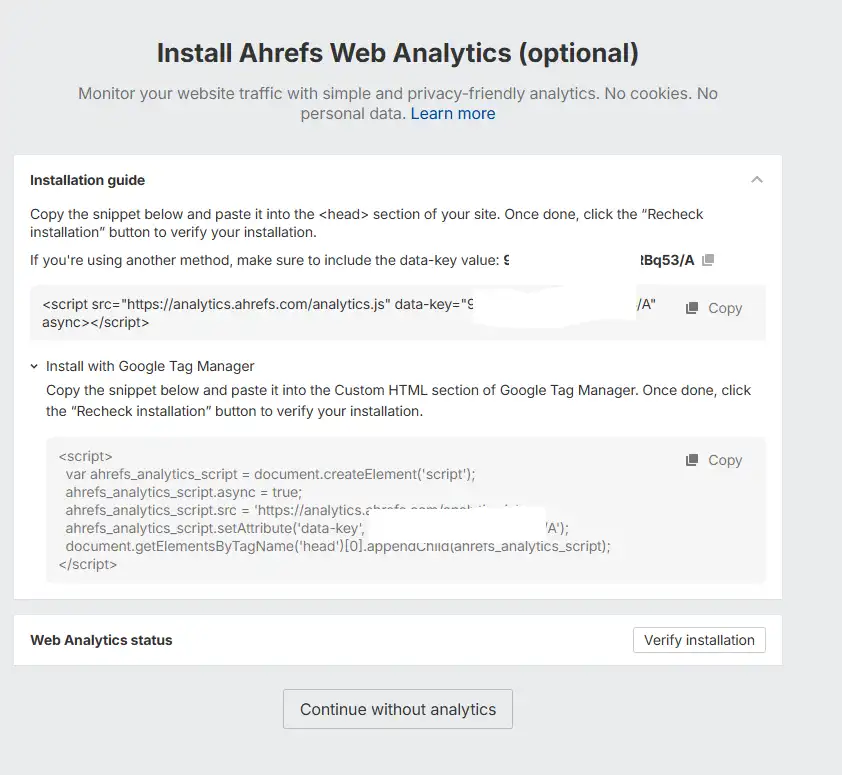
Easiest Way to Verify Your Site (No Technical Setup Required)
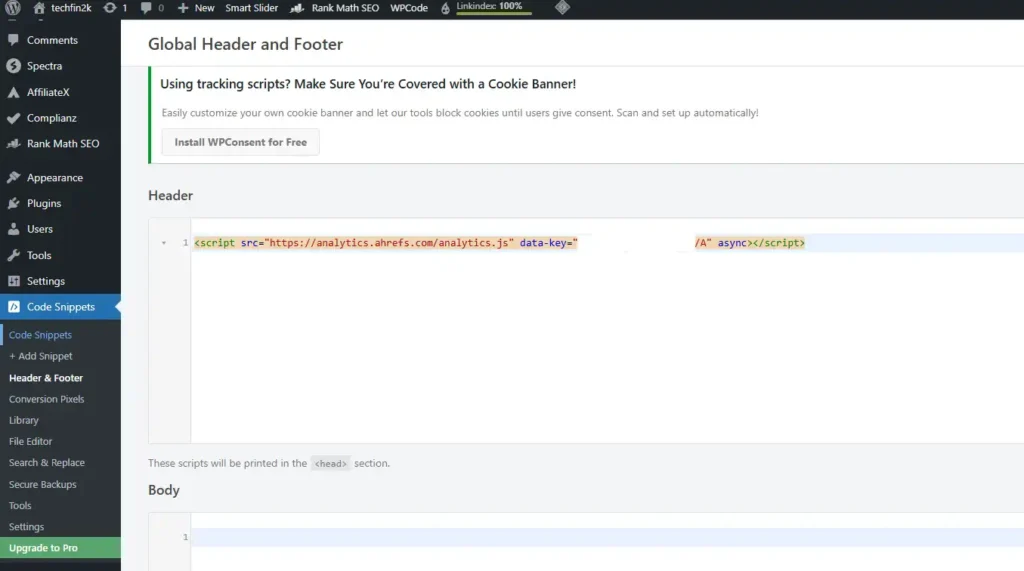
If you’re not comfortable editing theme files or dealing with meta tags manually, there’s a much simpler way to verify your website inside Ahrefs.
You can use the WPCode Lite plugin to paste the verification code safely into your site’s header — no coding required.
Step-by-Step: Verify Using WPCode Lite
- Go to WordPress Dashboard → Plugins → Add New
- Search for WPCode Lite – Insert Headers and Footers
- Click Install Now, then Activate
- Go to Code Snippets → Header & Footer
- Copy the verification meta tag or script from Ahrefs
- Paste it inside the Header section
- Click Save Changes
- Return to Ahrefs and click Verify
That’s it — your site will be verified in seconds.
How to Configure Ahrefs Site Audit Settings
Once your account is verified, the most powerful feature inside Ahrefs Webmaster Tools is the Ahrefs Site Audit, which scans your entire site for technical SEO issues. Proper configuration of audit settings ensures that Ahrefs crawls your website efficiently, respects your plan limits, and provides timely insights into your site’s health. This section covers the three essential configuration tabs: Schedule, URL Sources, and Crawl Settings.
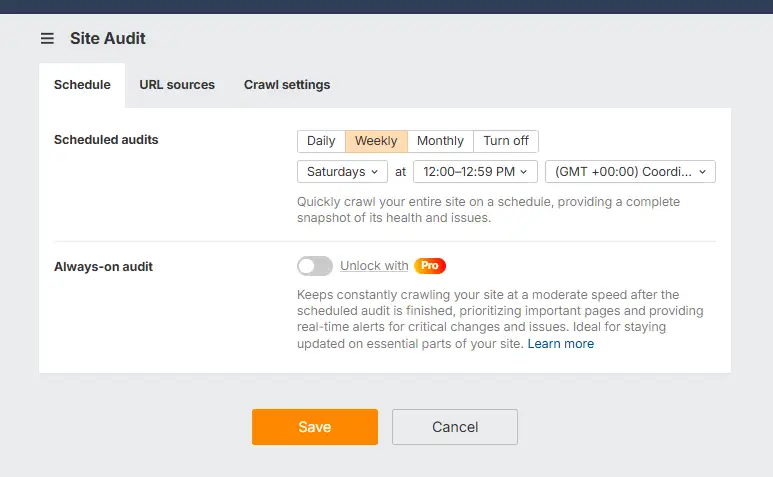
When you click Start Audit in Ahrefs Webmaster Tools you’ll configure three tabs that together determine how Ahrefs crawls and reports on your site: Schedule, URL sources, and Crawl settings. Configure these to balance coverage, server load and your monthly crawl credits.
Note: this guidance follows the typical AWT Site Audit UI and crawl-credit behavior; adjust if your plan shows different limits.
Quick snapshot — what you’ll see
- Schedule — Daily / Weekly / Monthly / Turn off; time and timezone; “Always-on audit” (Pro).
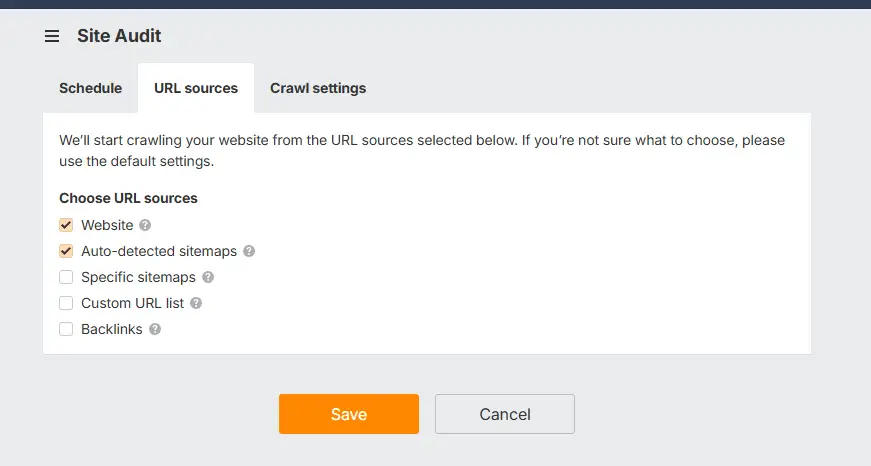
- URL sources — Website, Auto-detected sitemaps, Specific sitemaps, Custom URL list, Backlinks.
- Crawl settings — Crawl speed, include/exclude URL parameters, sitemap vs full crawl, robots rules.
Crawl-credit math (use this to plan cadence)
Ahrefs Webmaster Tools typically gives ≈ 5,000 crawl credits per project per month (your UI may display exact wording). Use this formula to estimate how many pages you can audit on each cadence:
- Per day:
5,000 ÷ 30 ≈ 166 pages/day - Per week:
5,000 ÷ 4 ≈ 1,250 pages/week
(or 5,000 ÷ 4.333 ≈ 1,154 pages/week if you prefer average weeks/month) - Per month:
Full 5,000 pages/month
Keep in mind:
- Redirect chains, duplicate URLs, sitemap entries and page resource requests can consume additional credits. Treat these numbers as planning guidance, not exact counts.
1) Schedule — choose the cadence
Recommendation logic (based on crawl credits):
- If your site is ≤ ~1,500 pages, a weekly audit fits comfortably within 1,250 pages/week allowance and gives timely coverage.
- If your site is ≤ ~500 pages and updates frequently, daily audits are feasible (~166 pages/day).
- For large sites (> 2,000 pages): use weekly partial (sitemaps/custom lists) + monthly full crawl to avoid exhausting credits.
Practical recommendations
- Default (most blogs/content sites): Weekly audit — off-peak weekend time (e.g., 02:00–04:00 server local time).
- High-update sites (news/ecommerce with many daily changes): Daily for top pages (use Custom URL list) + weekly/monthly full as budget allows.
- Very large sites: Monthly full crawl + weekly sitemap-driven checks of priority sitemaps.
2) URL sources — what to crawl
Default & recommended selections:
- Website — enabled (crawl from homepage and follow internal links). Always enable.
- Auto-detected sitemaps — enabled (Ahrefs finds sitemaps listed in robots.txt or common locations). Enable if you have XML sitemaps.
- Specific sitemaps — enable only if you need to target non-standard sitemap locations or split large sites into sections.
- Custom URL list — use for targeted, high-priority checks (e.g., top 1,000 pages).
- Backlinks — avoid for routine audits (adds many external sources and burns credits); enable only periodically if backlink-allocated pages are critical.
Recommended default for most readers
- Website + Auto-detected sitemaps (keeps coverage broad while efficient).
- Use Specific sitemaps / Custom URL list only for large sites or targeted audits.
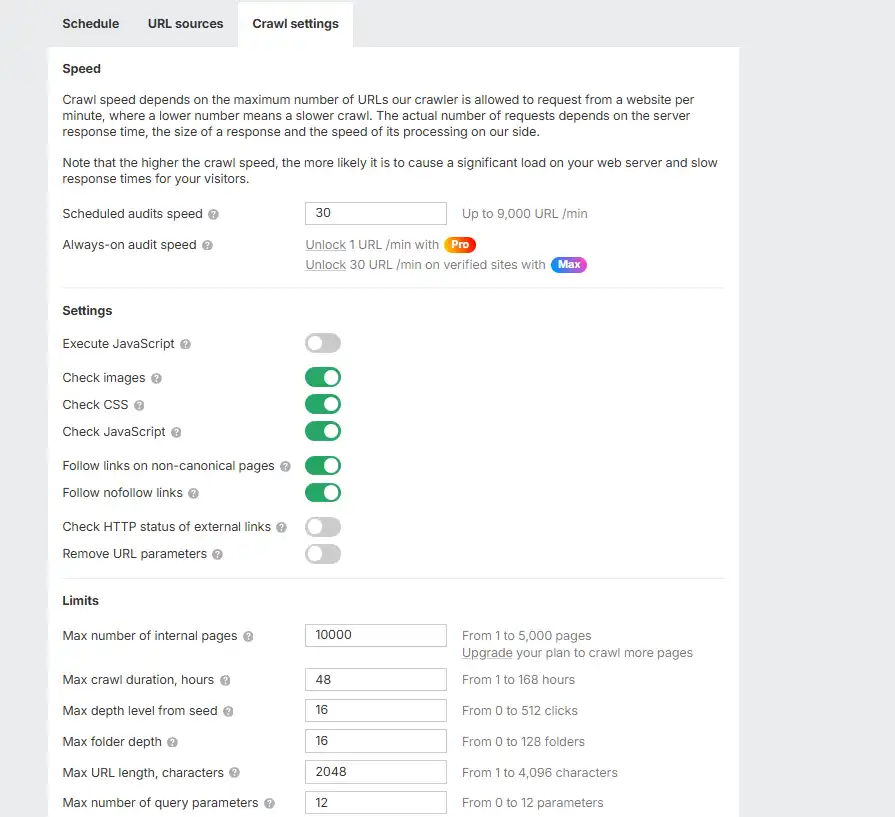
3) Crawl settings — control speed and scope
The Crawl settings tab controls how the Ahrefs crawler scans your website and what technical elements it checks during the audit.
These settings help you:
- prevent server overload
- avoid duplicate crawling
- detect more technical SEO issues
A. Speed
Scheduled audits speed
Controls how many URLs Ahrefs requests per minute.
- Higher speed → faster crawl but heavier server load
- Lower speed → safer but slower
✅ Recommended
Keep the default (~30 URLs/min)
This is safe for:
- WordPress blogs
- shared hosting
- VPS servers
Avoid very high speeds unless you run a powerful dedicated server.
B. Settings (What the crawler checks)
Turn ON the following for better audit accuracy:
✔ Check images
✔ Check CSS
✔ Check JavaScript
✔ Follow links on non-canonical pages
✔ Follow nofollow links
These help Ahrefs detect:
- broken images
- missing resources
- hidden crawl paths
- internal linking problems
Optional
Execute JavaScript
Enable only if your site relies heavily on JavaScript (React/SPA apps).
For most blogs → keep OFF.
Remove URL parameters
Turn ON to avoid duplicate crawling.
Example:
/post
/post?utm_source=twitter
/post?fbclid=123
All treated as one page → saves crawl time and cleaner reports.
C. Limits
This section sets advanced boundaries like:
- max pages
- crawl time
- depth
- URL length
For most users:
👉 Leave everything at default
Ahrefs already manages crawl limits automatically.
Only change these if you run a very large or complex website.
✅ Recommended Settings (Quick checklist)
Use this exact setup:
- Crawl speed → Default (~30)
- Check images → ON
- Check CSS → ON
- Check JavaScript → ON
- Follow non-canonical → ON
- Follow nofollow → ON
- Remove URL parameters → ON
- Execute JavaScript → OFF
That’s all you need.
Run Your First Ahrefs Site Audit
Start the crawl
- In the left sidebar click Site Audit.
- It displays all the verified domains
- Click Start Audit against the domain for which you want to audit
Estimated time: 10–30 minutes for small-to-medium sites (depends on site size and server response). For larger sites expect longer.
Understanding the Health Score
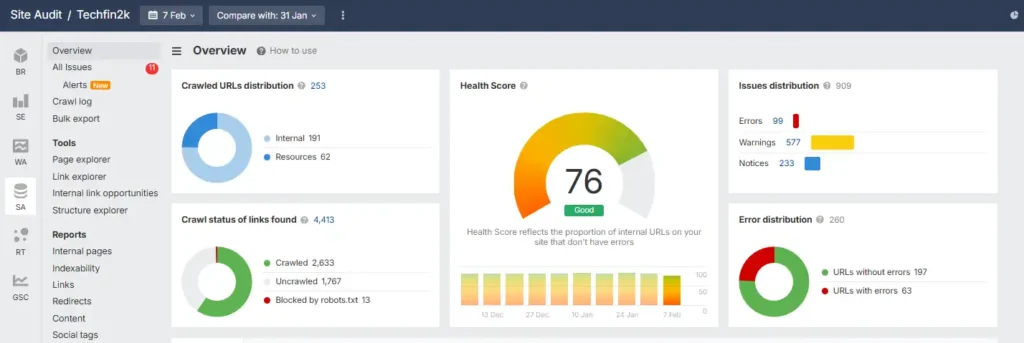
When the audit finishes you’ll see a Health Score (0–100) and a breakdown of issues.
In general:
- Higher score = fewer critical problems
- Lower score = more technical issues affecting SEO
Ahrefs also labels your score with simple statuses like Good, Fair, or Poor.
What the labels mean
- Excellent / Very High → Site is technically clean with very few issues
- Good → Mostly healthy, minor fixes recommended
- Fair → Several technical problems that should be addressed
- Poor → Many serious issues that require immediate attention
Note: These labels are not tied to strict number ranges and may vary slightly. Always focus on reducing Errors and Warnings rather than chasing a specific score. In practice, anything above ~85 is usually strong, but the real goal is to reduce Errors first — even a small score improvement can increase SEO health.
Audit issues — overview
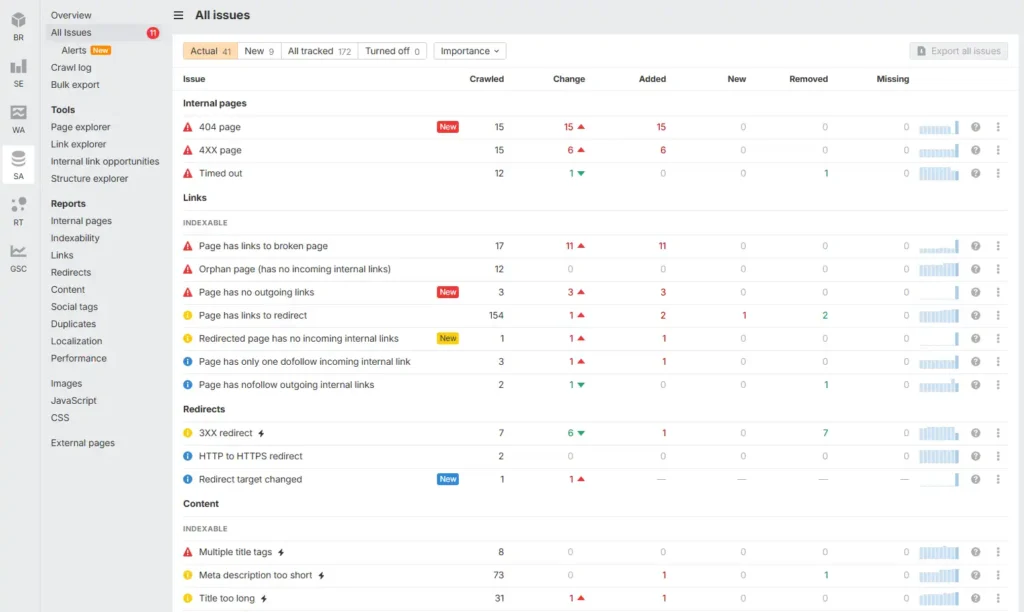
When your Site Audit finishes you’ll see issues color-coded by severity:
- Red = Errors (critical)
- Yellow = Warnings (important, lower severity)
- Blue = Notices (informational / low priority)
Below are the top issues shown in your report (grouped and ordered by priority for remediation). Use this as your triage checklist:
Highest priority — fix these first (Errors / red)
- 404 pages (15) — pages returning 404 that are still linked or indexed
- 4XX pages (15) — other client error pages
- Pages linking to broken pages (17) — internal pages that point at 404/4XX pages
- Timed out pages (12) — pages the crawler cannot fetch (server problems)
- Page has links to redirect (154) — pages linking to intermediary redirects (update to final URL)
- Orphan pages (12) — pages with no internal incoming links
High / medium priority (Warnings / yellow)
- Slow pages (142) — performance issues (LCP / TTFB etc)
- Indexable page not in sitemap (27) — add important pages to sitemap
- Meta description too short / missing (73 / 5) — on-page SEO fixes
- Open Graph / social tags incomplete (73) — affects social sharing
- H1 missing / multiple H1s (15 / 8) — on-page structure
Lower priority / informational (Notices / blue)
- Low word count (3) — thin content to expand
- Duplicate pages without canonical (3) — set canonical tags
- HTML lang attribute missing (3) — accessibility / localization
- CSS file size too large / large assets (61) — performance tuning
- Structured data validation errors (2) — fix schema for rich results
How I recommend you proceed (triage plan)
- Errors first — fix all 4XX/404, timed-out pages, and pages linking to broken pages. These cause the biggest SEO and UX damage.
- Redirects & orphan pages — fix redirect chains and add internal links for orphan pages.
- Indexing / Sitemap — ensure indexable pages are in sitemap and removed pages are de-indexed (via 410/redirect + removals).
- Performance — address slow pages and large assets (images/CSS).
- On-page SEO — H1, title, meta descriptions, low content — quick wins for SERPs.
- Social & structured data — finalize OG/X tags and schema.
- Notices / audit housekeeping — duplicates, lang attributes, other minor items.
🔴 Critical Errors (Fix These First)
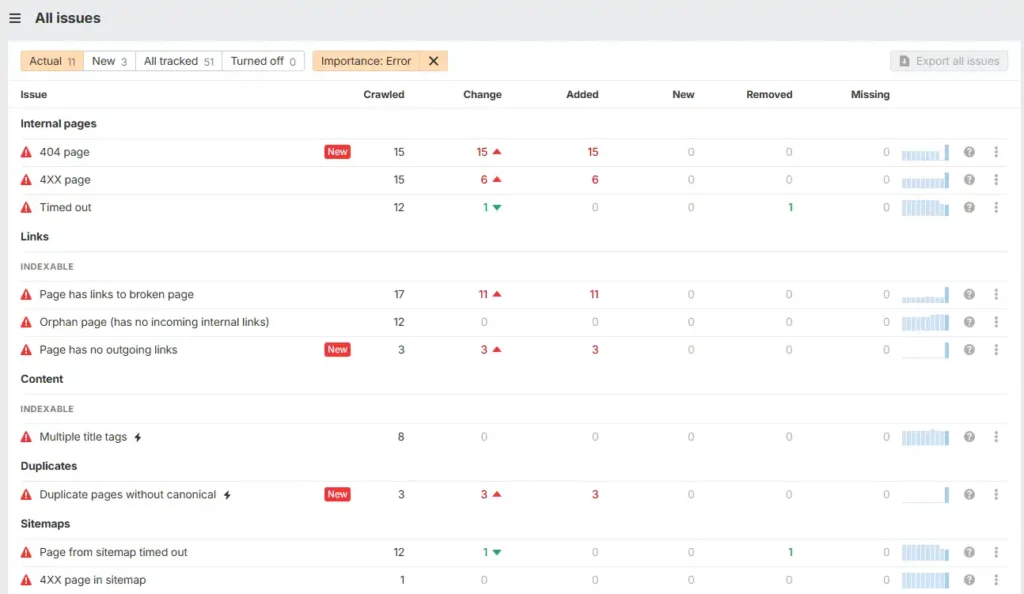
When running a Site Audit in Ahrefs Webmaster Tools, issues marked in red are classified as Critical Errors.
These are the most serious problems because they directly affect:
- user experience
- crawlability
- indexing
- rankings
Fixing these first usually gives the biggest improvement in your Health Score.
🧱 Broken or Unreachable Pages (404 / 4XX / Timed Out)
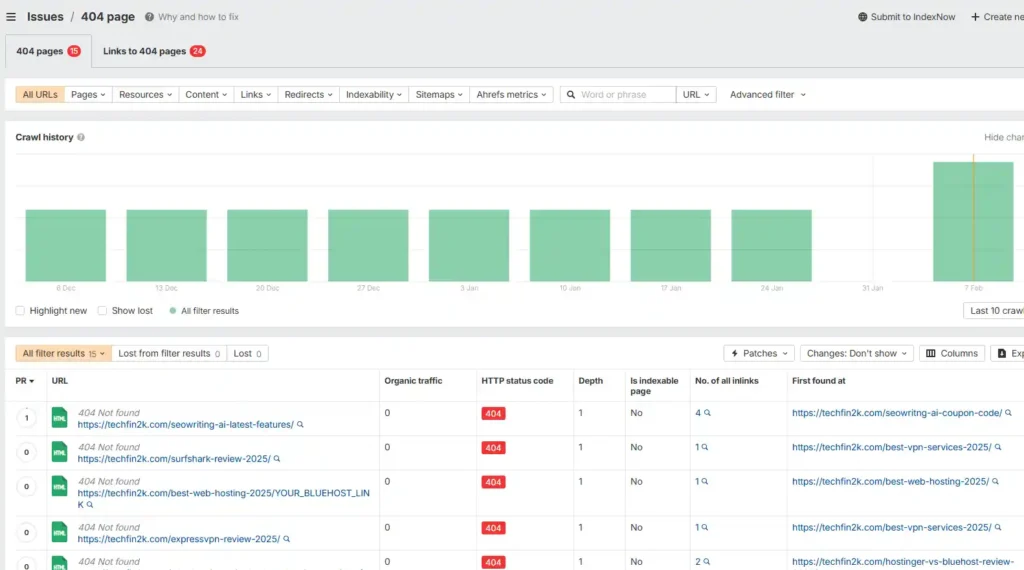
What Ahrefs found
Several URLs returned 404 (Not Found) or other 4XX errors, meaning the server could not load those pages when Ahrefs tried to crawl them.
These URLs are still being discovered through:
- internal links
- sitemap
- or old indexed links
What this means
When users or Google visit these URLs, they see an error page instead of content.
This:
- wastes crawl budget
- breaks navigation
- reduces trust
- and may cause rankings to drop for those pages
How to fix (simple)
For each broken URL:
- Page still needed → restore it
- Page moved → add a 301 redirect (Rank Math / Yoast / Redirection plugin)
- Page permanently removed → delete links and remove from sitemap
You don’t need server configs — a WordPress redirect plugin is enough.
Why fixing helps
- visitors don’t hit dead pages
- Google crawls the correct URLs faster
- link equity is preserved
- Health Score improves quickly
👉 These are usually the easiest and fastest SEO wins.
🔗 Pages Linking to Broken URLs
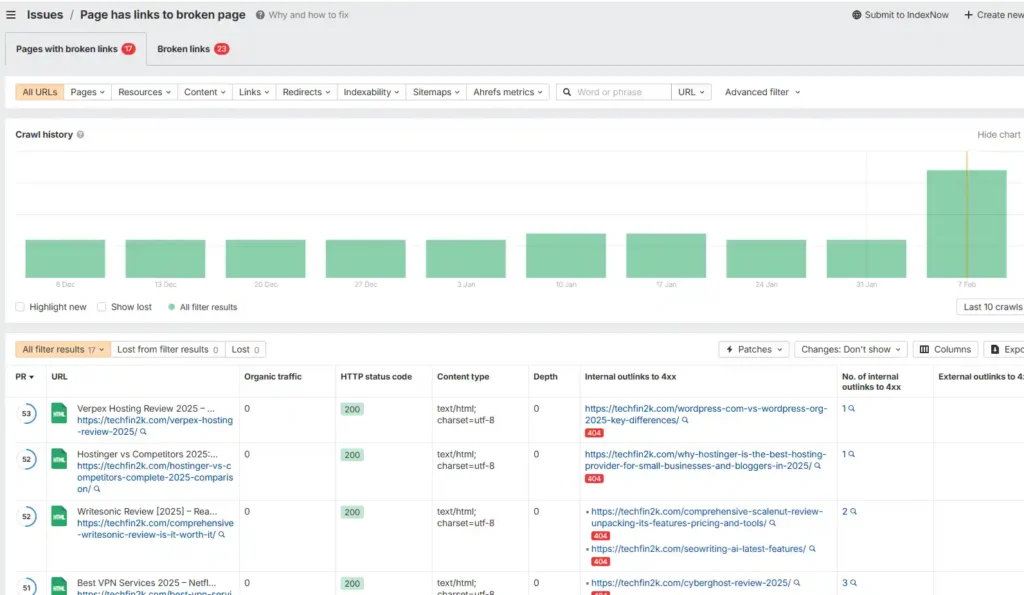
What Ahrefs found
Some pages on your site contain links that point to 404/4XX pages.
What this means
Visitors click internal links expecting content but land on errors.
Search engines also treat this as poor site quality.
How to fix
Open the “Pages linking to broken pages” report → edit those pages → update the link to the correct URL or remove it.
Takes only a few minutes per page.
Why fixing helps
- smoother navigation
- better user experience
- stronger internal linking
- improved crawl efficiency
🕸 Internal Linking Issues (Orphan / Isolated Pages)
Includes
- Orphan pages (no incoming internal links)
- Pages with no outgoing links
What this means
Some pages are disconnected from your website structure.
If Google cannot reach a page through links, it may:
- crawl it less often
- or not rank it well
How to fix
Add relevant internal links:
- link TO the page from related articles
- add links FROM the page to other useful content
Think of it as connecting your pages like a web.
Why fixing helps
- better indexing
- improved rankings
- stronger topical authority
- easier navigation for users
Duplicate / Title Problems
What this means
Search engines found duplicate or conflicting page signals such as:
- multiple title tags
- duplicate pages without canonical
This can confuse Google about which version to rank.
How to fix
Use Rank Math or Yoast to:
- keep only one title tag
- set canonical URLs properly
Most fixes take just a few clicks.
Why fixing helps
- clearer SEO signals
- prevents ranking dilution
- improves page visibility
🟡 Warnings (Important Improvements)
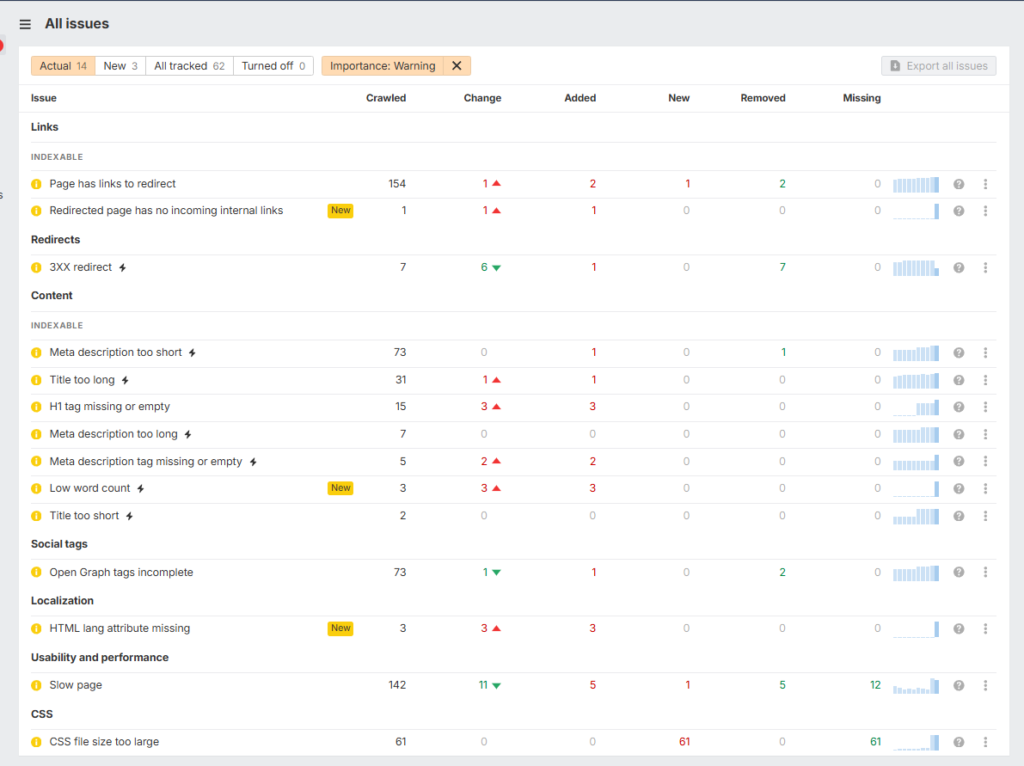
After fixing Critical Errors, the next step is resolving Warnings.
Warnings are not broken pages, but they highlight inefficiencies and missed optimizations that can:
- reduce rankings
- lower CTR
- slow crawling
- affect performance
Fixing these helps polish your site and improve overall SEO quality.
🔁 Redirect & Link Efficiency Issues
Includes
- Pages linking to redirects
- Redirected page has no incoming links
- 3XX redirects
What this means
Some internal links point to URLs that immediately redirect instead of the final page.
Example:
Page A → old URL → redirect → final page
This creates extra hops for both users and search engines.
How to fix
Update internal links to point directly to the final destination URL instead of the redirected one.
You can:
- edit posts/pages manually
- or update links during content edits
Benefit
- faster page loads
- cleaner crawl paths
- stronger link equity
- better SEO efficiency
🏷 On-Page SEO & Content Issues
Includes
- Meta description too short / long / missing
- Title too long / short
- H1 tag missing or empty
- Low word count
What this means
Some pages are missing important on-page SEO elements or have poorly optimized titles and descriptions.
These don’t break the page, but they hurt:
- click-through rate
- keyword relevance
- search visibility
How to fix
Open each affected page and:
- write clear titles (50–60 chars)
- add meta descriptions (140–160 chars)
- ensure one proper H1 tag
- expand thin content with helpful information
Your SEO plugin (Rank Math / Yoast) shows these fields directly in the editor.
Benefit
- higher CTR from Google
- better keyword targeting
- stronger rankings
- more organic traffic
🌐 Social & Localization Tags
Includes
- Open Graph tags incomplete
- HTML lang attribute missing
What this means
Social media platforms and browsers don’t get proper page metadata.
This affects:
- link previews on Facebook/Twitter
- language targeting
How to fix
Use Rank Math or Yoast to:
- enable Open Graph tags
- set your site language (usually already configured in WordPress settings)
Most fixes are automatic with SEO plugins.
Benefit
- better social sharing previews
- improved accessibility
- clearer signals to search engines
⚡ Performance Issues
Includes
- Slow pages
- CSS file size too large
What this means
Some pages load slower than expected due to heavy files or large CSS resources.
Slow pages hurt:
- user experience
- bounce rate
- rankings (Core Web Vitals)
How to fix
Simple improvements:
- optimize images
- enable caching plugin
- minify CSS/JS
- remove unused plugins/themes
No need for complex changes — basic optimization is enough.
Benefit
- faster loading
- better PageSpeed scores
- higher rankings
- happier visitors
🔵 Notices (Optional Improvements & Best Practices)
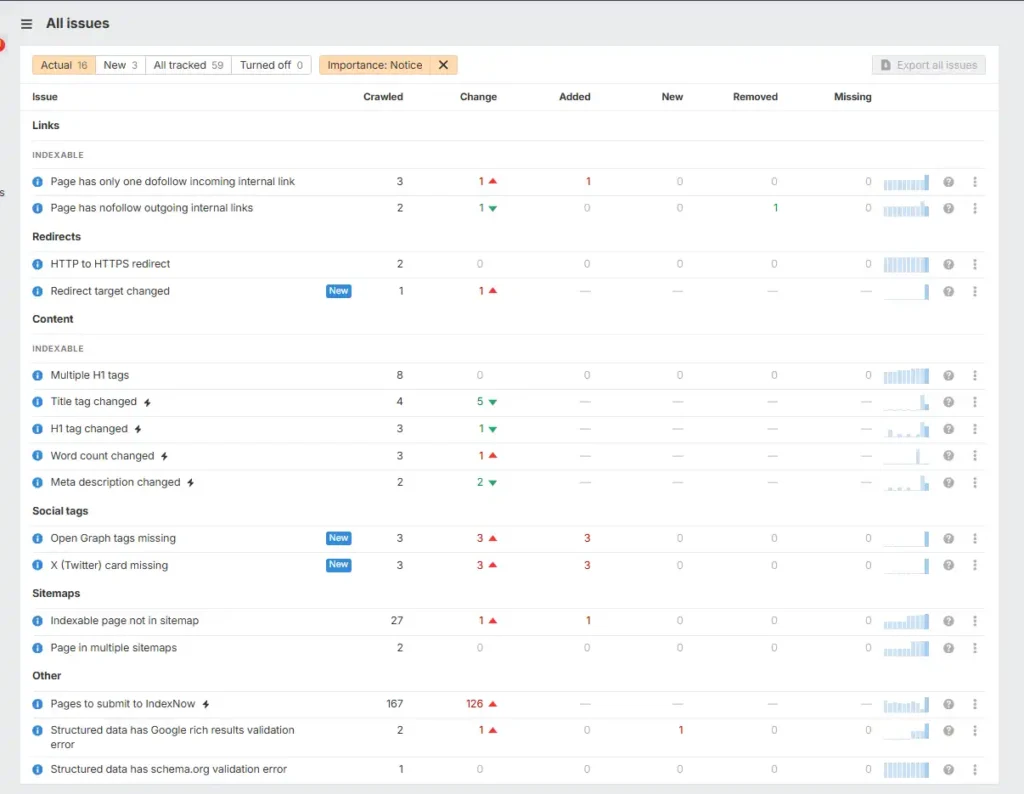
After fixing Errors and Warnings, you’ll see Notices in blue.
Notices are not critical problems.
Your site will still work fine, but these highlight small improvements and SEO best practices that can make your website:
- cleaner
- easier to crawl
- better optimized
- future-proof
Think of these as polishing tasks, not urgent fixes.
🔗 Internal Link Signals
Includes
- Page has only one dofollow incoming internal link
- Page has nofollow outgoing internal links
What this means
Some pages are weakly connected within your site.
Either:
- very few pages link to them, or
- links use
nofollow, reducing SEO value
How to fix
Add more relevant internal links from related articles and keep most internal links dofollow (default in WordPress).
No special tools needed — just improve your linking naturally.
Benefit
- stronger page authority
- better crawlability
- improved rankings for deeper pages
🔁 Redirect & Change Tracking
Includes
- HTTP → HTTPS redirect
- Redirect target changed
- Title/H1/word count/meta changed
What this means
Ahrefs detected updates or redirects between crawls.
These are mostly informational, not problems.
It simply tells you:
“Something changed since the last audit.”
How to fix
Usually no action needed.
Only review if:
- you didn’t expect changes
- or traffic dropped suddenly
Benefit
- helps monitor accidental SEO changes
- useful for tracking site updates
🏷 Social Tags Missing
Includes
- Open Graph tags missing
- X (Twitter) card missing
What this means
When your pages are shared on social media, previews may look plain (no image/title/description).
This doesn’t affect rankings directly, but affects visibility and clicks.
How to fix
Enable Social/Open Graph settings in Rank Math or Yoast.
Most plugins auto-generate these tags.
Benefit
- better social previews
- higher click-through rates
- more traffic from shares
🗺 Sitemap Improvements
Includes
- Indexable page not in sitemap
- Page in multiple sitemaps
What this means
Your sitemap isn’t perfectly organized.
Either:
- important pages are missing
- or duplicates exist
Sitemaps help Google discover pages faster.
How to fix
Regenerate your sitemap using your SEO plugin and resubmit it in Google Search Console.
Usually one click.
Benefit
- faster indexing
- cleaner crawl signals
- better discovery of new content
⚡ Structured Data & Indexing Enhancements
Includes
- Structured data validation errors
- Pages to submit to IndexNow
What this means
Some pages have minor schema markup issues or haven’t been submitted for faster indexing.
These don’t break your site but may limit rich results.
How to fix
- validate schema using your SEO plugin or Google Rich Results Test
- enable IndexNow if supported
Optional but helpful.
Benefit
- eligibility for rich snippets
- faster indexing
- better visibility in search results
📋 Quick Fix Summary (At a Glance)
Use this table as a quick reference while fixing issues in Ahrefs Site Audit.
| Issue Type | What it means | How to fix | Benefit |
|---|---|---|---|
| 404 / 4XX Pages | Broken or missing pages still linked or indexed | Restore page or add 301 redirect | Better UX + saves crawl budget |
| Broken Internal Links | Pages link to dead URLs | Update or remove bad links | Cleaner navigation + stronger SEO |
| Redirect Chains | Links pass through unnecessary redirects | Link directly to final URL | Faster pages + better link equity |
| Internal Linking Issues | Orphan or weakly connected pages | Add more relevant internal links | Improved crawlability & rankings |
| Titles & Meta Tags | Missing or poorly optimized metadata | Optimize using Rank Math/Yoast | Higher CTR & visibility |
| Slow Pages | Heavy files slow down loading | Compress images, cache, minify CSS/JS | Better speed & rankings |
| Social Tags Missing | No Open Graph/Twitter preview data | Enable social tags in SEO plugin | Better sharing previews |
| Sitemap Issues | Important pages missing/duplicated | Regenerate & resubmit sitemap | Faster indexing |
| Structured Data | Schema validation problems | Fix markup using plugin/tools | Rich snippets eligibility |
✅ SEO Audit Checklist (Quick Action List)
Follow this checklist while fixing issues in Ahrefs. Tick items as you complete them.
What Else You Get with Ahrefs Webmaster Tools (Free Features)
Most people think Ahrefs Webmaster Tools only provides Site Audit.
But after verifying your website, you also get access to a lightweight Site Explorer overview + Web Analytics, which helps you monitor:
- backlinks
- referring domains
- basic keyword rankings
- traffic insights
These are not full research tools like the paid version — but they’re very useful for tracking your own site’s growth.
Think of them as monitoring dashboards, not deep SEO tools.
1) Backlink overview (Site Explorer — free for your verified sites)
Ahrefs shows a simple backlink profile for your domain inside Site Explorer.
You can see:
- Domain Rating (DR)
- URL Rating (UR)
- Total backlinks
- Referring domains
- Dofollow links
- Traffic of linking domains
- First seen date
- Spam indicators
What this tells you
This helps you quickly answer:
- Am I gaining backlinks?
- Are links coming from real websites?
- Are some links low quality or spammy?
For example, you may notice domains marked “SPAM” or showing:
- 0 traffic
- 0 keywords
- strange domain names (.sale, .xyz, .icu, etc.)
- thousands of outgoing links
These are usually:
- auto-generated directories
- scraper sites
- bot links
- junk backlinks
Should you worry about spam links?
Usually no.
Google mostly ignores low-quality links automatically, so they rarely hurt rankings.
For small blogs, you can simply:
- ignore them
- focus on earning quality links instead
What you can’t do in free version
The free plan does not allow:
- competitor backlink analysis
- full exports
- advanced filters
- large historical reports
So treat this as:
👉 a monitoring tool, not a research tool
Why it’s still useful
Even with limits, you can:
- track link growth
- confirm guest post links are live
- detect sudden spam spikes
- monitor overall authority
Which is enough for most beginners.
🔍 Organic Keywords (Limited Preview Only)
Ahrefs also shows a small list of keywords your site ranks for.
But in the free version, you usually see:
- only a few keywords
- positions
- small traffic estimates
Example:
You might see just 2–5 keywords with positions like 70+, showing minimal traffic.
What this means
This is not a full keyword research tool.
It simply shows:
👉 “Here are some rankings we detected for your site.”
Why it’s still helpful
Even this limited preview helps you:
- confirm pages are indexed
- see if new posts start ranking
- track early keyword visibility
- spot pages getting impressions
For real keyword research, you’ll need the paid Keywords Explorer.
📊 Web Analytics (Completely Free & Very Practical)
Here’s a quick look at the free Web Analytics dashboard inside Ahrefs, showing traffic metrics, visitor behavior, and audience insights in one place.
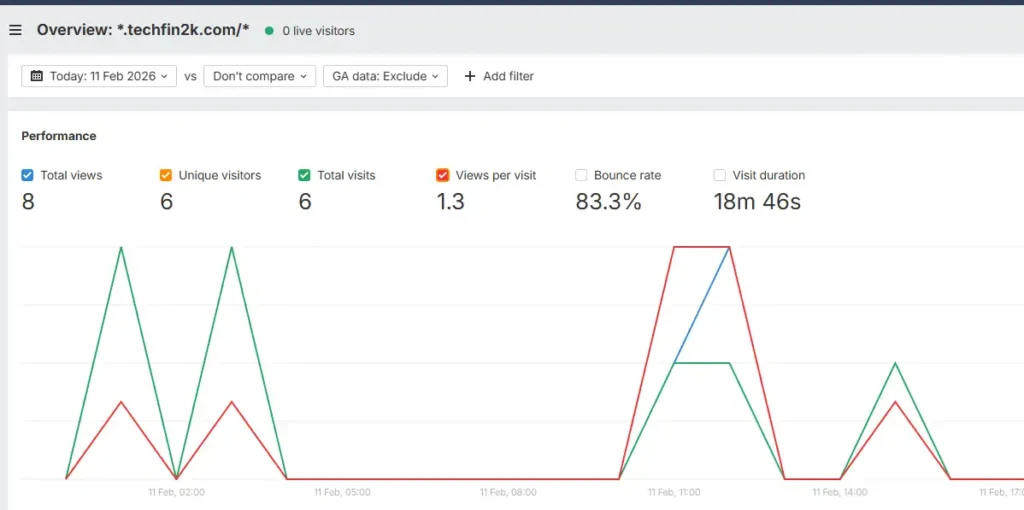
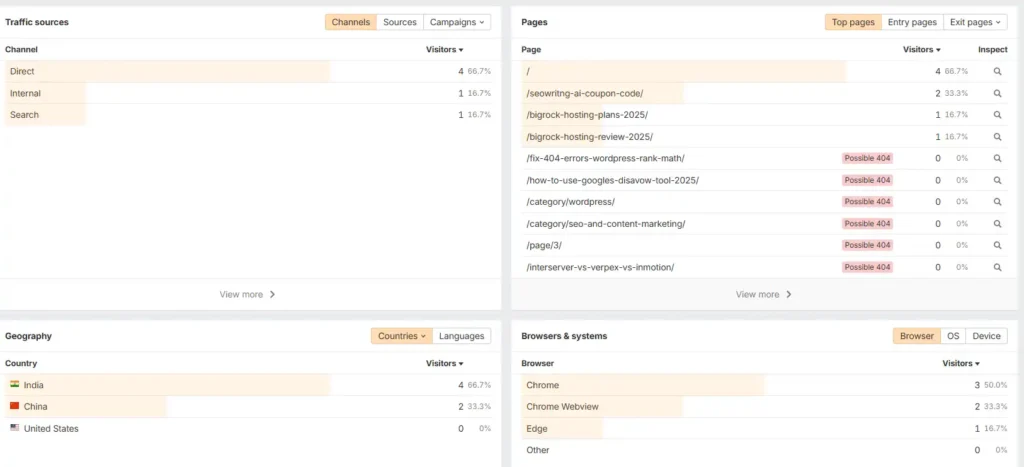
This is actually the most underrated feature of Ahrefs free.
Ahrefs includes its own Web Analytics, which works like a simple alternative to Google Analytics.
And it’s 100% free.
Why this is helpful (compared to Google Search Console)
While Google Search Console focuses mainly on search performance (impressions, clicks, rankings, and queries), Ahrefs Web Analytics shows visitor behavior metrics such as:
- bounce rate
- visit duration
- traffic sources/referrers
- total visits
- entry/exit pages
GSC does provide countries and device data, but only for search traffic from google.
Ahrefs shows traffic from all sources (direct, referral, internal, AI search, etc.), giving you a more complete picture of how people actually use your site.
So both tools complement each other rather than replace each other.
Always position it like:
👉 GSC = SEO performance
👉 Ahrefs Analytics = behavior insights
NOT:
👉 Ahrefs replaces GSC
Ahrefs Webmaster Tools (AWT-Free version) vs. Google Search Console (GSC)
| Feature | Google Search Console (GSC) | Ahrefs Webmaster Tools (AWT) |
|---|---|---|
| Data Source | Real Google Data Direct data from Google Search (clicks, impressions, rankings). | Real Visitor Data via Web Analytics Estimated SEO Data via Ahrefs search index. |
| Search Performance | Actual clicks, impressions, CTR, and average position from Google Search. | Organic keyword rankings discovered by AhrefsBot; traffic is estimated using search volume models. |
| Index & Crawl Status | Shows how Google crawls and indexes your URLs (URL Inspection + Coverage reports). | Independent technical crawl using AhrefsBot; identifies issues but does not show Google’s index state. |
| Technical SEO Analysis | Core Web Vitals, mobile usability, indexing problems. | Full Site Audit detecting status codes, canonicals, redirect chains, broken links, meta issues, orphan pages, performance warnings. |
| Backlink Data | Limited links report (top linking domains and pages only). | Backlink overview for verified sites: referring domains, anchor text, link types. |
| Traffic & Behavior | Search traffic only (queries, pages, countries, devices — Google Search only). | Web Analytics dashboard: total visits, bounce rate, session duration, traffic channels (Search, Direct, AI, Internal), countries, browsers. |
| Competitor Analysis | ❌ Not available | ❌ Not available in free AWT (requires paid Ahrefs). |
| Primary Strength | Source of truth for Google search performance and indexing. | Technical auditing + backlink monitoring + privacy-friendly visitor analytics. |
Google Search Console tells you how Google sees your site in Search. Ahrefs Webmaster Tools tells you what technical issues exist, how your backlink profile looks, and how visitors behave once they land on your site. Both tools complement each other — they serve different data purposes and should be used together.
| Feature | Ahrefs Free (AWT) | Paid Plans (Starter / Lite / Standard) |
|---|---|---|
| Price | $0 | From $29/month and above |
| Site Audit | ~5,000 crawl credits per verified project | Higher crawl limits + advanced automation (higher tiers) |
| Historical Data | Limited recent snapshot only | Historical data access (varies by plan) |
| Analyze Competitors | ❌ Not available | ✅ Full Site Explorer for any domain |
| Keyword Research | ❌ Not available | ✅ Full Keywords Explorer |
| Rank Tracker | ❌ Not included | ✅ Track and monitor specific keywords |
| Projects | Unlimited verified domains only | Limited projects including unverified domains |
Conclusion & Verdict
If you run a small blog or manage one or two sites, Ahrefs Webmaster Tools (AWT) is a no-brainer. It gives you a powerful free Site Audit, a basic Site Explorer view of your backlinks and organic keywords, and privacy-friendly Web Analytics — all without a paid subscription.
Use AWT to catch technical SEO issues, monitor backlinks, and track essential visitor behavior. While it won’t replace the full Ahrefs suite for deep competitor or keyword research, it solves most problems that stop beginners and small publishers from improving search performance.
Quick next steps
Follow this simple workflow to get value from Ahrefs Webmaster Tools fast:
- Verify your site
Import from Google Search Console (recommended) or use manual verification. - Run a full Site Audit
Start a crawl and review critical errors first (404/4XX pages, broken links, timeouts). - Fix high-priority issues
Restore or redirect broken URLs, clean up internal links, and remove redirect chains. - Enable Web Analytics
Add the tracking script to your site header to start monitoring real visitor behavior. - Re-crawl and resubmit
After fixes, run targeted crawls again and resubmit your sitemap.
Use this guide as a repeatable checklist:
audit → triage → fix → re-audit
For competitor research and large-scale exports you may eventually need the paid plan, but AWT is more than enough to get your site technically sound and tracking meaningful traffic.
👉 Now run your first free site audit with Ahref and see what issues you can fix today.
Frequently Asked Questions (FAQ)
Q1 — Is Ahrefs Webmaster Tools really free?
Yes. Ahrefs Webmaster Tools is free for verified websites. It includes a full Site Audit, a limited Site Explorer for your domains, and free Web Analytics. Paid plans are only required for competitor research and advanced features.
Q2 — Do I need to add a verification tag to my header? Will that break SEO?
Yes, verification is required. Adding the tag via WPCode or your theme header is safe and does not affect indexing or SEO. It only confirms site ownership.
Q3 — How many pages will AWT crawl for free?
The free Site Audit supports roughly 5,000 pages per project. Use sitemaps and priority URLs to ensure important pages are crawled first.
Q4 — Can I analyze competitors with AWT?
No. Free accounts only analyze verified domains. Competitor research requires a paid Ahrefs subscription.
Q5 — What’s the fastest way to fix 404/4XX errors?
Quick workflow:
- Export the list
- Decide: restore / 301 / 410 / remove links
- Implement redirects via plugin or server
- Update sitemap
- Re-crawl
Q6 — How does Ahrefs Web Analytics compare with Google Search Console?
They complement each other. Google Search Console focuses on search performance (queries, clicks, rankings). Ahrefs Web Analytics shows visitor behavior like visits, bounce rate, session time, and traffic sources across all channels.
Q7 — Do I need cookies or a consent banner for Ahrefs Web Analytics?
It’s designed to be more privacy-friendly than traditional analytics tools. Still follow local privacy laws if you use other tracking tools or collect personal data.
Q8 — I found spammy referring domains. Should I disavow them?
Usually no. A few low-quality links are normal and often ignored by search engines. Only consider disavow if you see clear large-scale spam or manipulative patterns.
