

- Introduction
- Understanding Ahrefs AI Content Helper: What It Does
- Step 1: Creating Your Brand Kit
- Step 2: Creating Your Article – Setup Fields
- Step 3: Understanding the Generated Content and Interface
- Step 4: Using the Title Tag Optimization Tool
- Step 5: Understanding Topics and Content Scoring
- Step 6: Meta Description Optimization
- Step 7: Headings and Competitors Panels
- Final Verdict: Is Ahrefs AI Content Helper Worth Using?
- Frequently Asked Questions (FAQs)
Introduction
Creating high-quality, SEO-optimized content that ranks requires understanding your competitors, covering the right topics, and maintaining consistent brand voice. Ahrefs AI Content Helper promises to streamline this process by analyzing top-ranking pages and guiding your content creation with real-time optimization scores. But does it actually deliver for affiliate marketers and detailed technical reviewers?
After spending 4+ hours testing Ahrefs AI Content Helper for creating hosting comparison articles, I discovered both powerful features and significant limitations that aren’t mentioned in promotional materials. This comprehensive guide walks you through exactly how to use the tool, what works exceptionally well, where it frustrates experienced content creators, and whether the $99/month upgrade is worth it for your content strategy.
Unlike generic tutorials that show perfect workflows, this guide documents the actual struggles, confusing interface decisions, and workarounds I discovered while creating a real hosting comparison article. You’ll learn from my mistakes so you can avoid wasting hours fighting with competitor URL lock-ins, AI context amnesia, and inconsistent data accuracy issues.
What You’ll Learn:
- Setting up Brand Kits for consistent voice across content
- Target keyword selection and location targeting strategy
- Understanding content scores and topic coverage optimization
- Using AI Chat, competitor analysis, and heading structure tools
- Real data accuracy issues I discovered with performance metrics
- Honest verdict: Free tier vs. $99/month upgrade value
- Better alternatives for specific content types
Understanding Ahrefs AI Content Helper: What It Does
Ahrefs AI Content Helper is a content optimization tool that analyzes top-ranking competitor pages for your target keyword and scores your content coverage from 0-100 in real-time. Unlike generic AI writers, it focuses on topic coverage rather than keyword stuffing, identifying core topics from competitors and tracking which ones you’ve addressed.
Key Features:
- Real-time content scoring (0-100) based on competitor topic analysis
- Search intent grouping to target the right audience
- Full competitor content access with performance metrics
- AI chat that references competitor articles and your draft
- Title, meta description, and heading optimization tools
Critical Limitation: Free tier includes 1 article per month. Additional articles require $99/month upgrade.
Step 1: Creating Your Brand Kit
Before creating content, set up a Brand Kit so AI suggestions match your writing style instead of generic output.
What Is a Brand Kit?
Brand Kits analyze your existing articles to understand your writing voice, audience, and content structure. When you use “Ask AI” features later, suggestions automatically align with your established style rather than producing generic AI content.
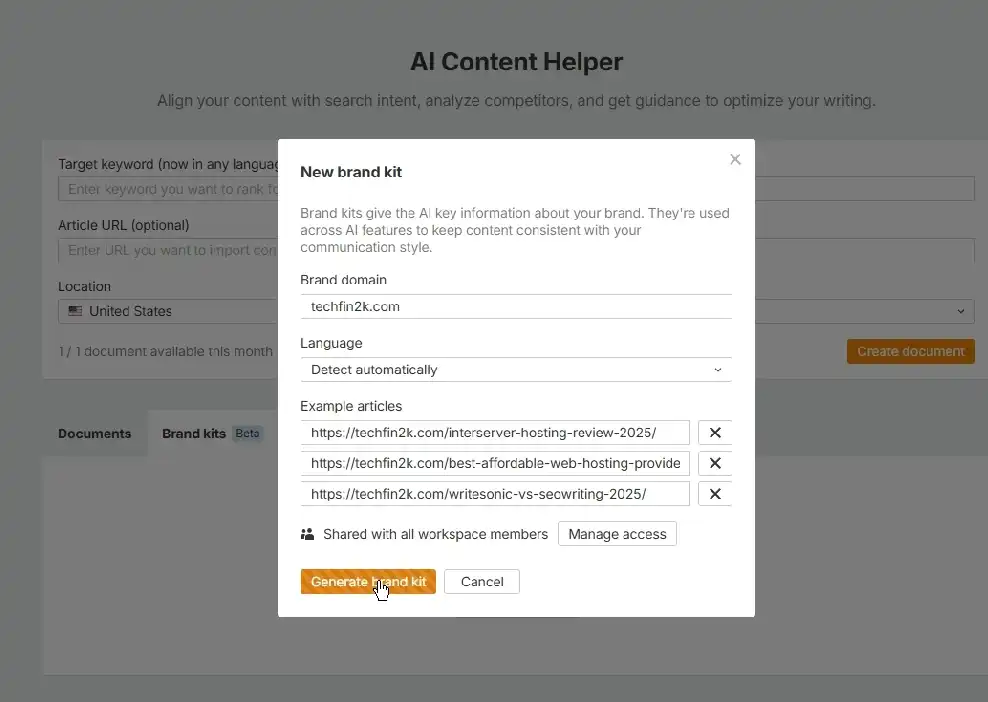
Quick Setup Process
- Access: Click “Brand kits” tab → “+ Add brand kit” button
- Domain: Enter your website (e.g.,
foenix.techfin2k.com) - Language: Choose “Detect automatically” or select manually
- Add 3 Example URLs: Choose articles that represent your best work and target style
My Example URLs:
- InterServer Hosting Review 2025 – detailed technical review
- Best Affordable Web Hosting Providers for Beginners – comparison structure
- Writesonic vs SEOWriting 2025 – head-to-head methodology
- Generate: Click “Generate brand kit” and review guidelines (1-2 Minutes)
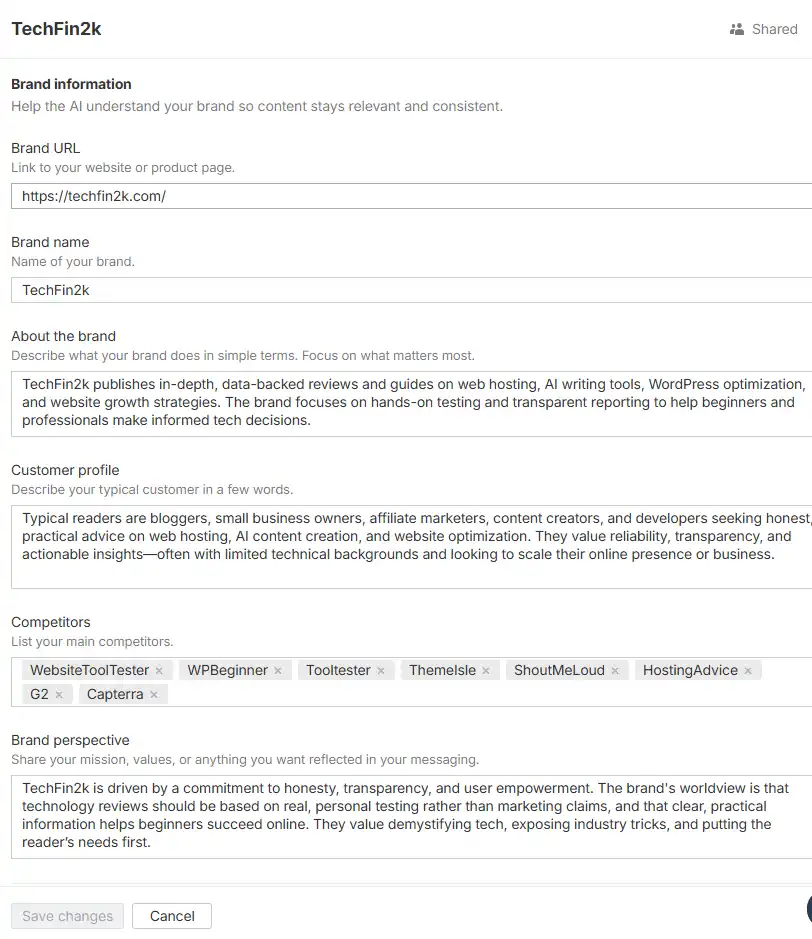
Ahrefs creates guidelines covering target audience, brand values, writing persona, style rules, and tone preferences. All fields are editable if you want to customize further.
Pro Tip: You can create multiple Brand Kits for different content types or websites. Apply your Brand Kit in Settings when creating articles to ensure AI maintains your voice.
What Brand Kit Actually Generates
When you create a Brand Kit, Ahrefs analyzes your three example articles and generates detailed guidelines across multiple categories. Here’s what it created for TechFin2k:
Brand Information
Brand URL: foenix.techfin2k.com
Brand Name: TechFin2k
About the Brand:
“TechFin2k publishes in-depth, data-backed reviews and guides on web hosting, AI writing tools, WordPress optimization, and website growth strategies. The brand focuses on hands-on testing and transparent reporting to help beginners and professionals make informed tech decisions.”
Customer Profile
“Typical readers are bloggers, small business owners, affiliate marketers, content creators, and developers seeking honest, practical advice on web hosting, AI content creation, and website optimization. They value reliability, transparency, and actionable insights—often with limited technical backgrounds and looking to scale their online presence or business.”
Competitors
WPBeginner, HostingAdvice, WebsiteToolTester, Tooltester, Capterra, G2, ThemeIsle, ShoutMeLoud
Brand Perspective
“TechFin2k is driven by a commitment to honesty, transparency, and user empowerment. The brand’s worldview is that technology reviews should be based on real, personal testing rather than marketing claims, and that clear, practical information helps beginners succeed online. They value demystifying tech, exposing industry tricks, and putting the reader’s needs first.
Step 2: Creating Your Article – Setup Fields
With your Brand Kit ready, navigate back to AI Content Helper to create your article. The interface presents four key fields:
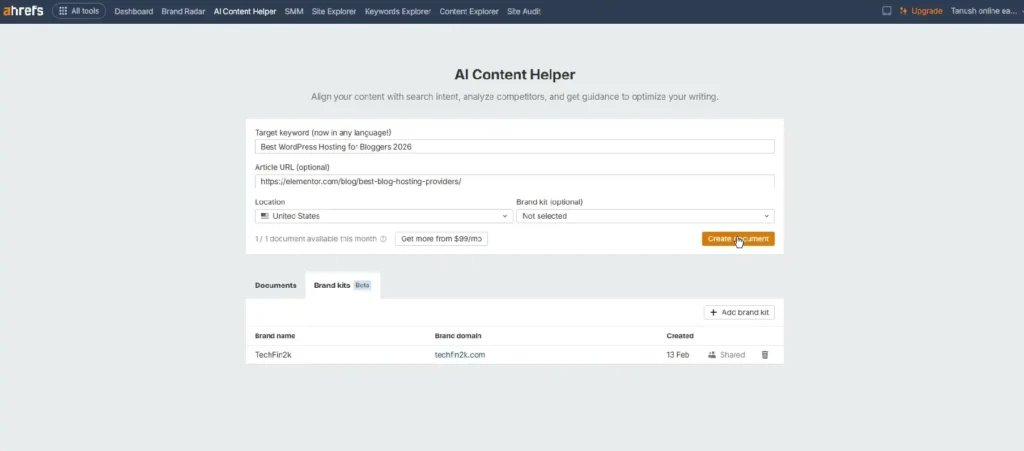
1. Target Keyword
Enter your primary focus keyword: Best WordPress Hosting for Bloggers 2026
Choose keywords with commercial intent that align with your affiliate partnerships and expertise.
2. Article URL (Optional) – My Critical Mistake
What this field is for: Importing YOUR existing published article to update it.
What I did wrong: I searched Google, found a top-ranking article, and entered elementor.com/blog/best-blog-hosting-providers in the Article URL field.
Why this was a mistake: This locked the tool into Elementor’s structure and host recommendations (I’ll show you the consequences later).
What you should do: Leave this field completely blank when creating new content. Only enter your own published URL if updating existing articles.
3. Location
Select your target market – I chose United States for highest affiliate commission potential.
Location determines which competitor pages Ahrefs analyzes and affects search intent grouping.
Search Intent Selection
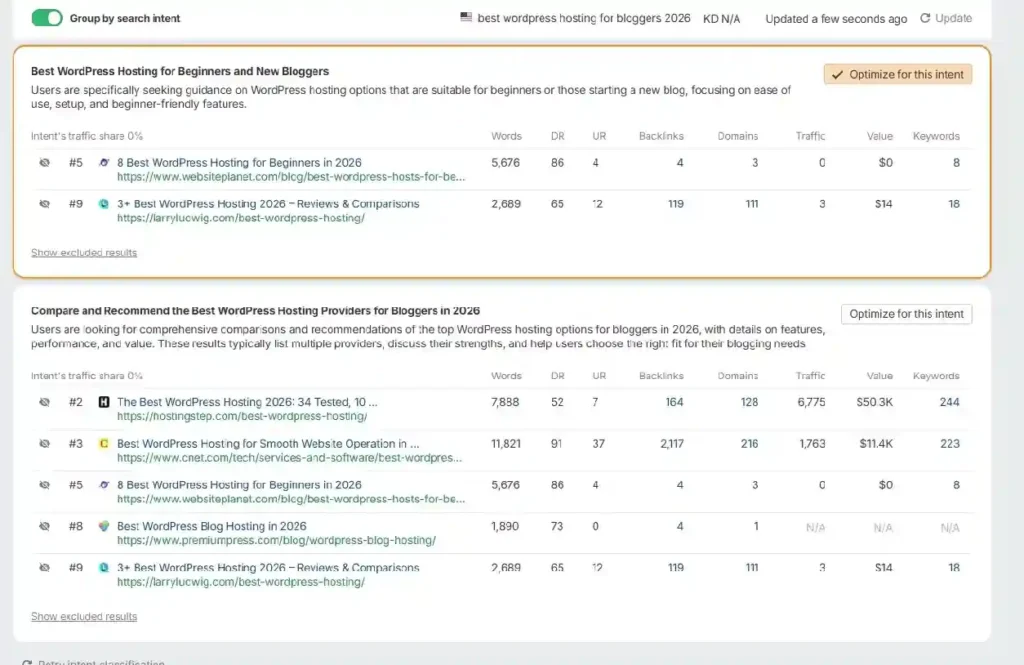
After clicking “Create document,” Ahrefs analyzed competitors and presented two search intents within 25 seconds:
- Best WordPress hosting for beginners and new bloggers
- Compare and recommend the best WordPress hosting providers for bloggers in 2026 ✓
I selected the second option for commercial comparison intent aligned with affiliate monetization.
Total generation time: Approximately 62 seconds from clicking “Create document” to first draft appearing in the editor.
Step 3: Understanding the Generated Content and Interface
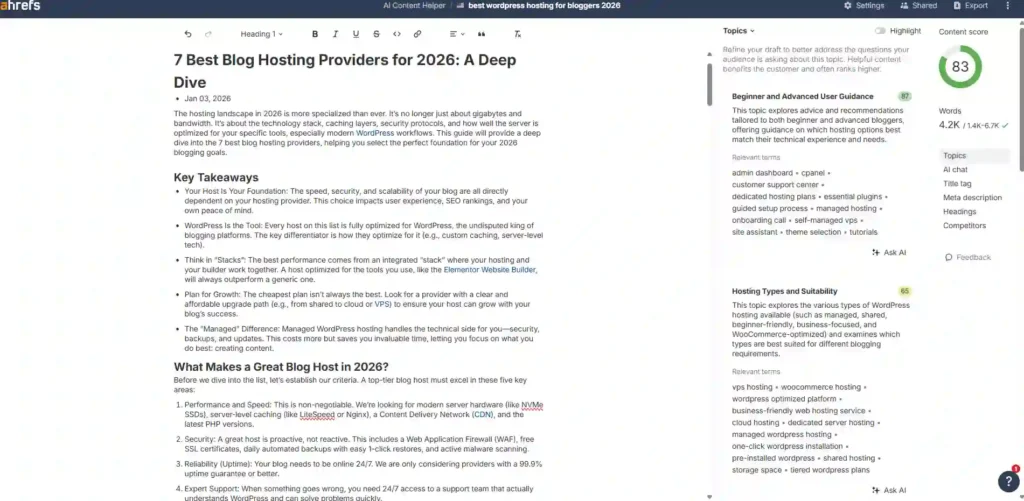
After selecting search intent, Ahrefs AI Content Helper generated a complete article draft titled “7 Best Blog Hosting Providers for 2026: A Deep Dive”.
The Editor Layout
Center – Main Writing Area:
- Full article draft with formatting toolbar (headings, bold, italic, lists, links)
- Title: “7 Best Blog Hosting Providers for 2026: A Deep Dive”
- Editable content organized in sections
Right Sidebar – Optimization Tools:
- Content Score: 83/100 – Green circular indicator
- Total words count – 4.2K
- Topics dropdown – Individual topic scoring visible:
- “Beginner and Advanced User Guidance” (87 score)
- “Hosting Types and Suitability” (65 score)
- Tabs below: AI chat, Title tag, Meta description, Headings, Competitors
- Two “Ask AI” buttons at bottom for content requests
What the AI Generated
The draft includes:
- Introduction & Key Takeaways (300 words)
- “What Makes a Great Blog Host in 2026?” section – 5 evaluation criteria
- 7 Detailed Host Reviews (500-700 words each):
- Elementor Hosting (positioned as #1)
- Hostinger
- SiteGround
- Bluehost
- WP Engine
- GreenGeeks
- HostGator
- “Comparison: Which Blog Host Is Right for You?” section with text-based comparison:
“Elementor Hosting | All-in-One Elementor Users | Google Cloud C2 + Enterprise CDN | Enterprise WAF & DDoS Protection
Hostinger | Budget-Conscious Beginners | LiteSpeed Servers + LSCache | In-House WAF & Free SSL | Low” [etc.]
- Final Verdict section
- FAQ (10 questions)
The Competitor URL Problem
Because I entered Elementor’s URL, the AI featured their recommended hosts, not mine:
❌ Elementor Hosting (#1 – not my affiliate)
❌ HostGator (#7 – not my affiliate)
✅ Hostinger (tested, not affiliate)
✅ Bluehost (affiliate, not tested)
✅ GreenGeeks (affiliate, not tested)
Missing my tested affiliates:
Solution: Use Ask AI to replace hosts and add your testing data (we’ll explore this next).
Step 4: Using the Title Tag Optimization Tool
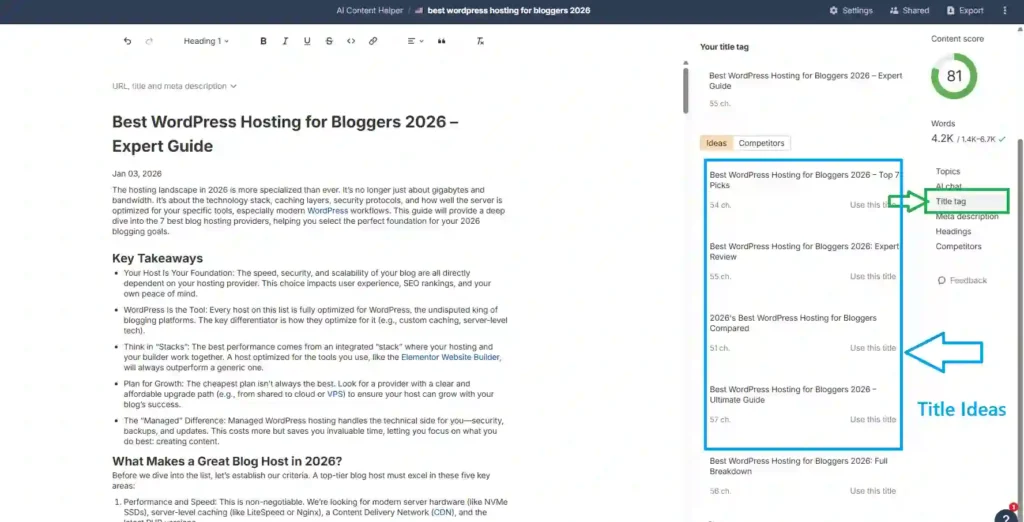
Click “Title tag” in the right sidebar.
What the Tool Provides
The tool displays educational guidance at the top:
- Include your target keyword
- Keep title between 50–60 characters
- Briefly describe your topic
Below this, it generates 6 alternative title suggestions based on your content.
Examples from my testing:
- Best WordPress Hosting for Bloggers 2026 – Full Comparison
- Best WordPress Hosting for Bloggers 2026 – Expert Picks ✓ (I selected this)
- Best WordPress Hosting for Bloggers 2026 – Expert Guide
- Best WordPress Hosting for Bloggers 2026: Top 7 Providers
Regenerate Feature
Click “Regenerate” at the bottom for 6 completely new suggestions. I tested this three times, receiving different variations each time.
Why I Chose “Expert Picks”
- “Expert” implies authority from hands-on testing
- “Picks” suggests curated selection
- 55 characters (within the 50-60 optimal range)
- Differentiates from generic “guide” titles
Note: Titles don’t auto-replace. Click your choice, copy it, and paste into your article title in the main editor.
Step 5: Understanding Topics and Content Scoring
The Topics panel scores how completely your article covers the concepts competitors discuss — not keyword density, but topical completeness.
Instead of tracking word counts, Ahrefs evaluates whether your content explains what searchers expect to learn.
How It Works
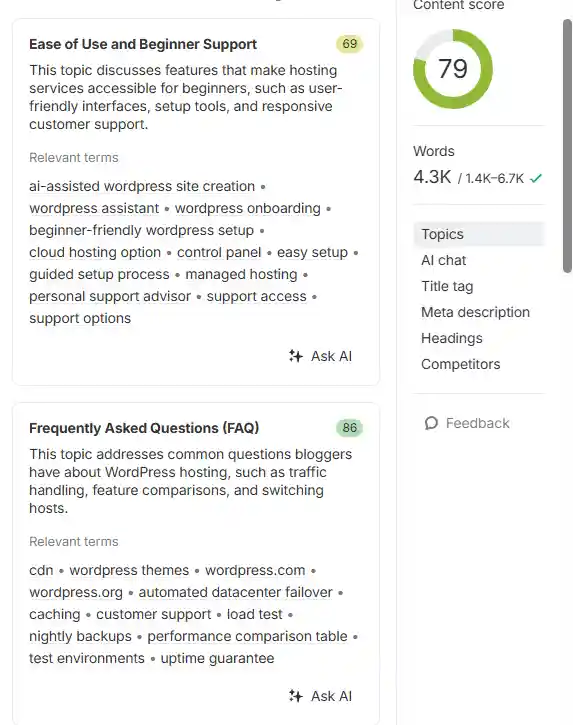
Click “Topics” in the right sidebar to view scored concepts:
My article topics:
- How to Choose the Right Hosting Provider: 90
- Ease of Use and Beginner Support: 69
- Performance Comparisons and Testing: 85
- Frequently Asked Questions (FAQ): 86
- Pros, Cons, and Feature Analysis: 73
- Hosting Types and Suitability: 64
Each topic displays:
- Coverage score (0–100)
- Description of expected discussion points
- Relevant terms competitors used
- Ask AI button to generate content for that topic
The overall content score updates dynamically as these individual topics change.
Critical Discovery: More Content ≠ Higher Score
To test the system, I used Ask AI to expand a low-scoring topic.
What happened:
- Before: Content Score 83/100
- After inserting AI-generated text: Content Score 79 ❌
The score decreased even though the article became longer.
Why this happened:
The AI-generated paragraph was readable but broader and less specific than my original explanation. When detailed points disappeared, coverage alignment weakened — and the score dropped.
Key insight:
The tool evaluates precision of coverage, not amount of text.
The Content Score Trap for Affiliate Marketers
My second critical test:
Used Ask AI to replace competitor hosts (Elementor, HostGator) with MY tested affiliates (Verpex, InMotion, InterServer, Thamara Cloud).
Result: Score plummeted from 83 to 61 ❌
Why:
My tested hosts weren’t in competitor articles, so covering them was considered “off-topic” by the AI’s analysis.
The fundamental problem:
The tool optimizes for matching competitors, not for providing unique value through authentic testing.
My recommendation:
Target 70-85 score while keeping your unique testing data and affiliate partners. Don’t chase 100 if it means removing what makes your content valuable.
Correct Workflow for Using Topics
The Topics panel works best as a guidance system, not an automation tool.
Avoid:
- ❌ Generate full section → Replace → Hope score improves
Use instead:
- ✅ Read what competitors discussed under the topic
- ✅ Write explanation in your own words with your testing data
- ✅ Use Ask AI only to clarify or expand specific points
- ✅ Keep your original structure and headings
This improves coverage while preserving accuracy and your authentic voice.
If Your Score Drops After Editing
Do not regenerate repeatedly.
Instead:
- Press Ctrl+Z (Undo)
- Add a brief supporting explanation manually
- Keep the same heading structure
In most cases the score recovers immediately because coverage balance returns.
What the Topics Panel Is Actually For
Think of it as a coverage checklist, not a writing engine.
It helps you:
- Identify missing explanations
- Validate completeness against search intent
- Refine sections iteratively
- Ensure readers’ expected questions are answered
You provide the expertise — the tool only verifies coverage.
📌 Note About the Topics Panel
The Topics panel is designed for progressive refinement, not one-click optimization. You’ll revisit it multiple times while editing — especially after rewriting sections or changing structure. Trying to optimize everything in one pass often causes score instability because the system evaluates balance, not volume. Treat it as continuous feedback rather than a final optimization step.
Bottom line: The Topics panel is a coverage checklist, not a replacement for your expertise. Use it to verify completeness, not to automate writing.
Step 6: Meta Description Optimization
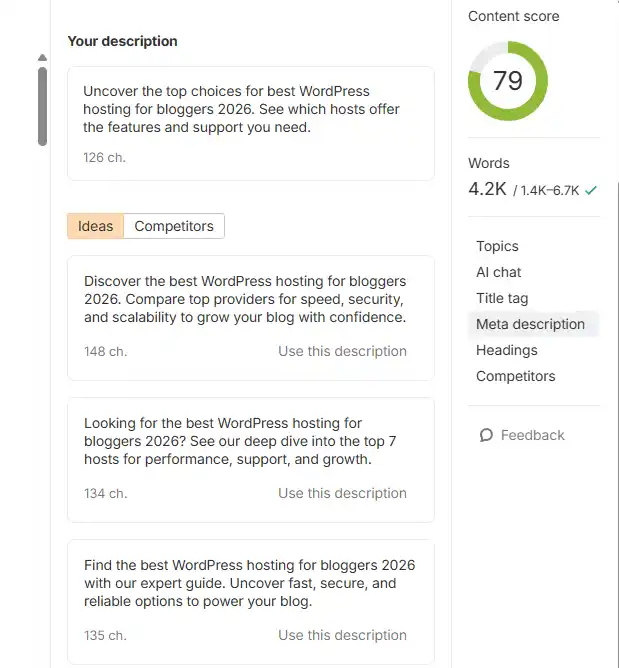
Click “Meta description” in the right sidebar to generate SERP-optimized summaries.
What the Tool Provides
The tool analyzes your draft and generates multiple description suggestions. Each one:
- Includes your primary keyword naturally
- Fits Google’s snippet length (typically 150-160 characters)
- Highlights different value angles (guide, comparison, expert picks, beginner help)
Additionally, it displays competitor meta descriptions from top-ranking articles, letting you see how they position their content in search results.
Understanding the Suggestions
The descriptions aren’t random—they match how top-ranking pages frame their messaging:
- Learning-focused: “Complete guide to choosing…”
- Comparison-focused: “Top 7 providers reviewed and compared…”
- Decision-focused: “Expert picks for bloggers in 2026…”
Your job: Choose the description that matches your article’s actual purpose. Compare against competitor descriptions to differentiate your positioning.
Regenerate Option
Click “Regenerate” for new variations if:
- The tone feels too generic
- It sounds like marketing copy instead of informative
- It doesn’t reflect your unique testing approach
- It’s too similar to competitor descriptions
Usually 2-3 regenerations produce a strong match.
Manual Application Required
Descriptions don’t auto-apply. Copy your selected version and paste it into your SEO plugin (Rank Math, Yoast, etc.).
Tip: Clarity beats cleverness. A simple description explaining exactly what readers will learn often outperforms persuasive wording because it aligns with search intent.
Step 7: Headings and Competitors Panels
After optimizing topics, Ahrefs provides two research-oriented panels:
- Headings — helps structure your article
- Competitors — shows how ranking pages approach the topic
Together they act as a built-in SERP research workspace inside the editor.
Headings Panel – Understanding Content Structure
Open the Headings tab in the sidebar.
Ahrefs extracts heading hierarchies from ranking pages and groups them by level:
- H2 main sections commonly used
- H3 supporting explanations
- H4 detailed sub-points
Instead of guessing what sections to include, you can see which structural patterns frequently appear across top pages.
How to insert headings:
Method 1 – Manual Copy
- Copy any suggested heading
- Paste it into your article
Method 2 – Direct Insert
- Click the position in your article
- Open Headings panel
- Click Insert
- The heading appears at that location
This allows quick restructuring without rewriting sections.
Important: The purpose is structural alignment—not copying content—so adapt the wording to match your article.
Competitors Panel – Built-in SERP Research
The Competitors tab lists ranking pages for your target keyword.
For each result Ahrefs shows:
- Coverage score (65-78 in my results)
- WC (word count): 2.7K-11.8K
- DR (domain rating): 52-91
- RD (referring domains): 3-213
- Short SERP description
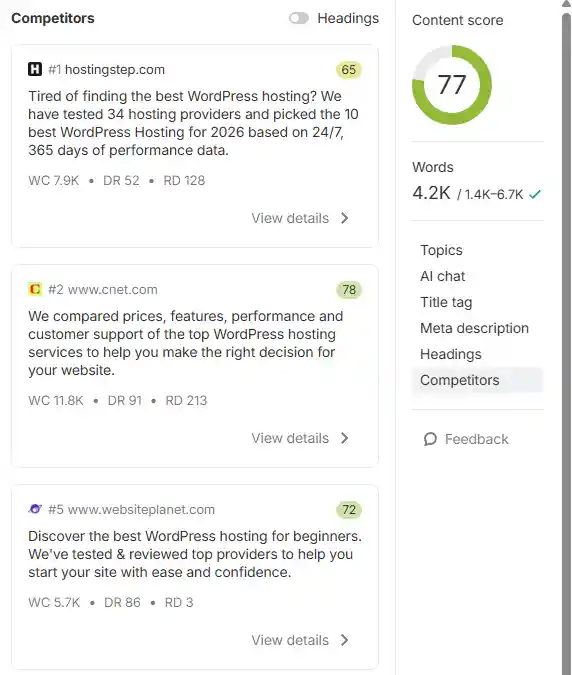
Interesting observation: hostingstep.com ranks #1 with a 65 Content Score, while cnet.com ranks #2 with a 78 score. This shows that Ahrefs’ Content Score is an internal optimization metric—overall site authority, backlinks, and page relevance also influence rankings.
This provides context about the type of pages ranking—long guides, comparisons, beginner tutorials, etc.
View Details: Full Article Analysis
Click View details to open the page inside Ahrefs.
You can inspect:
- Complete article content
- Table of contents (TOC)
- Section organization
- Topic coverage approach
This removes the need to open multiple browser tabs while researching.
How to Use Competitor Data Correctly
Do not copy text.
Instead observe:
- Which sections repeatedly appear
- What level of explanation they provide
- Which audience they target
- What questions they answer
Then write your own explanation using your testing experience.
Critical Discovery
These competitors are used to extract topics that influence the Content Score. In my case, Elementor’s article was included (because I entered their URL in Step 2), but articles featuring my tested hosts (Verpex, InMotion, InterServer) weren’t listed.
This explains why adding my affiliates dropped the score from 81 to 61.
The competitor set is mostly fixed once the document is created.—making the Article URL field decision in Step 2 critical.
Why These Panels Work Together
- Headings shows structure patterns
- Competitors shows content approach
Using both helps you:
- Avoid missing key sections
- Avoid adding irrelevant sections
- Match search intent while keeping your unique testing data
Final Verdict: Is Ahrefs AI Content Helper Worth Using?
After hands-on testing, Ahrefs AI Content Helper works very differently from typical AI writing tools.
It does not aim to replace writing.
It helps verify whether your article covers what searchers expect to learn.
The workflow makes this clear:
- A draft is generated
- You edit and structure the article
- AI suggests improvements
- You manually review and insert them
- The content score updates as coverage changes
Nothing is automatically replaced — every change requires manual confirmation.
Where the Tool Helps Most
- Understanding what topics ranking pages cover
- Structuring articles logically using real SERP patterns
- Identifying missing explanations
- Refining completeness rather than increasing length
Used correctly, it functions as a real-time content coverage checklist.
Important Limitations
- It does not generate or manage images
- AI suggestions are provided as drafts — you must copy and paste them
- Improvements are not auto-applied to your article
- Higher content scores do not automatically mean better rankings
Because of this, the tool works best as an optimization assistant, not an automated writer.
Who It Is Best For
Best suited for
- Writers creating original content
- Review and comparison articles based on testing
- Updating and improving existing pages
Less suitable for
- Fully automated content workflows
- One-click article generation
- Users expecting publish-ready output
Practical Recommendation
Use Ahrefs AI Content Helper to validate coverage, not to generate content.
A balanced content score is usually more useful than chasing a perfect one — maintaining real explanations and testing details matters more than maximizing the number.
Bottom Line
Ahrefs AI Content Helper doesn’t create articles for you.
It helps ensure your article answers the right questions.
If you approach it as a writing assistant, it feels restrictive.
If you treat it as a verification system, it becomes highly valuable.
How This Differs From AI Writing Tools
Ahrefs AI Content Helper belongs to a different category than AI content generators.
AI writing platforms (such as SEOwriting.ai, Scalenut, or Writesonic) focus on creating articles — generating introductions, sections, and full drafts automatically.
Ahrefs AI Content Helper focuses on validating coverage — checking whether your article explains the topics readers expect based on real search results.
In practical use:
- AI writers → help you produce content faster
- Ahrefs → helps you make sure the content is complete
Because of this, they are not replacements for each other.
A common workflow is generating a draft in a writing tool, then refining it inside Ahrefs to confirm nothing important is missing.
Frequently Asked Questions (FAQs)
1. Is Ahrefs AI Content Helper a fully automated AI writer?
No. Ahrefs AI Content Helper is a content optimization tool, not an automated writer. It generates draft content and suggestions, but you must manually copy, paste, and integrate everything into your article. There’s no one-click replacement or automatic content insertion.
2. Does Ahrefs AI Content Helper generate images for articles?
No. Unlike dedicated AI writing tools, Ahrefs does not create, suggest, or integrate images. You’ll need to source visuals separately using stock photo sites, screenshot tools, or other image generation platforms.
3. How does the Content Score work?
The Content Score (0-100) measures how completely your article covers topics found in top-ranking competitor pages. It’s based on topical completeness, not keyword density or word count. A score of 70-85 is usually sufficient—chasing 100 can mean removing unique value like your tested affiliate recommendations.
4. Can I use Ahrefs AI Content Helper for free?
Yes, but with limitations. The free tier includes 1 article per month. Additional articles require a $99/month upgrade. This makes the free tier best suited for optimizing your highest-traffic evergreen content.
5. What happens if I enter a competitor’s URL in the Article URL field?
This is a common mistake. Entering a competitor’s URL locks the tool into their article structure and product recommendations. For affiliate marketers, this means the AI will suggest their hosting picks instead of yours. Best practice: Leave the Article URL field blank when creating new content. Only use it to update your own published articles.
6. Why did my Content Score drop after adding my tested hosting affiliates?
Because Ahrefs analyzes top-ranking competitor pages to determine relevant topics. If your tested hosts (like Verpex, InterServer, or Thamara Cloud) aren’t mentioned in competitor articles, covering them lowers your score—the system considers them “off-topic.” This is the Content Score trap for affiliate marketers: the tool optimizes for matching competitors, not for showcasing unique testing.
7. Does a higher Content Score guarantee better Google rankings?
No. The Content Score is an internal Ahrefs metric, not a Google ranking factor. In testing, hostingstep.com ranked #1 with a 65 Content Score, while cnet.com ranked #2 with a 78 score. Overall site authority, backlinks, and page relevance also influence rankings.
8. How does the Brand Kit feature work?
Brand Kits analyze 3 of your existing articles to understand your writing voice, target audience, and content structure. When you use the “Ask AI” features, suggestions automatically align with your established style rather than producing generic AI content. You can create multiple Brand Kits for different content types or websites.
9. Can I change the competitor set after creating a document?
No. The competitor analysis is largely fixed once the document is generated. You cannot easily switch to analyze different competitors without creating a new document from scratch.
10. How long does it take to generate an article draft?
In testing, Ahrefs took approximately 62 seconds from clicking “Create document” to displaying the first draft in the editor. Search intent selection appears within 25 seconds.
11. Does Ahrefs AI Content Helper write the article for me?
No. It generates an initial draft and provides improvement suggestions, but you must:
- Manually copy and paste all suggestions
- Add your own testing data and experiences
- Structure sections based on your expertise
- Source and insert images separately
- Review and edit everything before publishing
Think of it as a coverage checklist, not a ghostwriter.
12. What’s the difference between Ahrefs AI Content Helper and tools like Writesonic or SEOwriting.ai?
AI writing tools (Writesonic, SEOwriting.ai, Scalenut) focus on creating content automatically—generating intros, sections, and full drafts with one click.
Ahrefs AI Content Helper focuses on validating coverage—checking whether your article explains the topics readers expect based on real SERP analysis.
Best workflow: Generate a draft in an AI writer, then refine it in Ahrefs to verify completeness.
13. What happens when I click “Ask AI” to improve a section?
The AI generates a separate draft suggestion based on competitor content and your Brand Kit. You must then:
- Review the suggested text
- Manually copy it
- Paste it into your article
- Edit to match your voice and testing data
Nothing is automatically replaced in your article.
14. Should I aim for a 100 Content Score?
Not necessarily. Target 70-85 while keeping your unique testing data and affiliate partners. A perfect score often means removing what makes your content valuable—authentic hands-on experience. The score measures competitor alignment, not content quality.
15. How does the Topics panel help with writing?
The Topics panel breaks down your article into scored concepts (0-100 each):
- Shows which topics competitors frequently cover
- Identifies missing explanations in your draft
- Updates dynamically as you edit
- Provides relevant terms competitors used
Use it as a completeness checklist, not a content generator.
